Google Unveils ‘Googlebook’: A New Era of Gemini-Native AI Laptops
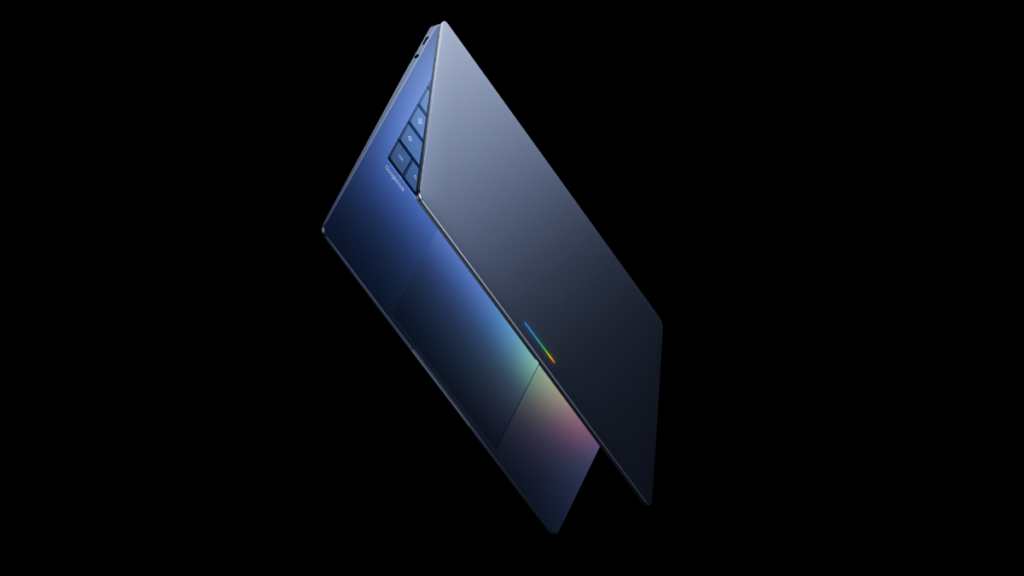
Table of Contents
The Shift From Operating Systems to Intelligence Systems
Google has officially entered the high-stakes AI hardware race. During the Android Show: I/O Edition on Tuesday, the company unveiled the Googlebook, a new category of laptops designed not just to run AI software, but to be fundamentally built around Gemini. This isn’t a simple update to the Chromebook line; it is a pivot toward what Google calls an “intelligence system.”
For over a decade, Chromebooks defined the “cloud-first” era by stripping away local complexity in favor of a browser-centric experience. However, the rise of Large Language Models (LLMs) and on-device neural processing units (NPUs) has changed the math. The Googlebook represents an attempt to create a symbiotic relationship between hardware and AI, positioning itself as a direct competitor to Microsoft’s Copilot+ PCs.
- The Core Value: Unlike traditional laptops where AI is an app or a sidebar, Googlebook integrates Gemini into the OS kernel and hardware interactions.
- Hardware Partners: Launching in Fall 2026 via Acer, Asus, Dell, HP, and Lenovo.
- Design Language: Characterized by a signature “glowbar” lightstrip and premium, ultraportable chassis.
According to Alex Kuscher, Senior Director at Google, the transition from ChromeOS to this new ecosystem is a response to how users now interact with technology—shifting from manual file management and app switching to intent-based prompting.
Decoding the ‘Intelligence OS’ and Project Aluminum
One of the most significant reveals—though subtly handled—is that Googlebooks will not run ChromeOS. Kuscher described the software as a “modern OS designed for Intelligence.” For those following industry leaks, this strongly points to Project Aluminum, the rumored convergence of Android and ChromeOS.
The goal here is to eliminate the friction between mobile and desktop. While Chromebooks can currently run Android apps via a containerized environment, the Googlebook promises a native experience. By merging the versatility of Android’s app ecosystem with the productivity of a desktop interface, Google is attempting to solve the “app gap” that has long plagued ChromeOS in the professional market.
This shift suggests a move toward a more unified kernel. If Project Aluminum is indeed the foundation, we can expect a system that manages memory and power more like a mobile device but scales to a laptop’s thermal envelope, allowing Gemini to run persistently in the background without draining the battery.
Magic Pointer and the Death of the Static Cursor
The standout feature of the Googlebook is the Magic Pointer. In a standard computing environment, the cursor is a blind tool—it clicks and drags. The Magic Pointer, however, uses Gemini’s multimodal capabilities to “understand” the pixels it is hovering over.
In practical terms, wiggling the cursor over a piece of data triggers an AI action. If you hover over a date in a Gmail message, Gemini identifies it as a temporal entity and suggests a calendar invite. If you select two disparate images—such as a photo of a room and a product shot of a sofa—the OS doesn’t just open them side-by-side; it uses generative AI to visualize the product within the space in real-time.
This represents a move toward contextual computing. Instead of the user navigating to a tool to perform a task, the tool comes to the user based on the visual context of their screen. While this sounds promising, the success of Magic Pointer will depend on the latency of the NPU and the accuracy of the on-device vision models.
Android Integration: Beyond Simple Casting
Google is leveraging its dominance in the mobile market to give the Googlebook a competitive edge. The integration isn’t just about syncing notifications; it’s about functional fluidity.
The “Quick Access” feature allows users to search and manipulate files on their Android phone directly from the laptop’s file explorer, treating the phone as a seamless extension of the laptop’s storage. Furthermore, the ability to cast apps from a phone to a Googlebook without installation removes the need for redundant app versions, allowing a user to maintain a single state across devices.
This is a direct challenge to Apple’s Continuity features. While macOS and iOS have a tight bond, the Googlebook aims to bring that same level of cohesion to the Android ecosystem, which has historically been fragmented across different OEMs.
What This Means for the Consumer Market
The introduction of the Googlebook signals a clear segmentation in Google’s hardware strategy. Chromebooks will likely remain the budget-friendly, education-focused tools, while Googlebooks will target the “Prosumer” and Enterprise markets.
For the Developer: The shift toward a unified Android/ChromeOS hybrid could simplify app development, allowing a single codebase to scale across mobile, tablet, and laptop forms without the current limitations of the ChromeOS Android container.
For the Creative: The “Create your Widget” tool, powered by Gemini prompts, allows users to build personalized dashboards without writing a line of code. This democratizes OS customization, turning the desktop into a modular workspace that evolves based on the user’s specific workflow.
For the Enterprise: The focus on an “Intelligence System” suggests that Google is betting on AI to handle the “drudge work” of corporate life—summarizing threads, organizing files, and automating data entry—directly at the OS level.
Hardware Specifications and Market Positioning
While Google has refrained from releasing a full spec sheet, the phrasing “Featherweight Design with Heavyweight Power” indicates a focus on the ultraportable category. We can expect these devices to compete with the MacBook Air and the Dell XPS 13.
Based on current market trends for AI PCs in 2026, we anticipate the following hardware requirements for the first wave of Googlebooks:
| Component | Expected Minimum Specification | Purpose |
|---|---|---|
| NPU | Custom Tensor Processing Unit (TPU) | On-device Gemini processing & Magic Pointer |
| RAM | 16GB to 32GB LPDDR5x | Handling LLM parameters in local memory |
| Display | OLED / Tandem OLED | High contrast for AI visual overlays |
| Connectivity | Wi-Fi 7 & 5G Integrated | Constant cloud-sync for Gemini hybrid models |
Pricing will be a critical factor. High-end Chromebooks currently peak around $1,000. Given the “premium craftsmanship” mentioned by Kuscher and the inclusion of dedicated AI hardware, the Googlebook will likely enter the $1,299 to $1,999 range, placing it firmly in the premium laptop bracket.
The Competitive Landscape: Google vs. Microsoft vs. Apple
The Googlebook is a calculated response to the Copilot+ PC standard. Microsoft has defined AI PCs by specific hardware requirements (40+ TOPS NPU). Google is taking a more holistic approach by controlling the OS, the AI (Gemini), and the hardware specifications across its partner network.
However, Google faces a significant trust hurdle. The success of the Googlebook depends on users’ willingness to entrust their entire workflow to an “Intelligence System” that may prioritize cloud-processing over local privacy. While Google has touted privacy in its AI initiatives, the nature of the Magic Pointer—which must essentially “see” everything on your screen to function—will likely attract scrutiny from cybersecurity experts.
Frequently Asked Questions
What is a Googlebook?
A Googlebook is a new category of AI-native laptops from Google, designed specifically to integrate the Gemini AI assistant into the hardware and operating system. It is intended to be more powerful than a standard Chromebook and more AI-integrated than a traditional laptop.
Does the Googlebook run ChromeOS?
No. Google has stated it uses a new “Intelligence OS,” which industry analysts believe is the result of Project Aluminum—a merger of Android and ChromeOS for a more seamless experience.
How does the Magic Pointer work?
The Magic Pointer uses Gemini’s multimodal AI to understand the content on your screen. By hovering or wiggling the cursor over an object, date, or image, the OS suggests intelligent actions, such as scheduling a meeting or visualizing a product in a room.
Can I run Android apps on a Googlebook?
Yes. Googlebooks are designed to run Android apps natively, offering a smoother experience than the containerized approach used in older Chromebooks.
Who is manufacturing the Googlebooks?
The first models will be produced by leading hardware partners, including Acer, Asus, Dell, HP, and Lenovo.
When can I buy a Googlebook?
Google has announced that the first models will be released in the Fall of 2026.