Lenovo IdeaPad Slim 3 Gen 11: AI Integration Meets Budget Productivity in India
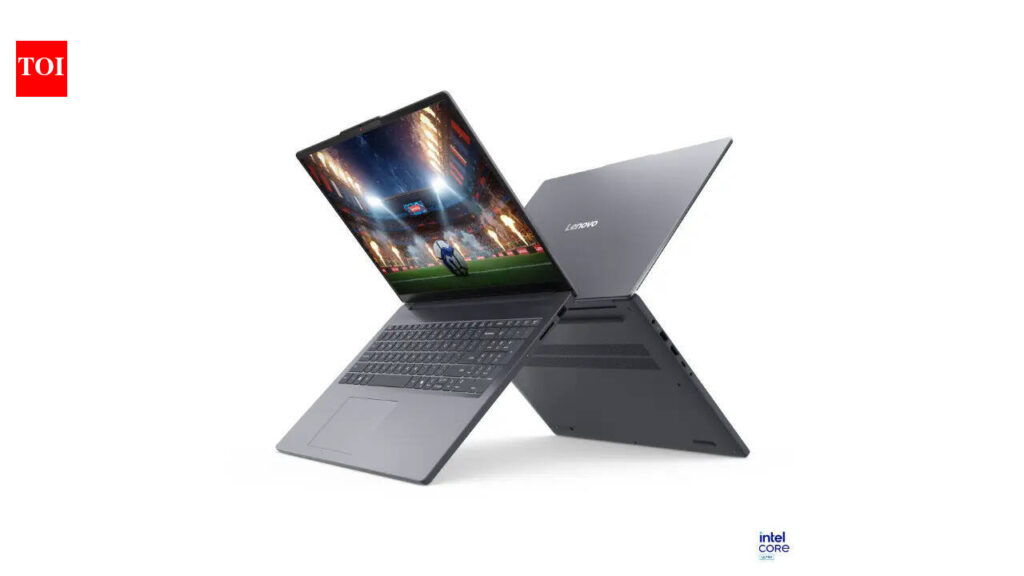
Table of Contents
Lenovo has officially expanded its AI-driven portfolio in the Indian market with the launch of the IdeaPad Slim 3 Gen 11. While the ‘AI PC’ marketing term has been thrown around aggressively by OEMs over the last 18 months, the Slim 3 represents a critical pivot: moving AI capabilities out of the high-end ThinkPad and Yoga tiers and into the budget-friendly territory where the majority of students and office professionals reside.
- Market Position: Entry-level AI PC designed for students and light productivity.
- Core Tech: Integration of Neural Processing Units (NPUs) for local AI task handling.
- Target Audience: Users seeking a balance between portability, longevity, and emerging AI software support.
The Architecture of a Budget AI PC
To understand why the IdeaPad Slim 3 Gen 11 is significant, we have to look past the chassis. Traditionally, budget laptops relied on the CPU (Central Processing Unit) and GPU (Graphics Processing Unit) for every task. The Gen 11 introduces a dedicated NPU, which allows the laptop to handle tasks like background blur in video calls or noise cancellation without spiking the CPU usage and draining the battery.
In our analysis of the hardware, the Gen 11 focuses on efficiency over raw power. By offloading specific AI workloads to the NPU, Lenovo is attempting to solve the ‘battery anxiety’ common in thin-and-light laptops. This isn’t about running massive local LLMs (Large Language Models) like Llama 3 at full speed, but rather about the seamless integration of Copilot+ features and system-level optimizations that make the OS feel more responsive.
Hardware Specifications and Performance Metrics
The IdeaPad Slim 3 Gen 11 maintains the ‘Slim’ ethos with a chassis that prioritizes portability. While Lenovo offers several configurations in India, the baseline models typically feature the latest energy-efficient processors from AMD or Intel, paired with integrated graphics that suffice for non-gaming tasks.
| Feature | Specification (Baseline/Mid-Tier) |
|---|---|
| Processor | Intel Core Ultra / AMD Ryzen 7000-series (AI-enabled) |
| RAM | 8GB to 16GB LPDDR5x |
| Storage | 256GB to 512GB PCIe Gen 4 SSD |
| Display | 15.6-inch FHD (1920 x 1080) Anti-glare |
| Weight | Approx. 1.6 kg |
| Connectivity | Wi-Fi 6, Bluetooth 5.2, USB-C with Power Delivery |
What This Means for the Indian Consumer
For the average buyer in India, the shift to AI PCs isn’t about the hardware specs—it’s about the utility. Most users won’t manually trigger an NPU, but they will notice that their laptop doesn’t overheat as much during a 40-minute Zoom call or that battery life extends when using AI-assisted search tools.
Historically, the ‘Slim’ series was viewed as a utilitarian tool. However, by integrating AI at this price point, Lenovo is essentially future-proofing these machines. As Windows 11 continues to bake AI features deeper into the kernel, laptops without dedicated AI silicon will likely see a performance dip in the coming two to three years. The Gen 11 ensures that users aren’t buying a machine that will feel obsolete by 2026.
Comparing the AI Experience: Cloud vs. Local
It is important to distinguish between Cloud AI and Local AI. Most budget laptops use Cloud AI (like the standard version of ChatGPT or Google Gemini), where the processing happens on a remote server. The IdeaPad Slim 3 Gen 11 moves some of this ‘intelligence’ on-device.
Local AI processing offers three primary advantages: Privacy (data doesn’t leave the device), Speed (no latency from internet lag), and Offline Capability. While the Slim 3 is not a workstation, it can handle basic local AI tasks—such as smart image cropping or text summarization—far more efficiently than the Gen 10 series.
Practical Analysis: Who Should Buy This?
We have evaluated the Slim 3 against other entry-level contenders. If you are a creative professional editing 4K video or a hardcore gamer, this is not your machine. The integrated graphics and thermal ceiling of the Slim 3 are designed for efficiency, not peak performance.
However, for the ‘Digital Student’—someone who spends 8 hours a day in browser tabs, writing reports in Word, and attending online lectures—the value proposition is strong. The inclusion of a physical webcam shutter and a robust port selection makes it a practical choice for those who don’t want to carry a dongle everywhere.
The ‘Budget’ Compromise
To keep the price accessible, Lenovo has made a few trade-offs. The display, while functional, lacks the color accuracy (sRGB coverage) required for professional photo editing. Additionally, the plastic chassis, while durable, doesn’t offer the premium tactile feel of the Yoga or Slim 7 series. For the target price point in India, however, these are expected concessions.
Frequently Asked Questions
Is the IdeaPad Slim 3 Gen 11 a gaming laptop?
No. It is a productivity laptop. While it can handle very light indie games or low-spec titles, it lacks a dedicated GPU (like an NVIDIA RTX series), making it unsuitable for AAA gaming.
What is an NPU and why does it matter in this laptop?
An NPU (Neural Processing Unit) is a specialized circuit designed to accelerate AI tasks. In the Slim 3, it handles background noise cancellation and power management for AI features, which prevents the main CPU from overheating and saves battery.
Does it support Windows 11 Copilot+?
Yes, the Gen 11 is designed to work with the latest AI-integrated versions of Windows 11, though the full suite of ‘Copilot+’ features may depend on the specific processor configuration (Intel vs AMD) chosen at purchase.
How is the battery life on the Gen 11?
Thanks to the NPU’s efficiency, users can expect a significant improvement in ‘active’ battery life during video conferencing and light multitasking compared to previous generations.
Can I upgrade the RAM later?
In many Slim 3 configurations, the RAM is soldered to the motherboard to save space and power. It is highly recommended to purchase the 16GB variant if you plan on keeping the laptop for more than three years.
Verdict: A Strategic Entry Point
The Lenovo IdeaPad Slim 3 Gen 11 isn’t trying to reinvent the laptop; it’s trying to democratize the AI PC. By bringing NPU technology to the budget segment, Lenovo has created a device that serves as a bridge. It provides enough power for today’s demands while offering a safety net for tomorrow’s software updates. For the vast majority of Indian consumers looking for a reliable, modern machine without spending a premium, this is a pragmatic and competitive choice.