Apple Unveils iOS 27: Siri’s Visual Intelligence Turns the iPhone Camera Into a Real-Time Action Engine
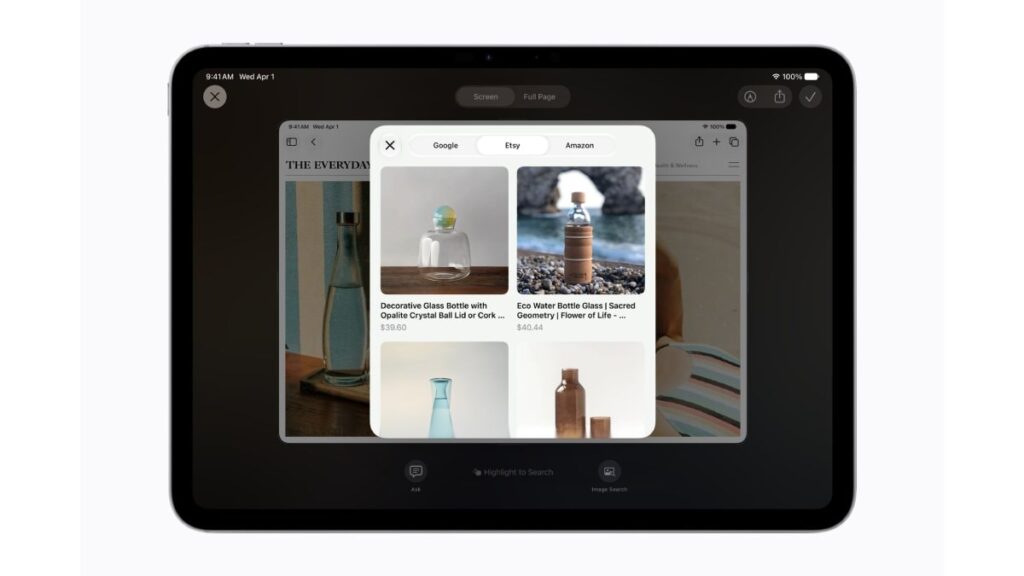
Table of Contents
The Convergence of Sight and Speech: Apple’s New AI Paradigm
At the 2026 Worldwide Developers Conference (WWDC), Apple shifted the conversation from generative text to active, environmental interaction. The announcement of iOS 27, alongside iPadOS 27 and macOS 27, marks a pivotal transition in how we interact with mobile hardware. While previous iterations of ‘Apple Intelligence’ focused heavily on writing tools and notification summaries, the core of this update is Visual Intelligence—a deep integration of Siri’s multimodal capabilities directly into the iPhone’s camera system.
- Multimodal Siri: Siri can now “see” and process real-time visual data via the Camera app, moving beyond simple image recognition.
- Action-Oriented Interface: A new dedicated Siri tab in the Camera app allows users to trigger workflows based on what the lens captures.
- OS Integration: Visual Intelligence is baked into the core of iOS 27, spanning across the Apple ecosystem to macOS and iPadOS.
- Contextual Awareness: The system can identify complex objects and suggest relevant actions, such as booking a table at a restaurant it sees or identifying a specific plant species and suggesting care instructions.
For years, the industry has seen “visual search” as a passive experience—you take a photo, and a database tells you what it is. Apple is attempting to turn this into an active experience. By integrating Siri’s large language model (LLM) directly with the camera’s live feed, the iPhone is no longer just identifying an object; it is understanding the intent behind the gaze.
Breaking Down Visual Intelligence: How It Actually Works
To understand Visual Intelligence, one must first understand multimodal AI. In traditional AI, a model processes one type of input (text or image). A multimodal model, like the one powering the new Siri in iOS 27, processes multiple types of data simultaneously. This allows Siri to correlate a visual image of a broken faucet with a text-based knowledge base of plumbing tutorials and a local map of available repair services.
The New Camera Workflow
Apple has introduced a dedicated Siri tab within the native Camera app. Unlike the previous “Visual Look Up” feature—which required a photo to be taken and then analyzed in the Photos app—this new interface operates in real-time. When a user switches to the Siri tab, the camera activates a low-latency analysis stream. The AI doesn’t just label the object; it offers a set of “Action Chips.”
For example, if you point your camera at a foreign language menu, Siri doesn’t just translate the text. It can analyze the dishes, cross-reference them with your health data (such as allergies logged in HealthKit), and suggest the best meal based on your dietary preferences.
On-Device Processing vs. Private Cloud Compute
A critical component of this rollout is the processing architecture. Apple continues to lean on its Private Cloud Compute (PCC). While basic object recognition happens on the A-series chip (on-device), complex reasoning—such as “Find a store that sells this specific brand of lamp and tell me if it’s in stock”—is routed through Apple’s secure servers. This ensures that while the AI is powerful, the visual data is encrypted and not stored by Apple, maintaining the privacy standards established in previous Apple Intelligence updates.
What This Means for the User Experience
The practical implications of Visual Intelligence extend far beyond novelty. We are seeing a shift from the “Search Era” (where you type keywords into a bar) to the “Observation Era” (where the device understands your physical context).
For the average consumer, this reduces the friction between seeing a need and fulfilling it. Consider the process of identifying a piece of furniture in a store. Currently, you might search for a brand name, browse a website, and check reviews. With iOS 27, you point the camera, and Siri can immediately pull up the price, read the latest customer reviews, and suggest a similar, cheaper alternative from a competitor—all within the camera viewfinder.
For accessibility, the impact is profound. The integration of Visual Intelligence into VoiceOver allows visually impaired users to receive high-fidelity, real-time descriptions of their surroundings. Instead of hearing “Object: Chair,” the system can now say, “There is a wooden dining chair three feet ahead of you, slightly to the left, with a blue cushion on the seat.”
Technical Comparison: Visual Intelligence vs. Google Lens
It is impossible to discuss Apple’s move without comparing it to Google Lens. While both tools aim to interpret the world visually, their philosophies differ fundamentally.
| Feature | Google Lens (Android/iOS) | Apple Visual Intelligence (iOS 27) |
|---|---|---|
| Primary Goal | Information Retrieval (Search) | Actionable Execution (Tasks) |
| Integration | App-based / Assistant overlay | Deep System Integration / Camera Tab |
| Data Privacy | Cloud-centric / Data-driven | Hybrid On-Device / Private Cloud |
| Contextual Linkage | Web-linked results | Linked to Apple Ecosystem (Calendar, Reminders, Health) |
Where Google Lens excels at providing a wide array of web results, Apple is betting on integration. If Visual Intelligence identifies a flyer for a concert, it doesn’t just give you a link to the event; it asks if you want to add it to your Calendar and suggests a ride-share based on your home address.
The Hardware Requirement: Who Gets These Features?
As is typical with major AI pivots, there is a hardware barrier. Multimodal AI requires significant NPU (Neural Processing Unit) throughput. While Apple hasn’t explicitly limited all Visual Intelligence features to the newest chips, the seamless, real-time nature of the “Siri Tab” is heavily optimized for the A18 and M-series silicon. Users on older devices may experience a lag, as the device will rely more heavily on the cloud for processing, rather than the instantaneous on-device inference seen on the iPhone 16 and 17 series.
Addressing the Privacy Paradox
critics have pointed out that a camera that “always understands” is a camera that is effectively always analyzing. Apple’s response lies in the transparency of the Siri Tab. By making this a conscious choice—switching to a specific tab—Apple avoids the controversy of “always-on” visual surveillance. The system is reactive, not proactive, until the user engages the specific AI mode.
Furthermore, the use of differential privacy ensures that the patterns learned from millions of users to improve the model’s accuracy are stripped of individual identifiers. This is a stark contrast to competitors who may use image data to build more comprehensive advertising profiles.
Common Questions About iOS 27 Visual Intelligence
Will Visual Intelligence work without an internet connection?
Basic object recognition and some Siri shortcuts will work on-device. However, for complex queries that require real-time data—like checking store inventory or deep research—an internet connection is required to access Private Cloud Compute.
Does the Siri Camera tab replace Google Lens?
For many users, yes. While Google Lens remains powerful for broad web searches, Apple’s integration with system apps (Reminders, Mail, Calendar) makes it a more efficient tool for taking direct action based on what you see.
Is my camera data sent to Apple’s servers?
Apple states that visual data processed via Private Cloud Compute is not stored on their servers and is not accessible to Apple employees. The processing happens in a secure enclave and is deleted immediately after the request is fulfilled.
Which iPhones support iOS 27 Visual Intelligence?
iOS 27 will be compatible with a wide range of iPhones, but the full real-time multimodal experience is optimized for devices with the A18 chip and newer. Older devices may experience slower response times.
Can I use Visual Intelligence for translation?
Yes, it enhances the existing Translate app integration, allowing for not just word-for-word translation but contextual explanation of signage and menus in real-time.
The Broader Impact on Mobile Computing
The introduction of Visual Intelligence is more than just a feature update; it is a bid to redefine the smartphone as a cognitive prosthetic. For the last decade, the phone has been a portal to the internet. With iOS 27, the phone is becoming a lens through which we interpret the physical world.
This move positions Apple strongly for the eventual transition to AR (Augmented Reality) glasses. The logic developed for the iPhone’s Camera tab is the same logic that will eventually power a head-mounted display. If Siri can identify a broken pipe through a handheld lens and suggest a fix, it can do the same via glasses, overlaying the instructions directly onto the user’s field of vision.
As we move toward the public release of iOS 27, the success of Visual Intelligence will be measured by its utility per interaction. If it saves users five minutes of searching and typing, it will be an unqualified success. If it remains a “party trick” for identifying plants and landmarks, it may struggle to move the needle on user behavior.