ViewSonic Launches IN05 Series ViewBoards in India: Bringing Android 16 and Generative AI to the Classroom
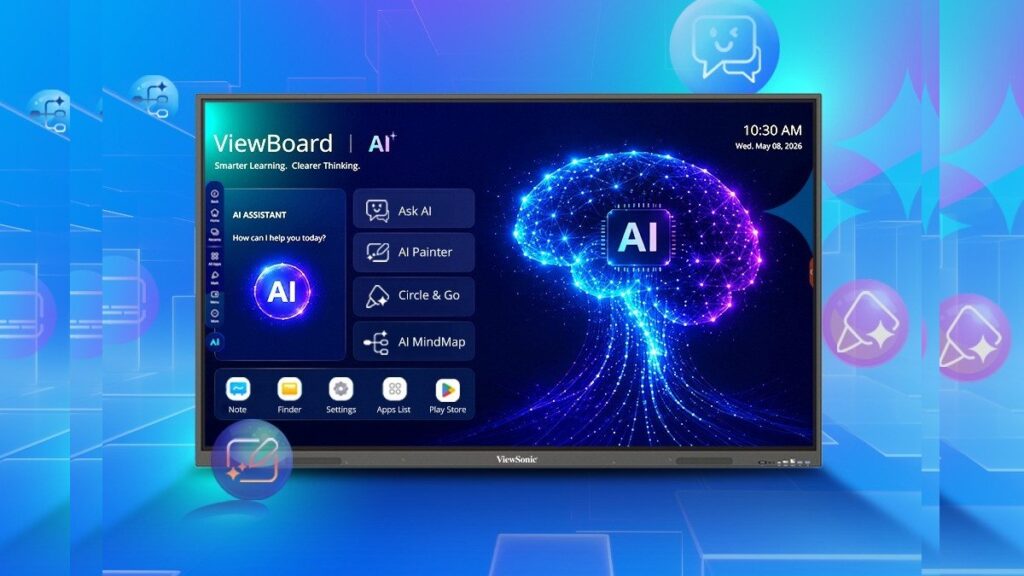
Table of Contents
A Paradigm Shift in Classroom Hardware
The traditional chalkboard has long since been replaced by the whiteboard, and the whiteboard by the interactive display. However, the hardware often lags behind the software it hosts. ViewSonic is attempting to bridge this gap with the launch of the ViewSonic IN05 series ViewBoard in India, a lineup of 4K EDLA-certified interactive displays that don’t just offer better resolution, but a fundamentally different operating environment.
Available in 65-inch (IN6505-N), 75-inch (IN7505-N), and 86-inch (IN8605-N) variants, these displays are arriving at a critical juncture in Indian education. As the National Education Policy (NEP) 2020 continues to push for the integration of technology in pedagogy, the demand for hardware that can handle complex AI workflows is skyrocketing. By shipping these units with Android 16—an aggressive leap in OS versioning—ViewSonic is signaling that these boards are intended to be future-proof hubs rather than static screens.
- OS Leap: The IN05 series is among the first professional displays to ship with Android 16, ensuring long-term app compatibility and security.
- AI Integration: New native tools including Ask AI, Video Pilot, and AI Mind Map move the board from a presentation tool to a co-creation tool.
- Hardware Punch: 8GB of RAM and 128GB of onboard storage address the common ‘lag’ associated with older interactive boards.
- EDLA Certification: Enterprise Devices Recommended App (EDLA) certification means seamless integration with the Google Play Store and Google Workspace for Education.
Decoding the Hardware: Beyond the 4K Panel
While 4K resolution is now standard, the real bottleneck in classroom technology has always been the System-on-a-Chip (SoC). Most interactive boards suffer from stuttering when multitasking between a browser, a PDF, and a video stream. The IN05 series attempts to solve this with 8GB of RAM and 128GB of storage. In practical terms, this allows teachers to keep multiple heavy applications open without the board rebooting or freezing—a common pain point in high-pressure classroom environments.
The audio setup, featuring dual speakers with 20W output, is designed for the acoustics of a typical classroom. While it won’t replace a dedicated PA system in a large lecture hall, it is sufficient for the 30-to-60 student range common in Indian secondary schools. The physical scale of the boards (ranging from 65 to 86 inches) ensures that visibility is maintained even for students in the back row, provided the room is appropriately scaled.
The Significance of EDLA Certification
To understand the IN05, one must understand EDLA (Enterprise Devices Recommended App) certification. Historically, Android-based boards operated on a ‘stripped-down’ version of Android that lacked official Google Play Store access, forcing schools to sideload apps via USB—a security nightmare for IT administrators.
With EDLA certification, ViewSonic boards gain full, secure access to the Google ecosystem. Teachers can sign in with their Google Workspace for Education accounts, access Google Drive files directly on the board, and download vetted educational apps from the Play Store. This transforms the board from a standalone peripheral into a fully integrated node in the school’s digital infrastructure.
The AI Layer: From Utility to Intelligence
The most contentious yet exciting part of the IN05 launch is the integration of Generative AI. ViewSonic isn’t just adding a browser; they are embedding AI into the workflow. The toolset includes Ask AI, Video Pilot, AI Mind Map, and Circle Go.
Ask AI functions as a real-time research assistant. Instead of a teacher spending five minutes searching for a specific historical date or a chemical property, the AI can synthesize an answer immediately on screen. However, the real value lies in AI Mind Map. This tool can take a central concept—say, “The Industrial Revolution”—and automatically generate a branching map of causes, effects, and key figures, which the teacher can then manually refine with students. This turns a static lecture into a collaborative discovery process.
Circle Go introduces a gesture-based search mechanism similar to the feature found in high-end consumer smartphones. A teacher can circle a complex diagram or a specific image in a digital textbook, and the board will instantly trigger a search for related resources, videos, and academic papers. Meanwhile, Video Pilot streamlines the way multimedia content is parsed, allowing for faster navigation and AI-assisted summaries of long-form educational videos.
What This Means for the Indian Education Market
The deployment of the IN05 series comes at a time when India is seeing a massive shift toward ‘Smart Classrooms.’ However, the first generation of smart boards were often just ‘giant tablets’ that were difficult to manage. The IN05’s focus on Android 16 and AI suggests a move toward Adaptive Learning.
For the educator, this means a reduction in ‘tech-friction.’ When a board takes 30 seconds to load a page, the momentum of the lesson is lost. With 8GB of RAM and a modern OS, that friction is minimized. For the institution, the shift to EDLA certification reduces the burden on IT departments, as device management can now be handled through centralized Google admin consoles.
| Feature | Legacy ViewBoards | IN05 Series | Classroom Impact |
|---|---|---|---|
| Operating System | Android 11/12 (Custom) | Android 16 | Better app support & security updates |
| RAM / Storage | 4GB / 32-64GB | 8GB / 128GB | No lag during multitasking |
| App Ecosystem | Sideloading/Limited | Full Google Play (EDLA) | Secure, vetted educational apps |
| AI Capabilities | Basic Search | GenAI Mind Mapping/Ask AI | Active co-creation in lessons |
Critical Analysis: The Challenges of AI in Pedagogy
While the feature set is impressive, the integration of AI in classrooms is not without risk. The ‘hallucination’ problem—where AI confidently presents false information as fact—remains a significant concern. If a teacher relies on Ask AI to provide a fact and that fact is incorrect, it undermines the educational process.
Furthermore, there is the risk of over-reliance. The AI Mind Map tool is a powerful brainstormer, but the cognitive work of organizing thoughts is a key part of a student’s learning process. If the AI does all the mapping, the critical thinking element is bypassed. Therefore, the IN05 series should be viewed as a scaffolding tool rather than a replacement for instructional design.
Integration and Availability
ViewSonic has opted for a targeted distribution model in India, selling through authorized education resellers and partners. This is a strategic move; interactive displays of this scale require professional installation and teacher training to be effective. A ‘plug-and-play’ retail approach often leads to underutilized hardware that eventually becomes an expensive digital wallpaper.
While pricing has not been officially disclosed, the inclusion of Android 16 and high-tier hardware suggests these will be positioned as premium offerings. The total cost of ownership (TCO) will likely be offset by the longevity provided by the newer OS, which should prevent the hardware from becoming obsolete within three years.
Frequently Asked Questions
Is Android 16 available on other interactive boards?
Currently, Android 16 is very new to the professional display market. ViewSonic is among the first to integrate it, giving the IN05 series a significant edge in software longevity and security compared to boards running Android 11 or 12.
What is EDLA certification and why does it matter?
EDLA stands for Enterprise Devices Recommended App. It is a certification by Google that ensures the device is fully compatible with Google Mobile Services (GMS). This allows users to use the Google Play Store, Google Drive, and Classroom securely and natively.
How does the AI Mind Map tool work?
The AI Mind Map uses generative AI to analyze a keyword or phrase provided by the user and automatically creates a visual hierarchy of related concepts. Teachers can then drag, drop, and edit these nodes to customize the lesson.
Do these boards require a constant internet connection?
While the boards have onboard storage for local files, the AI features (Ask AI, Circle Go, Video Pilot) require an active internet connection to communicate with the cloud-based AI models.
Which size is best for a standard Indian classroom?
For a room with 30-40 students, the 75-inch (IN7505-N) is generally the sweet spot. For larger halls or high-school settings with more depth, the 86-inch (IN8605-N) is recommended to ensure visibility for all students.
Final Verdict: Hardware That Finally Keeps Pace
The ViewSonic IN05 series ViewBoard is more than just a screen upgrade. By combining Android 16, EDLA certification, and a suite of generative AI tools, ViewSonic is addressing the three biggest failures of previous EdTech hardware: sluggish performance, fragmented app ecosystems, and a lack of actual utility beyond ‘displaying’ content.
The success of these boards in India will depend on how well educators are trained to use the AI tools. If used as a supplement to human teaching, the IN05 could significantly enhance classroom engagement. If used as a shortcut, it risks automating the learning process out of the student. Either way, the technical foundation is now firmly in place for the next era of digital education.