The Analog Bridge: Using Android Ethernet Tethering to Revive Legacy PCs
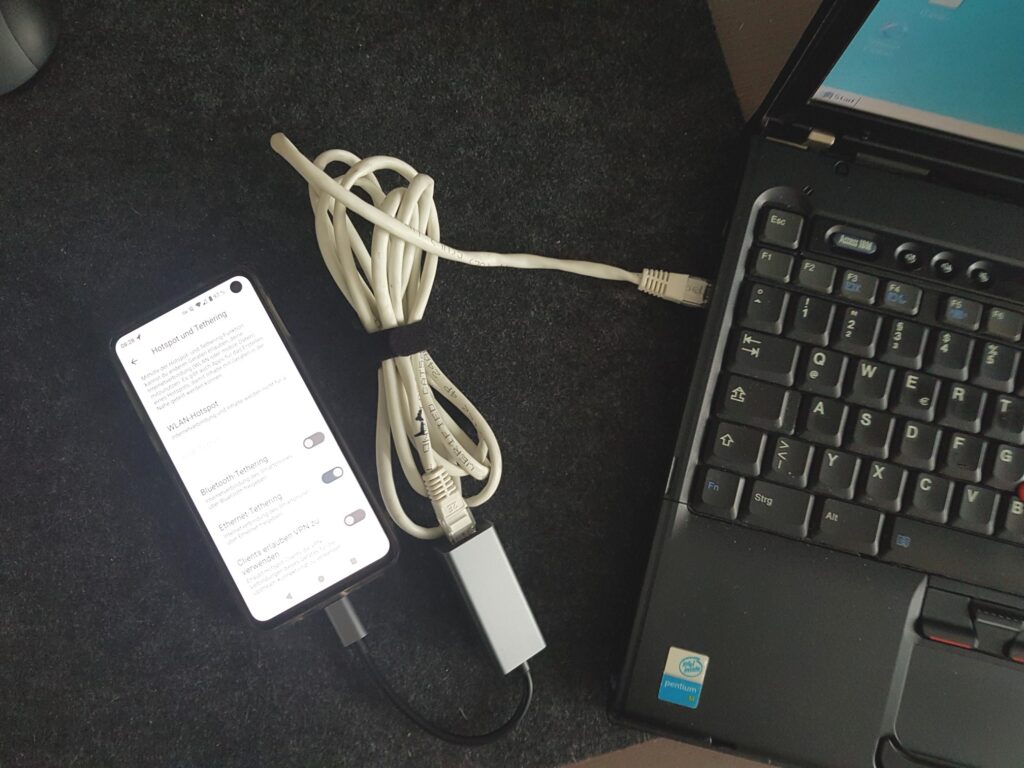
Table of Contents
The Connectivity Wall for Vintage Hardware
For enthusiasts of the late 90s and early 2000s computing era, the nostalgia is palpable. It was the golden age of 3dfx Voodoo cards, the chaotic early days of Napster, and the ubiquitous chime of ICQ. However, actually using these machines today presents a significant technical hurdle: the internet. While the hardware might still fire up, the networking stacks are hopelessly obsolete.
Most machines from the Windows 9x and XP era either lack wireless capabilities entirely or rely on early 802.11b modules. These legacy cards typically support only WEP (Wired Equivalent Privacy) encryption, a protocol so compromised that modern routers either disable it by default or treat it as a catastrophic security risk. For the modern user, the options are bleak. You can either downgrade your entire home network’s security—effectively inviting every neighbor and bad actor into your system—or set up a dedicated, isolated WEP network, which is a tedious exercise in network administration.
The traditional workaround is a wired Ethernet connection. If you have a physical LAN port and a router nearby, the problem is solved. But for those wanting to move a vintage build into a living room or a hotel where Ethernet ports are non-existent, the connectivity gap remains.
A Deceptively Simple Workaround
There is a solution that leverages the ubiquity of modern smartphones to act as a translation layer between legacy hardware and modern Wi-Fi. By utilizing Android’s Ethernet tethering feature, a smartphone can function as a sophisticated wireless-to-wired bridge.
The process is straightforward: connect a modern Android device to a WPA2 or WPA3 encrypted Wi-Fi network. Using a USB-C to Ethernet adapter (or a full-featured USB-C docking station), connect the phone directly to the legacy PC’s network port. In the Android settings menu under Network & Internet > Hotspot & tethering, enabling Ethernet tethering transforms the phone into a DHCP server and gateway.
As long as the legacy PC is configured for automatic network configuration via DHCP—the default for most Windows 98 and XP installations—the PC will see the phone as a standard wired connection. The Android device assigns an IP address and bridges the Wi-Fi connection to the wired network, effectively bypassing the need for the PC to understand modern encryption protocols.
Hardware Considerations and Performance
In practice, this setup is remarkably stable. Testing with various USB-C docking stations confirms that the bridge works consistently, although some high-end docks may require their own external power supply to maintain the connection, adding an extra cable to the mix. For a cleaner setup, a simple, passive USB-C to Ethernet dongle is usually sufficient.
The performance is more than adequate for the era of software being revived. While you won’t be streaming 4K video on a Pentium III, the connection is plenty fast for accessing legacy archives, updating old drivers, or browsing the few remaining sites that still render correctly in older browsers.
While it remains unclear if iOS offers an identical native bridge for Ethernet tethering without third-party hardware, the Android implementation provides a seamless way to keep the 3dfx and Winamp era alive without compromising the security of the rest of the modern home network.


