Microsoft Surface Pro and Laptop Pivot to Snapdragon X Elite: A New Era for Windows on ARM
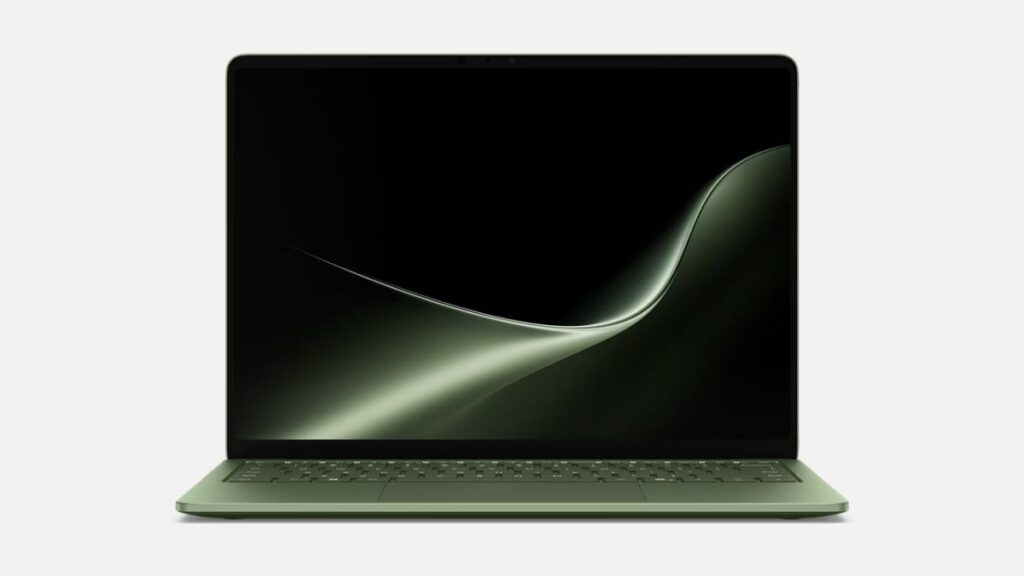
Table of Contents
The Architecture Pivot
Microsoft has fundamentally shifted the trajectory of its flagship hardware. The latest iteration of the Surface Pro and Surface Laptop represents more than just a spec bump; it is a full-scale migration to ARM-based architecture via the Snapdragon X series processors. By integrating the Snapdragon X Elite and X Plus platforms, Microsoft is attempting to solve the two greatest weaknesses of the Windows ecosystem: abysmal standby battery life and inconsistent thermal management.
- Processor Shift: Moving from Intel/AMD to Qualcomm Snapdragon X series for superior power-to-performance ratios.
- AI Integration: These are the first “Copilot+ PCs,” featuring a dedicated NPU (Neural Processing Unit) for on-device AI.
- Battery Leap: Claims of up to 20 hours of video playback, bringing Windows laptops closer to Apple Silicon’s efficiency.
- Hardware Versatility: The Surface Pro continues its 2-in-1 dominance with the new Flex Keyboard compatibility.
Dissecting the Hardware: Pro vs. Laptop
The hardware strategy here is split between flexibility and traditional productivity. The 12th-generation Surface Pro maintains its 13-inch touchscreen form factor, which has long been the gold standard for portable productivity. However, the internal overhaul is where the real story lies. The integration of the Snapdragon X series means the device no longer relies on the power-hungry x86 architecture that previously forced a trade-off between performance and fan noise.
Parallel to the Pro is the Surface Laptop, offered in 13.8-inch and 15-inch variants. For the first time in years, the Laptop feels like a direct competitor to the MacBook Air in terms of chassis-to-power ratio. Both lines now support configurations up to 64GB of RAM, a necessary move as local AI models (Small Language Models or SLMs) require significant memory overhead to run without relying on the cloud.
The Silicon Breakdown: Snapdragon X Elite and Adreno GPU
The core of these machines is the Snapdragon X series, which utilizes the Oryon CPU. Unlike previous ARM attempts in Windows (like the Surface Pro X), the X Elite is designed for high-performance multi-core workloads. The integrated Adreno GPU handles the graphical lift, though it’s important to note that these are productivity machines, not gaming rigs. The real star is the NPU, capable of 45 TOPS (trillions of operations per second), which allows features like Recall and live captions to run locally without draining the battery.
| Feature | Surface Pro (11th Ed) | Surface Laptop (7th Ed) |
|---|---|---|
| Display Size | 13-inch Touch | 13.8-inch / 15-inch |
| Processor | Snapdragon X Elite / Plus | Snapdragon X Elite / Plus |
| Max RAM | 64GB | 64GB |
| Battery Life | Up to 20 hrs (Video) | Up to 20 hrs (Video) |
| Starting Price | $1,499 | $1,599 |
The Software Hurdle: Prism and Compatibility
The biggest question facing any ARM-based Windows machine is: Will my apps work? To address this, Microsoft has introduced a new emulation layer called Prism. Based on the technical documentation and early benchmarks, Prism is significantly more efficient than the previous emulation cycles. It allows x86 and x64 applications to run on ARM silicon with a noticeable reduction in the performance penalty.
However, the experience is not seamless for everyone. While productivity apps like Microsoft 365 and Chrome run natively, specialized software—particularly kernel-level drivers or high-end creative suites—may still face stability issues. This is a critical distinction: these devices are optimized for the “modern cloud-first worker” rather than the legacy power user who relies on 15-year-old proprietary software.
Analysis: What This Means for the User
For the average consumer, this shift means the “battery anxiety” associated with Windows laptops is effectively over. The ability to leave a charger at home during a full workday is now a reality for Surface users. Furthermore, the transition to Copilot+ PCs signals a move toward a more proactive OS. Instead of AI being a separate window or a web-based chatbot, it is now integrated into the kernel of the machine.
From a market perspective, Microsoft is playing catch-up with Apple’s M-series. By partnering with Qualcomm, they have finally found a chip that offers the performance-per-watt necessary to make a thin-and-light laptop viable without throttling. The high starting price point—$1,499 for the Pro and $1,599 for the Laptop—positions these as premium tools, targeting executives and creative professionals who prioritize mobility over raw computing power.
Availability and Market Positioning
The new Surface lineup is rolling out globally with a focus on aesthetic variety. The Surface Laptop is available in Black, Dune, Jade, and Platinum, while the Pro sticks to Black, Dune, and Platinum. This expanded color palette suggests Microsoft is leaning into the “lifestyle tech” branding, attempting to appeal to a demographic that views their hardware as a fashion statement as much as a tool.
The inclusion of the Surface Pro Flex Keyboard is another tactical move. By decoupling the keyboard from the chassis more effectively, Microsoft is doubling down on the 2-in-1 versatility that defines the Pro line, allowing for a more natural tablet experience while retaining the ability to snap into a full workstation mode in seconds.
Comparing the Value Proposition
When comparing these to the previous Intel-based Surface models, the value is found in the Efficiency Gap. While an Intel i7 might offer slightly higher burst speeds in specific legacy apps, the Snapdragon X Elite provides a sustained, cooler performance profile. For a user spending 8 hours a day in browser tabs, spreadsheets, and Zoom calls, the ARM architecture is objectively superior.
Addressing the Cost of Entry
The pricing is aggressive. Starting at $1,499 for the Pro, Microsoft is betting that the combination of AI capabilities and battery life justifies a premium. However, the real cost for Pro users often includes the keyboard and stylus, which are typically sold separately, potentially pushing the total entry price toward $1,800. This makes the Surface a high-end investment rather than a budget-friendly option.
Frequently Asked Questions
Will all my Windows apps work on the new Surface?
Most apps will work via the Prism emulation layer. Native ARM apps (like Chrome and Office) will run at full speed, while others will be emulated. If you use very niche software or specialized hardware drivers, you should check the manufacturer’s ARM compatibility list first.
How does the battery life actually compare to MacBooks?
While Microsoft claims up to 20 hours of video playback, real-world mixed use typically lands between 12 and 15 hours. This puts it in the same league as the MacBook Air M3, a massive jump from the 6-8 hours typically seen in previous Intel-based Surface Pros.
What is a Copilot+ PC?
A Copilot+ PC is a new category of Windows computers defined by having an NPU capable of at least 40 TOPS, 16GB of RAM, and a 256GB SSD. These hardware requirements allow AI features like Recall, Cocreator, and Live Captions to run locally on the device rather than in the cloud.
Is the Surface Pro Flex Keyboard included?
No, the Flex Keyboard and the Slim Pen are generally sold separately. This allows users to choose their preferred input method but increases the overall cost of the device.
Can I play games on the Snapdragon X Elite?
The Adreno GPU is capable of handling casual gaming and some indie titles. However, because of the ARM architecture, many AAA games designed for x86 processors may not run or may suffer from performance drops due to emulation. It is not recommended as a primary gaming machine.
Which color should I choose?
The Laptop offers the widest variety with Jade and Dune being the new signature colors. The Pro is more conservative with Platinum and Black, though Dune is available for those wanting a modern, neutral look.
Ultimately, the new Surface line is a gamble on the future of computing. By moving to the Snapdragon X series, Microsoft is no longer just selling a tablet or a laptop; they are selling a vision of a high-efficiency, AI-native ecosystem. Whether the software ecosystem catches up fast enough to satisfy the most demanding users remains the only lingering question.