Google Unveils ‘Googlebook’: A New AI-First Laptop Category Built for Gemini Intelligence
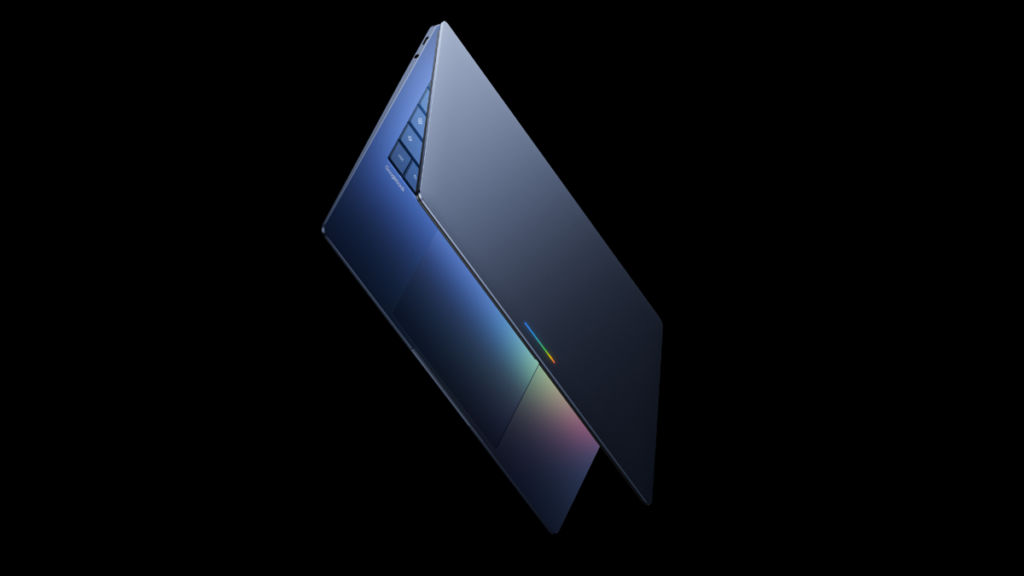
Table of Contents
A Fundamental Pivot in Personal Computing
Google has officially signaled the end of the ‘cloud-first’ era and the beginning of the ‘intelligence-first’ era with the unveiling of the Googlebook. Announced during the Android Show: I/O Edition, this new hardware category represents more than just a premium laptop line; it is a calculated attempt to redefine the relationship between a user and their operating system by centering the experience around Gemini, Google’s multimodal AI.
For over a decade, the Chromebook was the industry’s primary experiment in minimalism—stripping away local processing in favor of a browser. The Googlebook is the inverse. It aims to integrate high-compute AI capabilities directly into the hardware and OS layers, creating a device that doesn’t just run apps, but understands the context of what the user is doing across those apps. This move places Google in direct competition with Microsoft’s Copilot+ PC initiative, shifting the battleground from software productivity to integrated hardware-AI synergy.
- AI-Native Design: Built from the ground up for Gemini Intelligence, moving beyond simple AI add-ons.
- New OS Architecture: Likely based on the rumored ‘Project Aluminum,’ blending the flexibility of Android with the productivity of a desktop environment.
- Hardware Synergy: Launching in Fall 2026 via partners including Acer, Asus, Dell, HP, and Lenovo.
- Contextual Interaction: Features ‘Magic Pointer’ for onscreen AI actions and seamless Android device casting.
Deconstructing the ‘Intelligence System’
During the announcement, Google Senior Director Alex Kuscher emphasized a shift from an ‘operating system’ to an ‘intelligence system.’ To understand this, we have to look at how traditional OSs function: they are essentially file managers that launch applications. An intelligence system, by contrast, acts as a semantic layer that sits above the apps, capable of interpreting visual and textual data in real-time.
The most tangible manifestation of this is the Magic Pointer. Unlike a standard cursor that merely selects pixels, the Magic Pointer utilizes Gemini to analyze the content beneath the cursor. By ‘wiggling’ the pointer over a specific element—such as a date in a Gmail thread—the system can automatically trigger a calendar invite. This eliminates the manual process of copying and pasting data between fragmented applications, moving toward a ‘zero-click’ productivity model.
The Project Aluminum Theory
While Google has not explicitly named the operating system, the description of a “modern OS designed for Intelligence” strongly suggests the implementation of Project Aluminum. For years, industry leaks have pointed toward a convergence of ChromeOS and Android. The Googlebook appears to be the final destination for this merger.
By merging these two stacks, Google solves the ‘app gap’ that has plagued Chromebooks for years. Instead of relying on fragile Android containers within ChromeOS, the Googlebook likely runs a unified kernel that allows Android apps to operate with native performance while maintaining the window management and file system capabilities of a traditional laptop. This would allow the AI to index data across both mobile and desktop environments seamlessly.
Hardware Specifications and the ‘Glowbar’
Though detailed spec sheets remain under wraps, Google’s branding of “Featherweight Design with Heavyweight Power” suggests a focus on the ultraportable segment (13 to 14-inch chassis). To support local Gemini processing, these machines will likely require dedicated NPUs (Neural Processing Units) capable of handling trillions of operations per second (TOPS), mirroring the requirements seen in the Snapdragon X Elite and Intel Core Ultra series.
Visually, the Googlebook introduces a distinctive glowbar lightstrip on the lid. While it may seem like a cosmetic choice, in a device centered on AI, this strip could serve as a visual indicator for Gemini’s active processing states, similar to how the lights on a smart speaker pulse when listening. This provides a non-intrusive way for users to know when the ‘intelligence system’ is analyzing their screen.
| Feature | Chromebook (Traditional) | Googlebook (AI-Native) |
|---|---|---|
| Primary Focus | Web-based workflows / Cloud storage | Contextual AI / Local Intelligence |
| OS Foundation | ChromeOS | Intelligence-centric (Project Aluminum) |
| AI Integration | App-level / Browser extensions | OS-level / Magic Pointer / Gemini Core |
| App Ecosystem | Web apps & Android containers | Native Android-Desktop hybrid |
The Android Ecosystem Bridge
One of the most compelling aspects of the Googlebook is its approach to the ‘multi-device’ experience. Rather than just syncing files via Google Drive, the Googlebook allows for Direct App Casting. This means users can project a mobile-only app from their Pixel or Samsung device onto the laptop screen and interact with it without needing a separate laptop version of that app.
Coupled with ‘Quick Access’—which enables direct file searching on a connected phone from the laptop’s file explorer—Google is positioning the Googlebook not as a replacement for the phone, but as a high-compute hub for the Android ecosystem. This is a strategic counter-move to Apple’s ‘Continuity’ features, aiming to create a seamless wall between the pocket and the desk.
Customization via Generative AI
Google is also introducing a ‘Create your Widget’ tool. Unlike traditional widgets that offer a static set of options, this tool allows users to describe a function via a Gemini prompt. For example, a user could prompt, “Create a widget that tracks the price of Nvidia stock and alerts me when it hits $130, while displaying the latest tech news from GizStreet,” and the OS will generate a functional, live-updating UI element on the fly.
Market Positioning and Economic Impact
The Googlebook is clearly aimed at a higher price bracket than the budget-friendly Chromebooks found in K-12 education. With premium materials and advanced NPU hardware, we expect the entry point to start significantly above the $750 mark, likely competing in the $1,000 to $1,600 range. This puts them in direct competition with the MacBook Air and the high-end Windows AI PCs.
For Google, this is a gamble on hardware adoption. The challenge remains whether users perceive enough value in an ‘AI-first’ OS to move away from the familiarity of Windows or macOS. However, by leveraging the existing Android user base and the ubiquity of Gemini, Google has a unique advantage in distribution and user habit formation.
What This Means for the User
For the average consumer, the Googlebook represents a shift from tool-based computing to intent-based computing. Instead of opening a browser, navigating to a site, and performing a task, the user expresses an intent (via the Magic Pointer or Gemini), and the OS orchestrates the tools to achieve the result. This reduces cognitive load but increases reliance on Google’s AI ecosystem for data privacy and accuracy.
Frequently Asked Questions
Will Googlebooks replace Chromebooks?
Not immediately. Chromebooks will likely continue to serve the education and budget sectors, while Googlebooks target the premium, professional, and AI-power-user markets. However, over time, the ‘Intelligence OS’ may eventually merge into a single unified platform.
Can I run Windows apps on a Googlebook?
There is no official mention of Windows compatibility. The Googlebook is designed to run Android apps and web-based software. While virtualization (like Parallels or Wine) might be possible for enthusiasts, the focus is on a native Android/Gemini ecosystem.
How does Magic Pointer handle privacy?
Google has not detailed the specific privacy protocols for the Magic Pointer’s onscreen analysis. Given that Gemini requires data processing, it is likely a hybrid of on-device NPU processing for simple tasks and cloud-based processing for complex reasoning, though users will likely be able to toggle these permissions.
Which companies are making the hardware?
The first wave of Googlebooks will be produced by Acer, Asus, Dell, HP, and Lenovo, ensuring a variety of form factors from clamshells to 2-in-1 convertibles.
When can I buy a Googlebook?
Google has announced a Fall 2026 release window for the first generation of devices.
Journalistic Perspective: The Risk of the ‘AI Bubble’
While the technical capabilities of the Googlebook are impressive, there is a critical question regarding sustainability. The tech industry is currently in an ‘AI arms race,’ where hardware is being redesigned to accommodate software that is still evolving. The risk for Google is that the Googlebook might be a solution in search of a problem. If Gemini’s utility remains relegated to simple tasks and summaries, the specialized hardware (like the glowbar and dedicated NPUs) may become expensive novelties rather than essential tools.
However, if the integration of Project Aluminum succeeds in creating a truly fluid bridge between Android and desktop productivity, Google may have finally found the ‘killer app’ for its hardware division: the ecosystem itself. The success of the Googlebook will not be measured by its initial sales, but by how much it changes the daily workflow of the people who use it.