Asus Expands India Chromebook Market with CM32 Detachable, CM14, and CM15
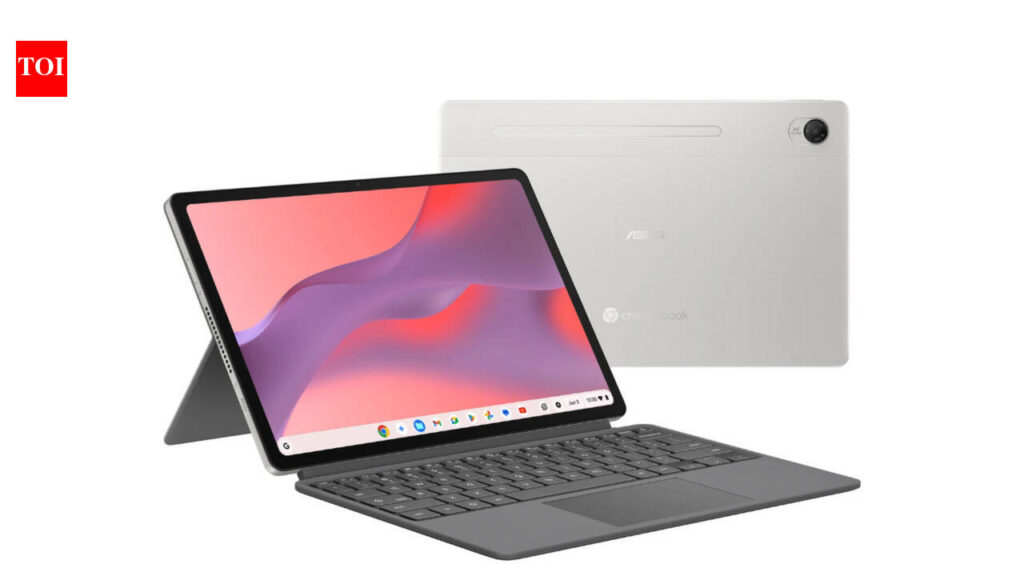
Table of Contents
Asus has officially broadened its footprint in the Indian computing market by introducing three new ChromeOS devices: the CM32 Detachable, the CM14, and the CM15. With a starting price point of Rs 26,990, Asus is clearly targeting the high-growth education and entry-level professional segments, where the demand for lightweight, long-battery-life machines has surged.
- CM32 Detachable: A premium 2-in-1 focusing on visual quality and portability, priced at Rs 37,990.
- CM14 & CM15: Productivity-focused clamshells powered by the MediaTek Kompanio 540, launching June 19.
- Price Floor: Entry models begin at Rs 26,990, making them some of the most competitive ChromeOS options in the region.
Breaking Down the CM32 Detachable: A Display Powerhouse
The CM32 Detachable is the standout of this trio, diverging from the typical budget Chromebook specifications. Most entry-level devices settle for 1080p 60Hz panels, but Asus has equipped the CM32 with a 2.5K resolution touchscreen boasting a 120Hz refresh rate. This is a strategic move; the higher refresh rate makes the fluid nature of ChromeOS feel significantly snappier, particularly when using the bundled Asus Pen for digital sketching or note-taking.
Weighing in at just 640g, the CM32 is designed for hyper-mobility. For students moving between lecture halls or professionals needing a secondary ‘digital notepad,’ the weight reduction is a tangible benefit. However, the trade-off for this portability is typically thermal management. Since these devices rely on passive cooling, the CM32 is optimized for web-based workflows rather than heavy Android app multitasking.
Analyzing the CM14 and CM15: The MediaTek Transition
While the CM32 focuses on the ‘tablet’ experience, the CM14 and CM15 are traditional laptops designed for typing-heavy workloads. Both models are built around the MediaTek Kompanio 540. This chipset is a critical piece of the puzzle. Moving away from Intel Celeron or Pentium processors allows Asus to offer significantly better battery life and instantaneous ‘wake-from-sleep’ times, mimicking the behavior of a smartphone.
The Kompanio 540 utilizes an ARM-based architecture, which is inherently more power-efficient. In real-world usage, this means users can expect 10-12 hours of active browsing without needing a charger. The CM15, with its larger chassis, likely offers a more comfortable typing experience and potentially a larger battery cell, catering to those who prefer a traditional 15-inch workspace over the compact 14-inch form factor of the CM14.
Technical Specifications Comparison
| Feature | CM32 Detachable | CM14 | CM15 |
|---|---|---|---|
| Display | 2.5K 120Hz Touch | FHD / HD (Model dependent) | FHD / HD (Model dependent) |
| Processor | ARM-based SoC | MediaTek Kompanio 540 | MediaTek Kompanio 540 |
| Weight | 640g | Lightweight Clamshell | Standard Laptop Form |
| Input | Detachable Keyboard + Pen | Physical Keyboard | Full Keyboard (NumPad) |
| Price (Starting) | Rs 37,990 | Rs 26,990 | Rs 26,990 (est.) |
What This Means for the Indian Consumer
The introduction of these devices signals a shift in how budget computing is approached in India. For years, the ‘budget laptop’ meant a slow Windows machine with a mediocre HDD. ChromeOS removes that friction by offloading the heavy lifting to the cloud.
For the average user, this means a device that doesn’t slow down after six months of use. For educational institutions, the low price point and ruggedness of the CM series make them viable for bulk deployment. The 2.5K screen on the CM32 also suggests that Asus is trying to lure in creative hobbyists who previously viewed Chromebooks as ‘just for browsing.’
The ARM Ecosystem: Performance vs. Compatibility
It is important to note that the MediaTek Kompanio 540 uses ARM architecture. While this is fantastic for battery life, a small subset of legacy Linux apps or specific x86-based Android apps may not run as efficiently as they would on an Intel-based Chromebook. However, for 95% of users—those using Google Docs, Sheets, YouTube, and Zoom—the difference is imperceptible.
The integration of the Google Play Store allows these devices to act as hybrid tablets and laptops. When combined with the 120Hz screen on the CM32, the experience is closer to an iPad or a high-end Android tablet than a traditional laptop, though the ChromeOS browser remains the primary utility.
Common User Questions (FAQ)
Can I run Windows apps on the Asus CM series?
No, these devices run ChromeOS. You cannot install .exe files. However, you can use web-based alternatives or Android apps from the Google Play Store.
Is the CM32 Detachable suitable for professional art?
For sketching and brainstorming, yes. The 2.5K display and Asus Pen provide excellent precision. However, for heavy Photoshop or 4K video editing, a full-powered Windows or Mac machine is required.
How long does the battery last on the CM14 and CM15?
Thanks to the MediaTek Kompanio 540, these models are optimized for efficiency, typically providing 10+ hours of usage depending on brightness and connectivity.
Does the CM32 come with the keyboard and pen?
Yes, based on the launch announcement, the Asus Pen is bundled, and the keyboard is designed as a detachable accessory for the CM32.
Which one is better for a student: CM14 or CM32?
If the student does a lot of typing (essays, coding), the CM14 is the better choice. If they prefer digital note-taking and media consumption, the CM32 Detachable is superior.