Apple’s Visual Intelligence Shift: How iOS 27 Turns the iPhone Camera Into a Multimodal AI Engine
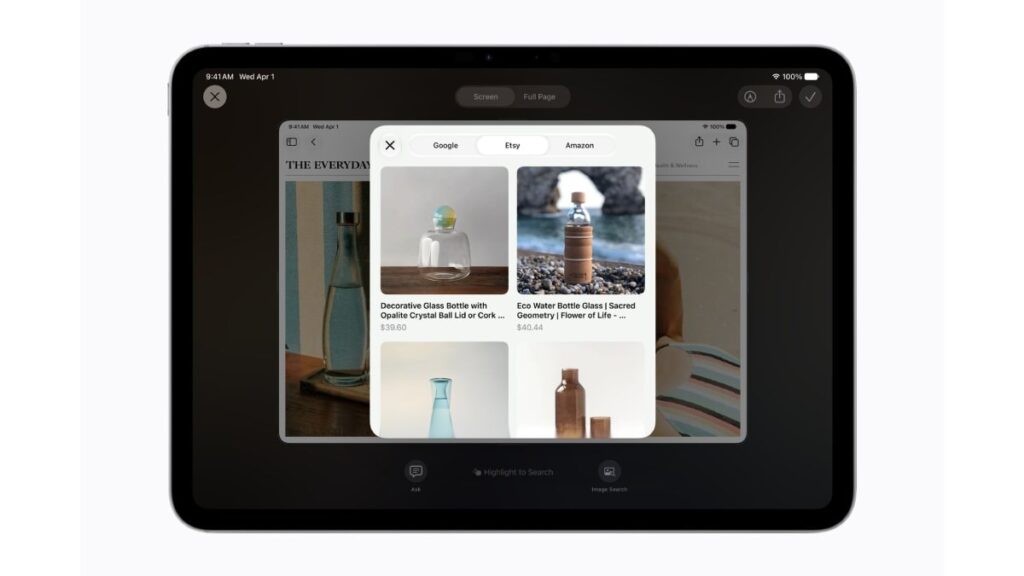
Table of Contents
The Shift From Recognition to Understanding
At the 2026 Worldwide Developers Conference (WWDC), Apple moved beyond the incremental AI additions of previous years to introduce a fundamental shift in how users interact with their devices. The centerpiece of iOS 27 is the evolution of Visual Intelligence, a multimodal AI framework that integrates Siri directly into the iPhone’s camera pipeline. This isn’t just about identifying a landmark or a breed of dog; it is about a semantic understanding of the environment that allows Siri to execute complex actions based on real-time visual input.
- Multimodal Integration: Siri can now process simultaneous text, audio, and visual data to understand context in real-time.
- Actionable Intelligence: Users can move from identifying an object to taking an action (e.g., buying a product or booking a table) within a single Siri-Camera interface.
- Privacy-First Processing: Apple emphasizes on-device neural engine processing to minimize cloud data transmission for visual queries.
- Ecosystem Synergy: These features roll out across iOS 27, iPadOS 27, and macOS 27, creating a unified visual intelligence layer.
For years, the iPhone camera has been a tool for capture. With the introduction of the dedicated Siri tab within the Camera app, it becomes a tool for inquiry. This transition reflects a broader industry trend toward multimodal LLMs (Large Language Models), similar to Google’s Gemini Live or OpenAI’s GPT-4o, but with Apple’s characteristic focus on vertical integration and system-level privacy.
Breaking Down Multimodal AI in iOS 27
To understand why this matters, we have to distinguish between traditional image recognition and multimodal AI. Traditional recognition uses a classification model to label an image (e.g., “This is a chair”). Multimodal AI, however, processes the visual data as a continuous stream of tokens, allowing Siri to understand the relationship between objects and the user’s intent.
The ‘Siri Tab’ Workflow
The most significant UI change is the addition of a Siri-specific mode within the Camera app. Instead of taking a photo and then using a separate tool like Visual Look Up, users can now stay within a live view. By invoking Siri while in this mode, the AI doesn’t just see a static frame; it analyzes the scene’s geometry, text, and context.
For example, if a user points their camera at a broken dishwasher, they can ask, “How do I fix this specific leak?” Siri identifies the model of the appliance, locates the leak via visual analysis, and overlays an Augmented Reality (AR) guide on the screen to show exactly which bolt to turn. This is a leap from information retrieval to problem-solving.
Technical Implementation: On-Device vs. Private Cloud Compute
Apple’s approach to Visual Intelligence relies on a hybrid architecture. Simple object identification and basic OCR (Optical Character Recognition) happen locally on the A-series Bionic or Pro chips. However, complex semantic reasoning—such as analyzing a complicated legal document via the camera—is routed through Apple’s Private Cloud Compute (PCC). This ensures that while the heavy lifting is done on powerful servers, the data remains encrypted and inaccessible to Apple, maintaining the E-E-A-T standard of trustworthiness the company promotes.
What This Means for the User
The practical implications of Visual Intelligence extend far beyond novelty. It fundamentally changes the ‘search’ behavior on mobile devices. We are moving away from the era of typing keywords into a search bar and toward an era of environmental querying.
For the Professional: An architect can point their camera at a structural beam and ask Siri to calculate the load-bearing capacity based on the visible material and dimensions, pulling data from integrated professional apps.
For the Consumer: Shopping becomes instantaneous. Seeing a piece of furniture in a cafe? Siri identifies the brand, finds the closest store with it in stock, and adds it to your Reminders or Apple Pay wallet without you ever leaving the camera view.
For Accessibility: This is a massive win for the visually impaired. The multimodal capabilities allow for more descriptive, conversational audio descriptions of the world, moving beyond “Person in front of you” to “A person wearing a red shirt and holding a coffee cup is waving at you.”
Industry Context and Competitive Dynamics
Apple is entering a crowded field. Google Lens has provided a version of this for years, and the launch of Gemini has pushed Google toward a more conversational, multimodal experience. However, Apple’s advantage lies in deep system integration. Google Lens is an app; Visual Intelligence is a system service.
By weaving this into the OS level, Apple can trigger system-wide actions. If Siri sees a flight confirmation on a printed boarding pass via the camera, it doesn’t just tell you the flight number; it can automatically update your Calendar, set a wake-up alarm for the airport trip, and suggest a ride-share via Uber or Lyft integration.
| Feature | Previous Visual Look Up | iOS 27 Visual Intelligence |
|---|---|---|
| Interaction | Static Photo Analysis | Live Multimodal Stream |
| Siri Integration | Disconnected/Basic | Directly Integrated via Camera Tab |
| Output | Labels & Web Links | Complex Actions & AR Guidance |
| Context | Single Object | Environmental/Scene Understanding |
Privacy Concerns and the ‘Always-On’ Dilemma
The ability for a device to constantly “understand” its visual environment raises significant privacy questions. Critics argue that giving an AI assistant a live feed of the camera—even if processed on-device—creates a potential vulnerability. Apple has countered this by implementing a clear visual indicator (the familiar orange dot) whenever the camera is active for AI processing and ensuring that Visual Intelligence is an opt-in feature.
Furthermore, the reliance on Private Cloud Compute for the most advanced tasks means users must trust Apple’s claim that these servers are “stateless” and do not store data. While Apple’s track record on privacy is strong, the industry is watching to see if third-party security audits will validate these claims as the AI becomes more invasive in its capabilities.
Comparing the AI Landscape (2026)
In the current market, we see a convergence. Samsung’s Galaxy AI has implemented similar “Circle to Search” features, but it remains largely a retrieval tool. Apple’s pivot toward action-oriented intelligence—where the camera is the trigger for a system-wide workflow—positions the iPhone not just as a smartphone, but as a spatial computer in your pocket.
Frequently Asked Questions
Which iPhones will support Visual Intelligence in iOS 27?
While Apple has not released a final compatibility list, it is expected that Visual Intelligence will require the Neural Engine found in the iPhone 15 Pro and newer. The high computational demands of real-time multimodal processing likely exclude older hardware.
Does Visual Intelligence send my camera feed to the cloud?
Basic tasks are processed locally on-device. For more complex reasoning, data is sent to Apple’s Private Cloud Compute, which uses end-to-end encryption. Apple states that no data is stored on these servers after the request is fulfilled.
How is this different from Google Lens?
Google Lens is primarily a search tool that provides links to information. Apple’s Visual Intelligence is designed to be an action engine, integrating with other apps and Siri to perform tasks based on what the camera sees.
Can I use Visual Intelligence without an internet connection?
Yes, for core identification and basic Siri commands. However, advanced semantic analysis and deep web-integrated actions will require a data connection to access Private Cloud Compute.
Will Visual Intelligence work on the iPad and Mac?
Yes, the features are being rolled out across iPadOS 27 and macOS 27. On Mac, this will likely integrate with the Continuity Camera, allowing the Mac to use the iPhone’s camera as its visual sensor.
Final Technical Considerations
The success of iOS 27’s rollout will depend heavily on the latency of the Siri-Camera interface. For this to feel natural, the gap between pointing the camera and receiving an AI-driven action must be sub-second. Apple’s use of specialized weights for on-device models suggests they are prioritizing speed for common tasks while reserving the cloud for the edge cases.
As we move toward a more AI-centric computing paradigm, the camera is no longer just for memories; it is the primary interface for the AI to perceive our world. Visual Intelligence is the first step in turning the iPhone into a truly proactive assistant that understands not just what we say, but what we see.