Acer PM1: Can a Smartphone-Powered Laptop Alternative Solve the PC Affordability Crisis?
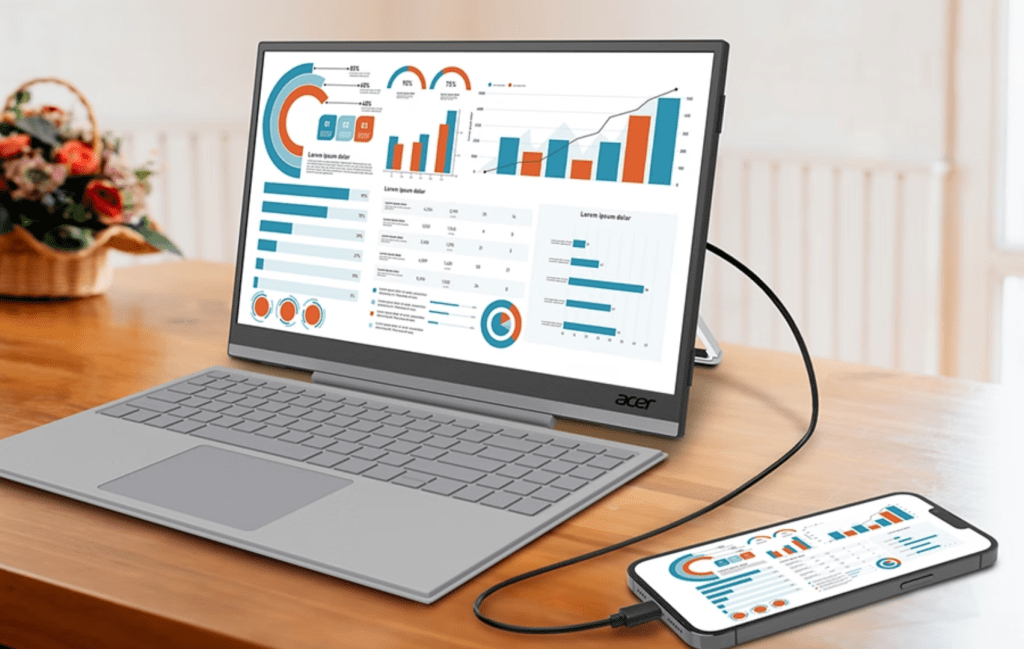
Table of Contents
The Convergence of Mobile Power and Desktop Utility
For years, the dream of the ‘pocket PC’ has been chased by hardware giants, often ending in commercial failure. However, the economic landscape of 2026 has created a strange new incentive for this form factor to return. With the entry-level price for a competent, RAM-sufficient laptop now hovering around $700, a growing segment of consumers is being priced out of the traditional PC market. Enter the Acer PM1, a strategic piece of hardware that doesn’t try to be a computer, but rather transforms the high-performance smartphone already in your pocket into a functional workstation.
- The Concept: The Acer PM1 is a portable USB-C monitor and magnetic keyboard combo that leverages a phone’s processing power.
- Hardware Specs: Features a 15.6-inch 1080p touchscreen (PM161JB) and a 12.3-inch ultrawide variant (PM131QT).
- Software Synergy: Optimized for Samsung DeX and Android 16’s native Desktop Mode.
- Market Timing: Targets budget-conscious users facing rising laptop costs and a ‘RAM crisis’ in entry-level PCs.
The core of the Acer PM1 system is an elegant, if pragmatic, realization: the SoC (System on a Chip) in a modern flagship phone often outperforms the processors found in budget laptops. By decoupling the screen and input methods from the CPU, Acer is offering a modular path to productivity that bypasses the need for a $700 investment in a machine that may be obsolete in three years.
Technical Breakdown: How the PM1 Architecture Works
To understand the Acer PM1, one must first understand DisplayPort Alternate Mode (DP Alt Mode). This is the technology that allows a USB-C port to transmit a high-definition video signal. The PM1 isn’t just a screen; it is a peripheral hub designed to bridge the gap between a mobile OS and a desktop experience.
The PM161JB and PM131QT Hardware
The flagship model, the PM161JB, provides a 15.6-inch 1080p canvas. While 1080p might seem modest in an era of 4K displays, for a productivity tool, it maintains a balance between pixel density and power consumption. The inclusion of a touchscreen is critical here; because mobile operating systems are designed for touch, having a tactile interface allows users to switch between ‘desktop’ and ‘tablet’ modes without reaching for a mouse.
Then there is the PM131QT, a 12.3-inch ultrawide version. While it offers a more compact footprint, the aspect ratio is unconventional, potentially leading to ‘letterboxing’ when running standard 16:9 Android apps. However, for those utilizing multitasking windows in Desktop Mode, the extra horizontal real estate can be an asset for side-by-side document editing.
The Input Layer: Pogo Pins and Precision
Unlike cheap Bluetooth keyboards that suffer from latency and battery anxiety, the PM1 utilizes a Surface-style magnetic keyboard. By connecting via pogo pins, the keyboard gains a stable, low-latency connection and draws power directly from the monitor/phone chain. The integrated trackpad is the final piece of the puzzle, providing the precision necessary for spreadsheet management or light coding—tasks that are nearly impossible on a standard mobile screen.
The Software Catalyst: DeX and Android 16
Hardware is only half the battle. A 15-inch screen showing a giant version of a phone app is not a laptop; it is a mirror. For the Acer PM1 to be viable, it requires a desktop environment. This is where the synergy with Samsung and Google becomes apparent.
Samsung DeX: The Gold Standard
Samsung DeX (Desktop Experience) has spent years refining the transition from mobile to desktop. When a DeX-compatible phone hits the PM1, the interface transforms into a windowed environment with a taskbar, start menu, and support for multiple app windows. In my own testing with similar docked setups, DeX manages to mimic the feel of a ChromeOS device with surprising fluidity. The ability to drag and drop files and manage a file explorer makes it a legitimate tool for administrative work.
Android 16’s Native Desktop Mode
For the first time, Google has baked ‘Desktop Mode’ directly into the core of Android 16. While some manufacturers have been slow to enable the toggle in their skins, the underlying capability is there. This means the Acer PM1 is no longer dependent on a single manufacturer like Samsung; it is becoming a universal accessory for the Android ecosystem. The focus is on free-form windows and improved keyboard shortcuts, narrowing the gap between a mobile OS and a full-fledged OS like Windows 11 or macOS.
Historical Context: Why This Time is Different
Critics will rightly point out that we’ve seen this before. In 2011, Motorola attempted to push smartphone docks. Asus released the Transformer line. Both failed because the value proposition was inverted: you were paying for a bulky accessory to support a phone that was significantly weaker than a cheap Netbook.
Fast forward to 2026, and the variables have shifted in three critical ways:
- The Performance Gap: Modern mobile chips (like the Snapdragon 8 series or Apple’s A-series) now rival mid-range laptop CPUs. The success of the MacBook Neo—which utilizes an iPhone-derived chip—proves that mobile architecture can handle desktop workloads.
- The Price Floor: The ‘RAM crisis’ has pushed entry-level laptop prices up. Consumers can no longer find a reliable 16GB RAM machine for $400. If a user already owns a $1,000 smartphone, spending $200 on an Acer PM1 is a more rational financial move than spending $700 on a mediocre laptop.
- User Behavior: Gen Z and Alpha are increasingly ‘mobile-first.’ The need for a full Windows environment is shrinking for a large percentage of students and casual workers who primarily use browser-based tools (Google Docs, Canva, Notion).
What This Means for the Consumer
The introduction of the Acer PM1 signals a shift toward modular computing. Instead of buying a new PC every four years, users may move toward a model where they upgrade their ‘brain’ (the phone) every few years and keep their ‘interface’ (the monitor and keyboard) for a decade.
Practical Implications for Different Users
For Students: The PM1 offers a lightweight way to handle essays and research. By utilizing the phone’s 5G connectivity, the setup remains portable without needing to hunt for campus Wi-Fi.
For Digital Nomads: The ability to consolidate devices reduces the risk of theft and the weight of a travel bag. A single USB-C cable connecting a phone to a PM1 is more efficient than carrying a laptop, charger, and tablet.
For Budget Buyers: It provides a bridge. If you cannot afford a new PC, the PM1 allows you to maximize the utility of the hardware you already own, effectively extending the life and value of your smartphone investment.
The Critical Caveats: Battery and Ergonomics
Despite the promise, the Acer PM1 faces significant hurdles. The most pressing is power draw. A 15.6-inch screen is a power-hungry component. If the PM1 is drawing power from the phone, battery life will plummet. Conversely, if the PM1 is plugged into a wall and provides ‘pass-through charging’ to the phone, it becomes a stationary desk setup, losing some of its portable appeal.
Then there is the ‘awkwardness factor.’ The PM131QT ultrawide model, in particular, risks feeling like a niche product. Without a proper laptop hinge (since the phone sits separately or is propped up), the ergonomics are a compromise. You are essentially using a monitor with a keyboard, which is less stable than a clamshell design.
Comparing the PM1 Approach to Traditional Budget Laptops
| Feature | Acer PM1 + Flagship Phone | Budget Laptop (~$700) |
|---|---|---|
| Processing Power | High (Mobile SoC) | Moderate (Entry-level CPU) |
| Portability | High (Modular) | Moderate (Single unit) |
| Software | Android/DeX (App-centric) | Windows/macOS (Full OS) |
| Upgradability | Upgrade phone separately | Difficult/Impossible |
| Input | Touch + Magnetic Keyboard | Physical Keyboard + Trackpad |
Frequently Asked Questions
Will the Acer PM1 work with iPhones?
Yes, but with significant limitations. While iPhones support screen mirroring and HDMI output via USB-C (on newer models), Apple does not have a ‘Desktop Mode’ equivalent to Samsung DeX. You will likely see a mirrored version of your phone screen rather than a windowed desktop environment.
Does it require a specific Android version?
To get the full ‘Desktop Mode’ experience, Android 16 or higher is recommended. However, Samsung Galaxy devices running One UI with DeX will work regardless of the base Android version, provided the hardware supports USB-C video output.
Can I plug a USB flash drive into the Acer PM1?
Based on early sightings of the hardware, there appears to be a USB-A port on the back of the monitor. This would allow users to expand storage or connect a mouse, provided the phone’s OS supports the peripheral.
Will this drain my phone battery quickly?
Yes. Powering a 15-inch display is taxing. Users will likely need to keep the PM1 plugged into a power source to maintain the phone’s charge while working.
Is this a replacement for a gaming laptop?
No. While high-end phones can run mobile games beautifully, they cannot run x86 Windows games. This is a productivity and media-consumption tool, not a gaming rig.
The Verdict on the Modular Future
The Acer PM1 is not a revolution, but a reaction. It is a response to the rising cost of hardware and the plateauing of mobile software. By treating the smartphone as the CPU and the monitor as the shell, Acer is attempting to revive a failed concept from 2011 by applying it to a 2026 economy.
Whether it succeeds depends entirely on the pricing. If Acer positions this as a $150–$250 accessory, it becomes an irresistible alternative for students and casual users. If it’s priced closer to a budget Chromebook, the appeal vanishes. Regardless, the PM1 proves that the industry is finally admitting that for many people, the ‘computer’ is already in their pocket—it just needs a bigger screen.