ASUS Expands Indian ChromeOS Lineup: CM32 Detachable, CM14, and CM15 Launch With Budget Focus
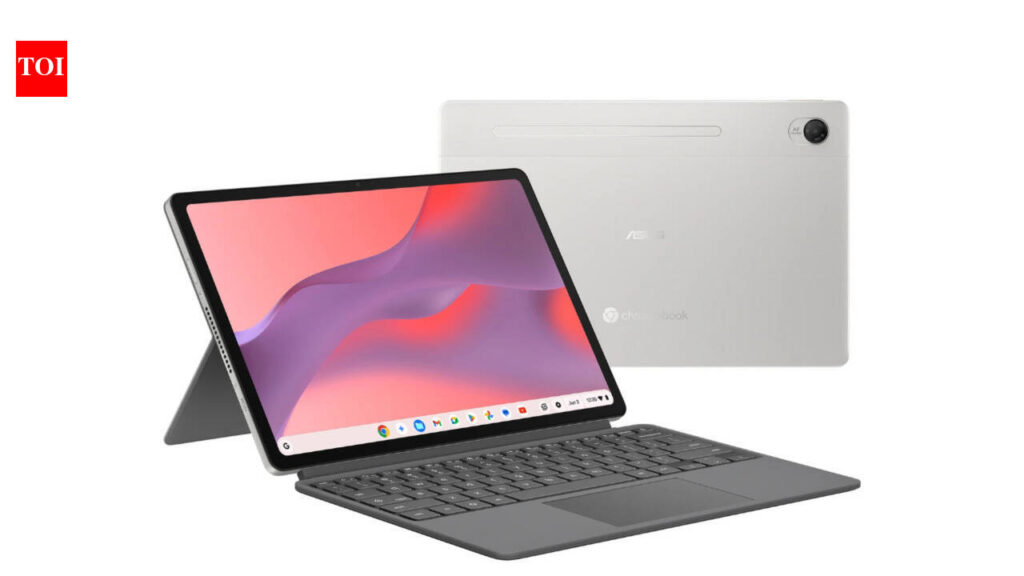
Table of Contents
Expanding the ChromeOS Ecosystem in India
ASUS has officially expanded its computing portfolio in India with the introduction of three new ChromeOS devices: the CM32 Detachable, the CM14, and the CM15. Starting at a competitive price point of Rs 26,990, this move signals a strategic push by ASUS to capture the growing demand for lightweight, cloud-centric computing in the Indian education and entry-level professional sectors.
The launch comes at a time when the Indian market is seeing a shift toward hybrid learning and remote work, where the traditionally ‘underpowered’ perception of Chromebooks is being challenged by the integration of Google’s AI-driven features and a more robust Android app ecosystem. By offering three distinct form factors—a detachable tablet-hybrid, a compact 14-inch clamshell, and a larger 15-inch productivity machine—ASUS is attempting to cover every possible budget use case from primary school students to freelance administrators.
- Broad Portfolio: ASUS is targeting three distinct segments: portability (CM32), balanced mobility (CM14), and productivity (CM15).
- Aggressive Pricing: Entry pricing starting at Rs 26,990 makes these some of the most accessible brand-name ChromeOS devices in the region.
- Strategic Versatility: The CM32 Detachable offers a 2-in-1 experience, bridging the gap between a tablet and a laptop.
- Cloud-First Approach: These devices are optimized for the Google Workspace ecosystem, focusing on battery longevity and fast boot times over raw local processing power.
The decision to launch these specific models suggests that ASUS is closely monitoring the ‘value-per-rupee’ metric that dominates the Indian consumer electronics market. While high-end Windows laptops struggle to dip below the 40k mark without significant compromises, the CM series leverages the efficiency of ChromeOS to keep hardware costs low while maintaining a premium chassis feel.
The Hardware Breakdown: CM32, CM14, and CM15
To understand the value proposition, we must look at how these three devices differ in utility. The ASUS CM32 Detachable is the standout for those prioritizing versatility. It features a removable keyboard and a touchscreen interface, making it a viable competitor to entry-level iPads or Android tablets for note-taking and media consumption. In a classroom setting, the ability to pivot from a typing tool to a digital sketchbook is a significant advantage.
Moving up to the CM14, we find the ‘sweet spot’ of the lineup. The 14-inch form factor has long been the industry standard for portability. It provides enough screen real estate for split-screen multitasking (e.g., having a Google Doc and a research tab open side-by-side) without the bulk of a full-sized laptop. This model is likely to be the volume driver for college students and corporate fleet deployments.
Finally, the CM15 caters to users who find the 14-inch screen too restrictive. With a larger display and typically a more generous keyboard layout (often including a numeric keypad), the CM15 is designed for those who spend 8+ hours a day on spreadsheets or data entry. While it sacrifices some portability, the increased visual space is critical for productivity tasks that would otherwise feel cramped on a tablet or small laptop.
Technical Specifications Comparison
| Feature | CM32 Detachable | CM14 | CM15 |
|---|---|---|---|
| Form Factor | 2-in-1 Detachable | Clamshell Laptop | Clamshell Laptop |
| Target User | Students / Casual Users | Students / Remote Workers | Admin / Data Entry |
| Starting Price | Rs 26,990 (Approx) | Competitive Mid-range | Premium Budget |
| Primary Strength | Versatility & Touch | Balance of Size/Weight | Screen Real Estate |
What This Means for the Indian Consumer
The arrival of the CM series isn’t just about adding more SKUs to a shelf; it’s about the accessibility of a ‘good enough’ computing experience. For many users in India, the traditional Windows laptop experience is bogged down by long boot times, frequent system updates, and the need for expensive hardware to run basic software. ChromeOS flips this script by moving the heavy lifting to the cloud.
For a student in a Tier-2 or Tier-3 city, a device starting at Rs 26,990 that provides instant access to Google Classroom, Docs, and Sheets—and can last an entire school day on a single charge—is a transformative tool. It removes the financial barrier to digital literacy. Furthermore, the inclusion of the CM32 Detachable provides a touch-first experience that is more intuitive for younger children who are transitioning from tablets to traditional computers.
From a business perspective, the CM14 and CM15 provide a low-cost entry point for companies to implement a ‘Cloud-First’ strategy. Rather than investing in expensive hardware that depreciates rapidly, firms can deploy these Chromebooks as thin clients that connect to centralized company servers, enhancing security and simplifying IT management through the Google Admin console.
The ChromeOS Value Proposition in 2026
It is important to distinguish between the hardware capabilities of these ASUS devices and the software they run. A common mistake is comparing a Chromebook’s specs (like 4GB or 8GB of RAM) directly to a Windows laptop. Because ChromeOS is a lightweight kernel based on Gentoo Linux, it requires significantly fewer resources to maintain system fluidity.
In 2026, the value of these devices is further amplified by the integration of AI. With Google’s Gemini and other LLM-based tools being baked directly into the browser and OS, the need for a powerful local GPU or CPU is diminishing. The ASUS CM series is designed to be a gateway to these AI services, allowing users to summarize documents, draft emails, and organize data using cloud-based intelligence rather than local processing power.
Market Positioning and Competitive Landscape
ASUS is entering a crowded space where HP and Lenovo also maintain strong Chromebook presence in India. However, ASUS’s edge often lies in build quality and thermal management. While some budget Chromebooks feel like plastic toys, the CM series tends to employ a more rigid construction that can withstand the rigors of being carried in a backpack throughout a university campus.
When compared to low-end Windows laptops in the 30k price range, the ASUS CM series typically wins on three fronts: Boot speed, Battery life, and Security. A Windows device at this price point often suffers from ‘bloatware’ and sluggish performance after six months of use; a Chromebook remains consistently fast because it doesn’t store as much junk locally.
Addressing Common User Concerns
Is a Chromebook enough for a professional?
For users whose work is primarily browser-based (SaaS tools, CRM, Email, Google Workspace), the answer is yes. However, if your workflow requires heavy local software like the full Adobe Creative Cloud suite or AutoCAD, these devices are not suitable replacements. They are complements, not universal substitutes.
How does the Detachable handle productivity?
The CM32 is a productivity tool, but not a powerhouse. It is designed for ‘burst’ work—answering a few emails, editing a slide deck, or taking notes in a meeting. For long-form writing or complex data analysis, the CM14 or CM15 are significantly more ergonomic choices.
Frequently Asked Questions
Which ASUS Chromebook is best for students?
For younger students or those who prefer a tablet-like experience for drawing and reading, the CM32 Detachable is ideal. For high school and college students who need to write long essays and carry their device to class, the CM14 offers the best balance of screen size and portability.
Can I run Android apps on the ASUS CM series?
Yes, these devices support the Google Play Store, allowing you to install a wide variety of Android applications. This greatly expands the utility of the device beyond the browser, allowing for the use of mobile-optimized versions of apps like Instagram, Zoom, and various educational tools.
What is the expected battery life of these devices?
While exact figures vary by configuration, the CM series is designed for efficiency. Most users can expect 8 to 12 hours of active use on a single charge, depending on screen brightness and the number of open tabs.
Do these Chromebooks work offline?
Yes. While they are designed for the cloud, Google Docs, Sheets, and Slides have ‘Offline Mode’ capabilities. You can continue to work on your files, and the changes will sync automatically once you reconnect to Wi-Fi.
How does the price of Rs 26,990 compare to other options?
This is one of the most aggressive price points for a brand-name Chromebook in India. It undercuts many entry-level Windows laptops while providing a faster, more secure experience for basic computing tasks.
Are these devices durable enough for kids?
ASUS generally builds the CM series with durability in mind, but for children, it is recommended to use a protective case, especially for the CM32 Detachable, as the screen is more exposed than in a clamshell design.
Which processor is used in these models?
These models typically utilize Intel N-series or MediaTek processors designed for low power consumption and high efficiency, ensuring the devices stay cool and the battery lasts longer.