ASUS Expands India’s Education Market with CM32 Detachable, CM14, and CM15 Chromebooks
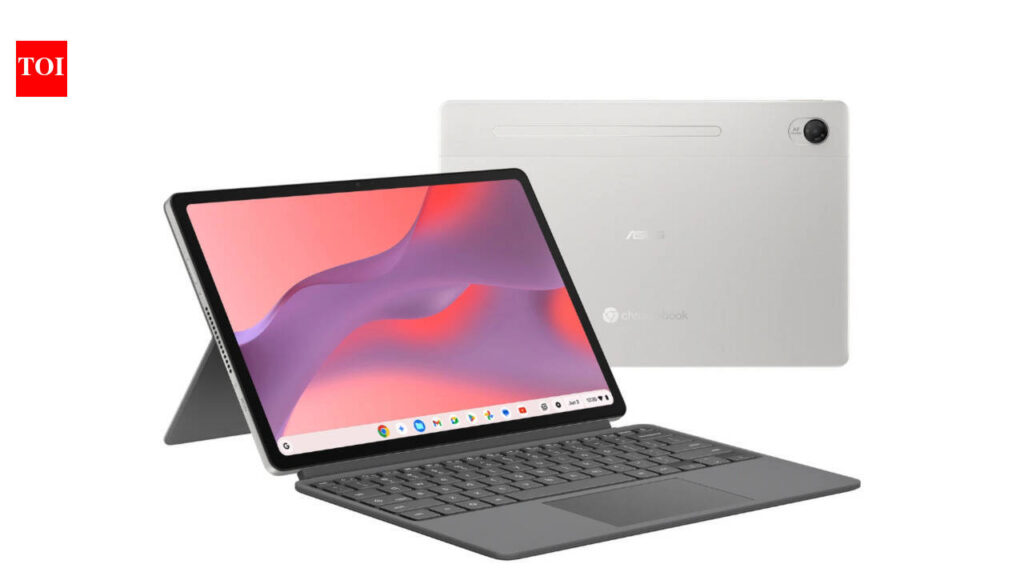
Table of Contents
Expanding the ChromeOS Footprint in India
ASUS has officially expanded its computing portfolio in the Indian market with the introduction of three new devices: the CM32 Detachable, the CM14, and the CM15. Starting at a competitive entry point of Rs 26,990, these devices are positioned not merely as budget alternatives to Windows laptops, but as specialized tools for the growing segment of cloud-first students and remote professionals.
- Diverse Form Factors: The lineup includes a versatile 2-in-1 detachable (CM32) and traditional clamshell laptops (CM14, CM15).
- Aggressive Pricing: Starting at Rs 26,990, making them some of the most accessible new Chromebooks in the region.
- Target Audience: Specifically engineered for the K-12 and higher education sectors, as well as lightweight corporate productivity.
- Cloud Integration: Deep integration with Google Workspace and Android app support via the Play Store.
The timing of this launch aligns with a broader shift in the Indian education sector, where the move toward hybrid learning has spiked demand for devices that offer long battery life, instant boot times, and high durability. Unlike traditional laptops that can struggle with bloatware and OS degradation over time, these Chromebooks rely on a lightweight kernel that ensures consistent performance across the device’s lifespan.
The Versatile Choice: ASUS CM32 Detachable
The CM32 Detachable is the most flexible member of the new trio. Designed for those who pivot between content consumption and light creation, it features a removable keyboard that transforms the device into a standalone tablet. This versatility is critical for students who may need to take handwritten notes via a stylus or read digital textbooks in a tablet orientation.
From a technical perspective, the CM32 prioritizes portability. While it lacks the raw processing power of a Core i5 or i7 machine, its ARM-based architecture (typical for détachables in this price bracket) allows for impressive standby times. Users can expect the device to wake from sleep nearly instantaneously, a hallmark of ChromeOS that remains its primary competitive advantage over Windows 11 in the budget segment.
Scaling Up: The CM14 and CM15
For users who require a more traditional typing experience and larger screen real estate, ASUS has introduced the CM14 and CM15. The CM14 serves as the ‘goldilocks’ device—small enough to fit in a backpack but large enough to handle multiple browser tabs without significant zooming. The CM15, on the other hand, targets the ‘desktop replacement’ niche for those who don’t want to invest in a heavy gaming rig but need a larger display for spreadsheets and document editing.
Comparing the CM14 and CM15 Technical Profiles
| Feature | Chromebook CM14 | Chromebook CM15 |
|---|---|---|
| Primary Use Case | Ultra-portable / Student | Home Office / Productivity |
| Display | 14-inch Anti-glare | 15.6-inch HD/FHD |
| Portability | High (Lightweight chassis) | Moderate (Larger footprint) |
| Keyboard | Compact layout | Full-sized with NumPad |
The inclusion of a numeric keypad on the CM15 is a subtle but significant detail. For accounting students or data entry professionals in India, this feature significantly reduces the friction of working within Google Sheets or online portals, which is often a pain point in smaller 13 or 14-inch laptops.
What This Means for the Indian Consumer
The introduction of these devices at the Rs 26,990 mark signals a strategic move by ASUS to capture the ‘entry-level’ market that has previously been dominated by low-end Windows laptops that often suffer from sluggish performance due to mechanical hard drives or limited RAM.
By leveraging ChromeOS, ASUS is providing a device that stays fast because it offloads the heavy lifting to Google’s servers. For a user in a city with improving 5G penetration, the local hardware specs matter less than the bandwidth. The practical implication is that a student can now own a reliable, secure, and fast machine without needing to spend Rs 40,000+, provided their workflow is centered around the web.
The Trade-offs: Who Should Avoid These?
It is important to be transparent about the limitations of the CM series. These are not machines for 4K video editing, heavy AAA gaming, or complex software development involving local IDEs. While Linux support (Crostini) allows some developers to run VS Code or Python, the hardware is not designed for high-compute tasks. If your workflow requires Adobe Creative Cloud or specialized CAD software, these Chromebooks will not suffice.
Market Context and Competitive Landscape
India’s Chromebook market is currently seeing a resurgence. According to recent industry trends, there is a growing preference for ‘Thin Clients’ in corporate environments to enhance security and ease of management. ASUS is positioning the CM series to compete directly with HP and Acer’s budget offerings.
The CM series’ success will likely depend on the adoption of the ChromeOS Flex ecosystem and the continued rollout of Google’s AI-integrated features in the browser. As Google integrates Gemini more deeply into the OS, the value proposition of a ‘cheap’ laptop increases, as the intelligence resides in the cloud, not the silicon.
Frequently Asked Questions
Are these Chromebooks suitable for online classes?
Yes. With integrated webcams and microphones, combined with the native integration of Google Meet and Classroom, the CM series is specifically designed for the educational environment.
Can I install Windows apps on the ASUS CM32, CM14, or CM15?
No, these devices run ChromeOS. However, you can install a wide variety of Android apps via the Google Play Store and certain Linux applications through the built-in developer environment.
How long does the battery typically last on these models?
While specific benchmarks vary by usage, ASUS Chromebooks in the CM series typically offer 8 to 12 hours of active use, significantly outperforming budget Windows laptops in the same price range.
Do these devices support touchscreens?
The CM32 Detachable features a touchscreen as a core part of its tablet functionality. Touch support on the CM14 and CM15 varies by specific SKU; check the local retailer for the touch-enabled variants.
Is the storage expandable?
Chromebooks typically use eMMC storage for speed and efficiency. While you cannot replace the internal drive, most CM models include microSD card slots for expanding storage for local files.
Final Technical Verdict
The ASUS CM series represents a calculated play for the budget-conscious Indian consumer. By offering three distinct form factors, ASUS ensures that whether the user is a primary school student needing a tablet (CM32) or a freelance writer needing a full keyboard (CM15), there is a viable option. At the Rs 26,990 starting price, the barrier to entry for a modern, cloud-integrated computing experience has never been lower.