The QWERTY Exodus: Why Power Users Are Switching to Colemak-DH
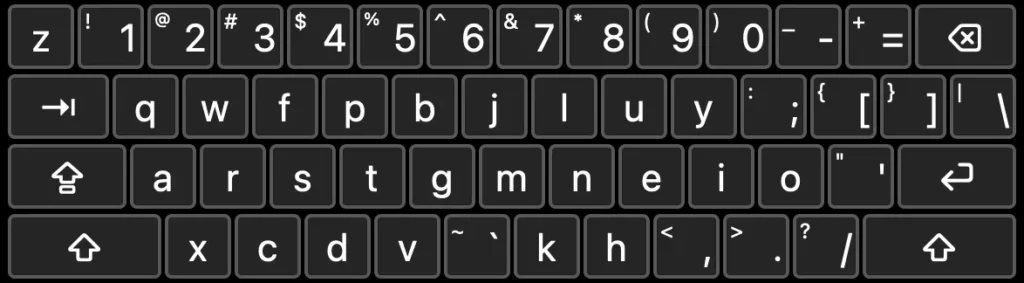
Table of Contents
The Hidden Cost of Fast Typing
Speed is often the primary metric of success in the digital age, but for many power users, high words-per-minute (WPM) counts mask a deeper problem: poor form. It is a common paradox in the tech community to find individuals capable of hitting 100 WPM while relying on a handful of fingers and a haphazard posture that defies every rule of touch typing. For these users, the result isn’t just inefficiency—it is the looming threat of Repetitive Strain Injury (RSI) and chronic finger fatigue.
The struggle to correct these habits is often a losing battle. Attempting to force a “correct” finger placement onto a QWERTY layout—a design originally intended to prevent mechanical typewriter jams rather than optimize human anatomy—often feels counterintuitive. When the brain has spent decades associating specific keys with specific, albeit incorrect, finger movements, the muscle memory becomes an invisible wall.
Enter Colemak-DH
For those reaching a breaking point with QWERTY, the appeal of alternative layouts like Colemak-DH is growing. Unlike the original Colemak, the DH variant modifies the layout to better accommodate the natural reach of the fingers, reducing the strain on the pinkies and optimizing the home row. The goal is simple: minimize finger travel and maximize comfort.
The transition, however, is rarely seamless. Many users opt for a gradual immersion approach using tools like keybr.com. By introducing letters progressively and focusing on accuracy over speed, typists can build new neural pathways without completely sacrificing their productivity during the learning phase. The challenge is that a 95% accuracy rate, which sounds high on paper, translates to a significant amount of backspacing and correction in a real-world workflow, momentarily tanking the very speed the user originally prized.
The Technical Friction of Implementation
Implementing a custom layout on modern hardware introduces its own set of hurdles. On macOS, for instance, while a standard Colemak layout is available natively, the DH modification requires third-party installation. Many developers and power users have turned to Homebrew to manage these installations, using commands like brew install --cask colemak-dh to bypass the limitations of default system settings.
There is also the physical dilemma of keycaps. On a MacBook Pro, the butterfly or scissor-switch mechanisms make removing keycaps a risky endeavor. This forces the user into a cognitive dissonance where the labels on the keys contradict the actual input—a mental overhead that can slow down a professional’s workflow for days or even weeks.
Beyond the Alphabet: The Symbol Struggle
While most of the discourse around keyboard layouts focuses on letters, the true friction often lies in the symbols. Most alternative layouts, including Colemak-DH, preserve the standard symbol placements of the US QWERTY layout. For international users, particularly those utilizing Portuguese or other European layouts, this creates a double-layered learning curve.
The shift from a regional layout to a US-based symbol set can feel more jarring than the letter change itself. When combined with the struggle of managing shift-key discipline—ensuring the opposite hand handles capitalization to avoid “pinky lock”—the process becomes an exercise in mindful computing. The transition reveals how deeply our regional hardware preferences and OS-specific symbol mappings influence our interaction with technology.
Ultimately, the switch to Colemak-DH is less about speed and more about sustainability. It is a conscious decision to trade short-term productivity for long-term joint health, transforming the act of typing from a subconscious habit into a deliberate, ergonomic practice.


