Microsoft’s Surface Laptop 8 for Business Tests a Built-in Privacy Screen, But Quality Trade-offs Persist
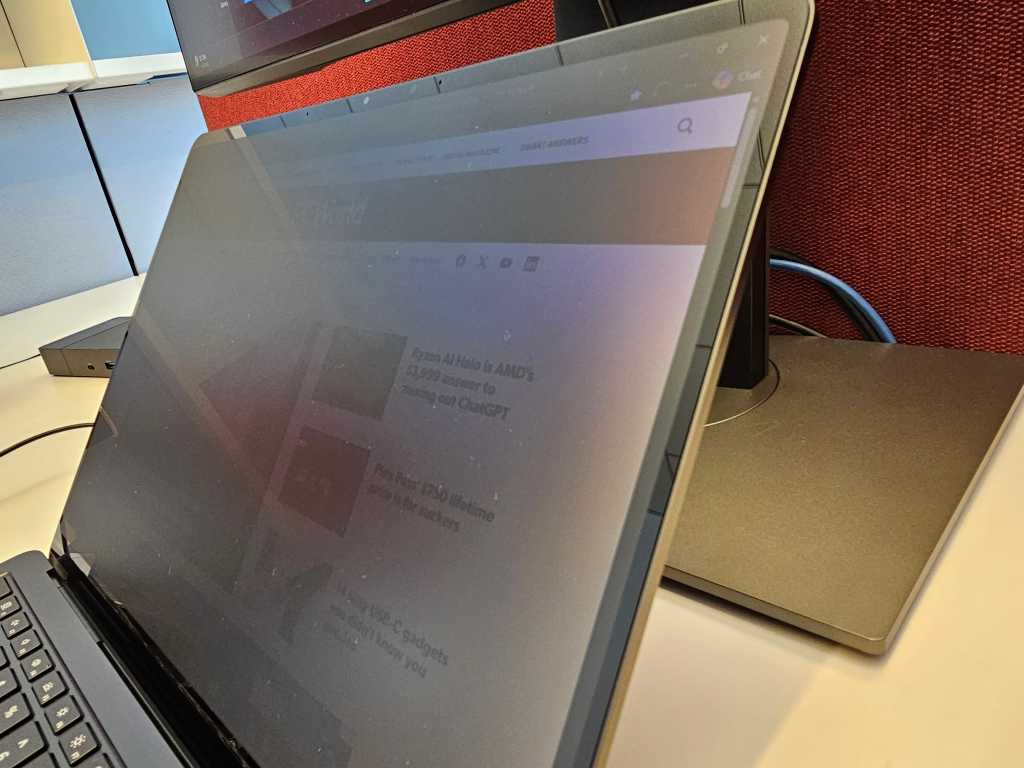
Table of Contents
The End of the Plastic Privacy Filter?
For years, the corporate traveler’s toolkit has included a clumsy, adhesive plastic laminate—the third-party privacy screen. While effective at blocking prying eyes on a crowded flight or in a coffee shop, these filters often degrade touch sensitivity and mute color accuracy. Microsoft is attempting to solve this with a hardware-level integration in the new Surface Laptop 8 for Business.
The implementation is deceptively simple: a dedicated privacy key located in the function row, adjacent to the Escape key. One tap triggers a shift in the display’s light emission, narrowing the viewing angle so that the screen dims into near-opacity for anyone not sitting directly in front of the device. It is a move that mirrors the approach taken by Samsung with the privacy features on the Galaxy S26, attempting to bake security directly into the silicon and glass.
Testing the ‘Privacy’ in Privacy Screen
In practical application, the effectiveness of the Surface Laptop 8’s privacy screen depends entirely on what you are hiding. During testing, the display remained perfectly legible from a head-on perspective. However, as the viewing angle shifts, the content fades rapidly. This is ideal for preventing a neighbor from reading specific lines of a confidential email or glancing at a password.
However, there is a distinction between hiding data and hiding activity. While a seatmate on a long-haul flight might not be able to read a specific cell in an Excel spreadsheet, they can certainly tell you are working in Excel. The high-contrast elements of a webpage—such as the layout of a news site or the distinct color blocks of a corporate dashboard—remain discernible even when the filter is active. For those seeking total visual invisibility, this technology is more of a deterrent than a blackout curtain.
The Cost of Integration: The Return of ‘Speckling’
The most concerning aspect of the new display isn’t the privacy filter itself, but the visual artifacts that accompany it. The Surface Laptop 8 utilizes an enhanced version of Microsoft’s PixelSense technology, dubbed PixelSense Flow, which aims for higher brightness and improved refresh rates. Notably, these units do not use OLED panels, which were plagued by a similar ‘speckling’ issue in the Surface Pro 11.
On the Surface Laptop 8, a subtle speckling effect—resembling a fine layer of dust trapped behind the glass—becomes apparent on white backgrounds. This is particularly noticeable when the brightness is dialed back and the privacy mode is engaged. The phenomenon likely stems from how the privacy layer offsets pixels to redirect light; when the eye catches these slight differences in pixel orientation, it manifests as a grainy texture.
When contacted for comment, Microsoft requested photographic evidence of the issue. However, the very nature of the speckling makes it notoriously difficult to capture on camera, as it often disappears under the aggressive processing of smartphone lenses or fails to translate through a digital sensor.
A Narrow Competitive Edge
Beyond the privacy toggle and the transition to Intel’s Panther Lake processors, the Surface Laptop 8 for Business offers few radical departures from its predecessor. By integrating the privacy screen, Microsoft is targeting a specific niche: the high-security corporate user who refuses to carry external accessories.
For the average user, the trade-off is a question of priority. If your workflow involves constant travel and sensitive data, the convenience of a one-touch privacy filter outweighs the slight loss in visual purity. But for those who primarily work in a fixed environment—perhaps flanked by large external monitors that remain completely exposed to the rest of the office—the feature feels more like a novelty than a necessity.


