Microsoft’s Surface Laptop 8 for Business Bets on Hardware Privacy, But at a Visual Cost
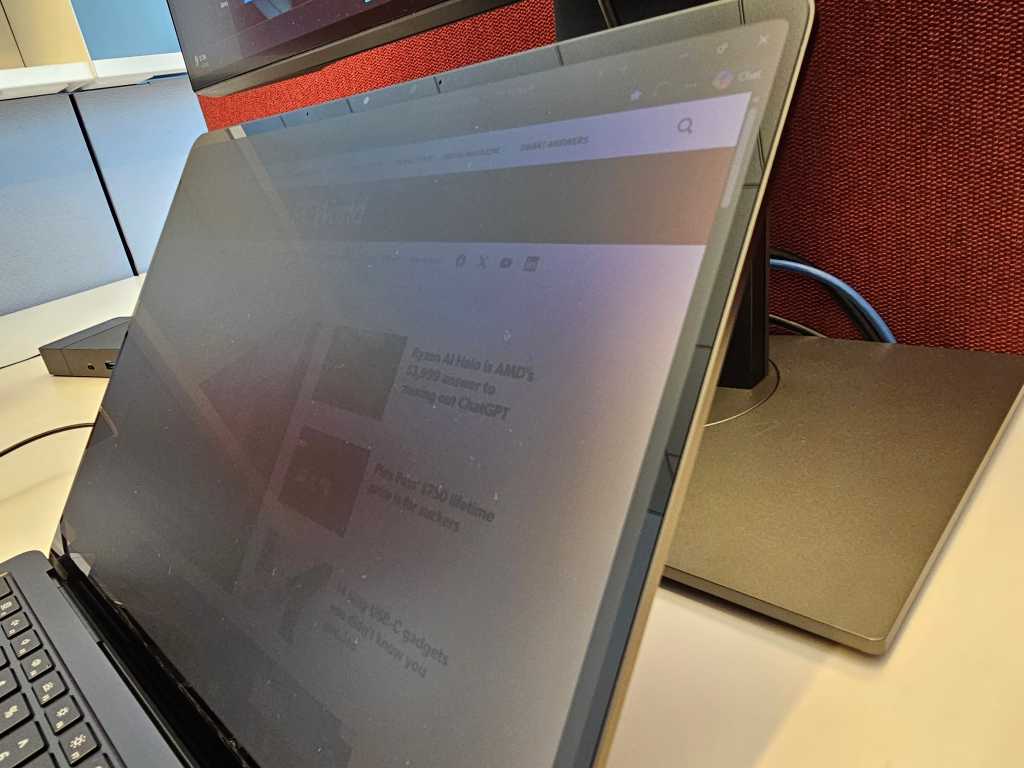
Table of Contents
The End of the Plastic Laminate
For years, the corporate traveler’s solution to ‘visual hacking’—the act of someone glancing at your screen in a crowded airport or cafe—has been a clunky, third-party plastic adhesive. These privacy filters, while effective, often kill touch sensitivity and distort color accuracy, turning a vibrant display into a muddy mess. Microsoft is attempting to solve this with a hardware-integrated solution in the new Surface Laptop 8 for Business.
On specific 13.8-inch configurations of the new laptop, Microsoft has added a dedicated privacy key located in the function row next to the Esc key. A single tap engages the privacy mode, dimming the display and restricting the viewing angle. Unlike the adhesive films of the past, this digital shift preserves the touchscreen’s responsiveness, bringing a similar utility to the laptop world that Samsung previously implemented with the Galaxy S26’s Privacy Display feature.
Privacy vs. Obscurity
In practice, the technology creates a narrow cone of visibility. When viewed head-on, the screen remains legible, though there is a slight, noticeable darkening along the periphery. However, as you move to the side, the image quickly fades into a near-opaque black.
But there is a critical distinction between protecting specific data and hiding the nature of your work. While a seatmate on a long-haul flight might struggle to read the specific figures in a confidential quarterly projection spreadsheet, they can still easily tell you are looking at a spreadsheet. The high-contrast elements of a UI—such as the layout of a popular news site or the structure of a corporate dashboard—remain discernable. The technology obscures the details, but it doesn’t hide the activity.
There is also the inherent irony of the modern workstation: the privacy screen only protects the laptop itself. In an open-plan office, where this device is often tethered to two massive external monitors, the integrated privacy filter becomes a niche luxury. Your laptop may be a vault, but your 27-inch Dell UltraSharp remains a billboard for anyone walking by.
The Return of the ‘Speckle’
The most concerning aspect of the Surface Laptop 8’s display isn’t the privacy feature itself, but a recurring ghost in Microsoft’s hardware: speckling. This visual artifact—a light, dust-like grain visible on white backgrounds—plagued the OLED panels of the Surface Pro 11 and the lower-resolution screens of the Surface Laptop Go.
The Surface Laptop 8 avoids OLED in favor of ‘PixelSense Flow,’ an enhanced iteration of Microsoft’s proprietary display tech designed for higher brightness and refresh rates. Yet, the speckling persists. It is most evident when the privacy mode is engaged and the brightness is dialed back; the eye can pick up a slight difference in how pixels reflect light, creating a textured, uneven appearance on white webpages.
When pushed for a technical explanation, Microsoft requested photographic evidence, a difficult ask given that such subtle artifacts are often invisible to smartphone cameras but glaringly obvious to the human eye. This suggests a possible misalignment in pixel orientation—a side effect of the hardware required to shift the viewing angle for privacy.
A Marginal Leap Forward
Outside of the privacy toggle and the transition to Intel’s Panther Lake processors, the Surface Laptop 8 for Business feels remarkably similar to its predecessor. The addition of adaptive color by default lends the screen a yellowish cast—a move that may appeal to those sensitive to blue light but detracts from professional color grading.
The integrated privacy screen is a genuine quality-of-life improvement for those who actually use it, and it is certainly superior to a sticky piece of plastic. However, if that privacy comes at the cost of display uniformity and a subtle grain across the panel, the trade-off may be too steep for users who prioritize visual perfection over corporate secrecy.


