Microsoft’s Surface Laptop 8 for Business Bets on Built-in Privacy, but Visual Trade-offs Linger
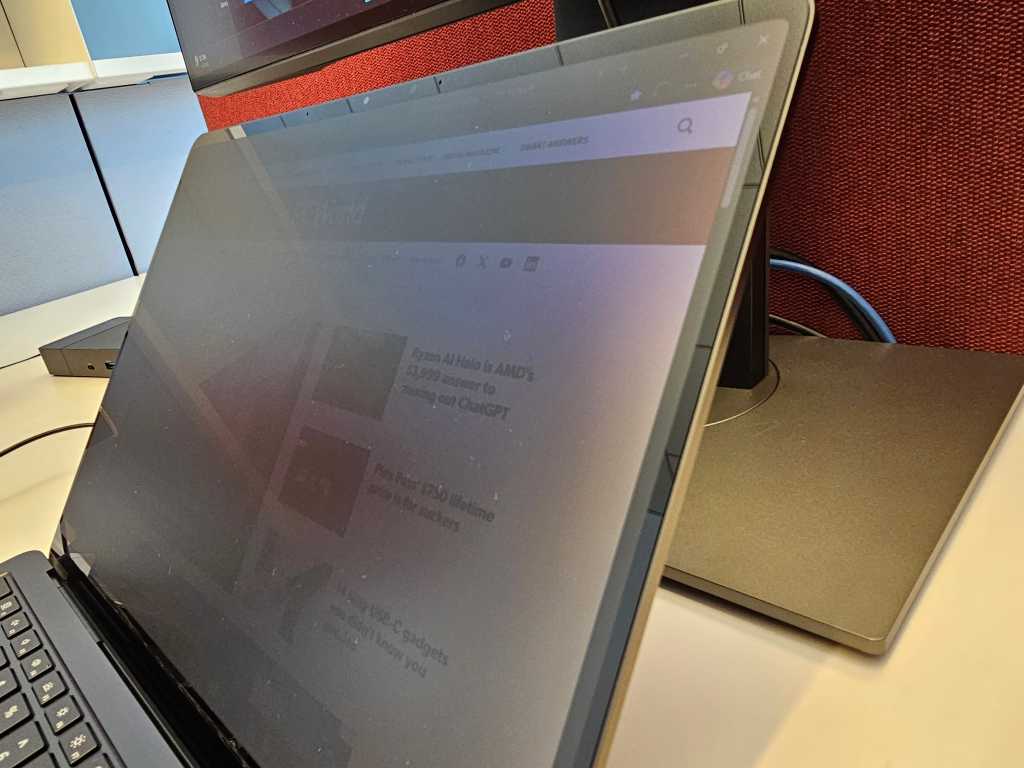
Table of Contents
For the corporate traveler, the nightmare scenario is predictable: a 14-hour haul from San Francisco to Taipei, a tray table deployed, and a curious competitor sitting in 12B watching every line of your quarterly projections. Historically, the only defense was a third-party plastic privacy laminate—clunky filters that often crippled touchscreen responsiveness and muted color accuracy.
Microsoft is attempting to solve this with the Surface Laptop 8 for Business. Rather than a physical overlay, Microsoft has integrated an electronic privacy layer directly into the 13.8-inch panel. With a dedicated hardware key located in the function row next to the Escape key, users can instantly shift the display into a restricted viewing mode. When activated, the screen dims slightly for the user, while becoming nearly opaque to anyone viewing from an angle.
The Privacy Paradox
In practice, the technology functions similarly to the Privacy Display found on Samsung’s Galaxy S26, which uses specialized layering to narrow the viewing angle. Viewed straight-on, the display remains legible and crisp. However, as you move perpendicular to the device, the content fades rapidly into a dark haze.
But “privacy” is a relative term. While the system effectively hides specific text or figures in a spreadsheet, it doesn’t mask the nature of the work. A prying eye can still discern the general layout of a webpage or the presence of a data table. If a colleague recognizes the specific UI of a corporate dashboard or the layout of a site like ESPN, the context of your activity remains visible, even if the granular data is obscured. It is a deterrent against casual shoulder-surfing, but not a vault for high-security intelligence.
The Return of ‘Speckling’
The more concerning discovery during testing is the return of “speckling”—a visual artifact that resembles a fine coat of dust trapped beneath the glass. This issue previously plagued the OLED panels of the Surface Pro 11 and certain iterations of the Surface Laptop Go.
The Surface Laptop 8 for Business does not use OLED; instead, it utilizes “PixelSense Flow,” an enhanced LCD technology designed for higher peak brightness and smoother refresh rates. Interestingly, the speckling becomes most apparent on high-contrast white backgrounds when the privacy mode is active and brightness is dialed back. It appears that the privacy mechanism may slightly offset certain pixels or alter how light reflects through the panel, creating a subtle, grainy texture that is noticeable to the keen eye.
When the brightness is pushed to maximum, the effect largely disappears. However, in a dimmed office environment or on a flight, the texture is present. When contacted for comment, Microsoft requested photographic evidence of the phenomenon—a difficult task given that these micro-artifacts often elude standard camera sensors, existing in the gap between the hardware’s output and the human eye’s perception.
A Narrow Value Proposition
Beyond the privacy key, the Surface Laptop 8 for Business is a remarkably incremental update. Aside from the integration of Intel’s Panther Lake processors, there is little to distinguish this chassis from its predecessor. The addition of adaptive color settings by default also lends the screen a warm, yellowish cast—a choice that blue-light sensitive users may appreciate, but which purists will find distracting.
For the executive who spends half their life in airport lounges, the integrated privacy screen is a genuine quality-of-life improvement. It eliminates the need for unsightly plastic clips and preserves touchscreen utility. However, for the average office worker, the benefit is limited. After all, the privacy screen only protects the laptop; it does nothing for the two 27-inch external monitors sitting on your desk in an open-plan office.
Microsoft has delivered a feature that works as advertised, but the visual cost—specifically the speckling—suggests that the marriage of electronic privacy and high-density LCDs is still a work in progress.


