macOS 27 Golden Gate First Look: The Non-AI Improvements That Actually Matter
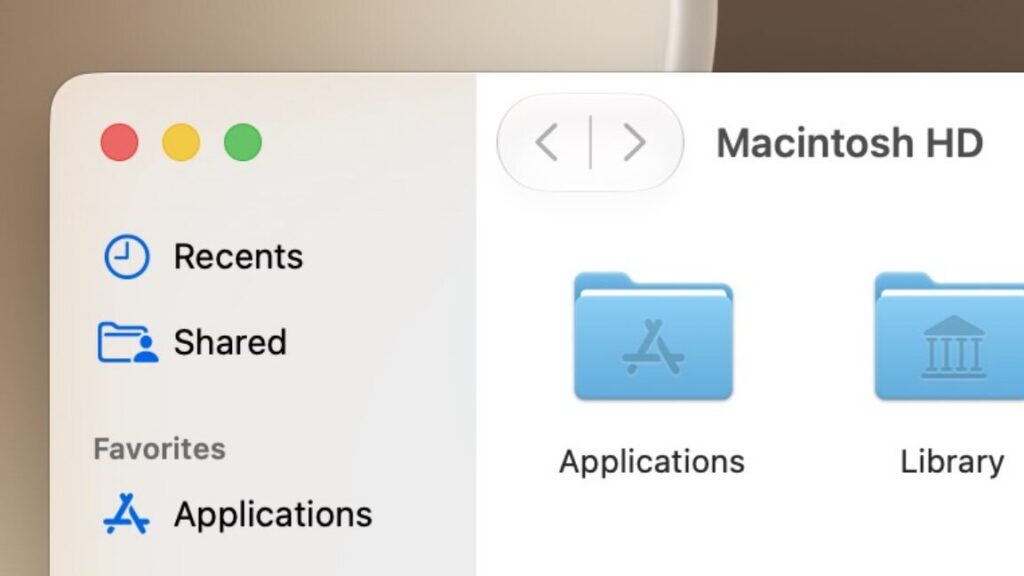
Table of Contents
The Quiet Side of the Apple Keynote
At this year’s Worldwide Developers Conference (WWDC), the air was thick with talk of generative AI. Between the redesigned Siri and the rollout of Apple Intelligence, it felt as though the core operating system had become a mere delivery vehicle for LLMs. However, for those of us who spend ten hours a day staring at a MacBook screen, the ‘platform improvements’—the subtle tweaks to window management, transparency, and responsiveness—often matter more than a chatbot that can summarize an email thread.
I have spent the last week running the first developer beta of macOS 27 Golden Gate on an M1 MacBook Air. Choosing the M1 is a deliberate stress test; as the oldest silicon Apple still supports now that Intel compatibility has been fully deprecated, it serves as the baseline for how these visual changes impact real-world performance. While the AI features are the headline, Golden Gate introduces a level of granular control over the system’s aesthetic that has been missing since the early days of Big Sur.
- Granular Opacity: The move from a binary toggle to a slider for Liquid Glass effects.
- Refraction Tweaks: Subtle changes to how the OS handles background blurring to reduce visual noise.
- UI Regression: A return to more traditional border structures in certain window elements to improve legibility.
It is important to note that this analysis is based on an early beta. Historically, Apple iterates heavily on the ‘glass’ effects between the June developer seed and the September public release. Expect further refinements to the refraction engines and color tinting before the official fall launch.
Deconstructing ‘Liquid Glass’ and the Opacity Slider
Since the introduction of the ‘Liquid Glass’ design language in previous versions, users have been split. Some love the futuristic, semi-transparent look; others find it distracting, particularly when text from a background window bleeds through to the foreground. In macOS 26.1, Apple attempted to solve this with a simple ‘Clear’ or ‘Tinted’ toggle in the Appearance settings. It was a blunt instrument that didn’t satisfy either camp.
In macOS 27 Golden Gate, Apple has replaced this toggle with a fine-grained slider. This allows users to precisely calibrate the opacity of the system’s translucent elements. During my testing, I found that the ‘halfway’ point—splitting the difference between maximum clarity and maximum tint—provides the best balance of modern aesthetics and functional legibility.
The Physics of Refraction
The Liquid Glass effect is not just a transparency filter; it is a simulated refraction of light. In the Golden Gate beta, Apple has tweaked the refraction algorithm. In the Control Center and volume HUDs, the blur is more diffused. This means that while you can still tell there is a window beneath the overlay, the distinct shapes are harder to make out, reducing the ‘visual vibration’ that often occurs when high-contrast images are blurred under white text.
The Persistence of Visual Conflict
Despite these improvements, the ‘glassy’ look isn’t without its flaws. When pushing the slider to the maximum ‘Clear’ setting, I encountered several instances of visual conflict. Specifically, when a semi-transparent menu overlaps another window with dense text, the resulting overlap creates a muddying effect that makes both sets of text difficult to read. This is the inherent trade-off of the Liquid Glass philosophy: the more ‘real’ the glass looks, the less legible the interface becomes in complex multitasking scenarios.
Structural Changes: A Return to Stability
One of the most interesting shifts in Golden Gate is where Apple has decided to stop using transparency. In macOS Tahoe, the sidebar was often nested in a floating bubble that didn’t extend to the window edge, creating a soft, floating aesthetic. While visually pleasing, it felt disconnected from the actual workspace.
Golden Gate reverts some of these elements to a more traditional structure. The sidebar now extends from the edge of the window to the edge of the content area, reminiscent of the more rigid layouts seen in macOS Big Sur. Similarly, the toolbar area now features a harder barrier. By introducing these solid anchors, Apple is acknowledging that total transparency leads to a loss of spatial orientation for the user.
What This Means for the End User
For the average user, these changes might seem cosmetic, but they represent a shift in Apple’s approach to accessibility and user preference. By moving the opacity settings into the initial setup flow, Apple is treating visual comfort as a primary configuration step rather than a hidden accessibility setting.
From a performance standpoint, the M1 MacBook Air handled the new refraction effects without noticeable lag. This suggests that the Liquid Glass updates are being optimized at the kernel level rather than simply adding more GPU overhead. For users on older Apple Silicon, this means the OS will feel ‘snappy’ even with the more complex visual effects enabled.
Frequently Asked Questions
What is macOS 27 Golden Gate?
macOS 27 Golden Gate is the latest version of Apple’s desktop operating system, focusing on ‘platform improvements,’ enhanced parental controls, and the integration of Apple Intelligence AI features.
How do I adjust the Liquid Glass effect in Golden Gate?
Navigate to System Settings > Appearance. You will find a new slider that allows you to move between ‘Clear’ and ‘Tinted’ opacity for system windows and overlays.
Does the new design slow down older Macs?
Initial testing on M1 hardware indicates that the visual updates are well-optimized and do not cause significant performance degradation or battery drain compared to macOS Tahoe.
When will the public beta of macOS 27 be available?
Following the standard Apple release cycle, the public beta is expected to launch in July, with the final stable version arriving in the fall.
What happened to the Clear/Tinted toggle from macOS 26.1?
Apple has replaced the binary toggle with a granular slider in macOS 27 to give users more precise control over their system’s transparency levels.