Google is Quietly Giving Users a ‘Preferred Sources’ Knob to Fight AI Noise
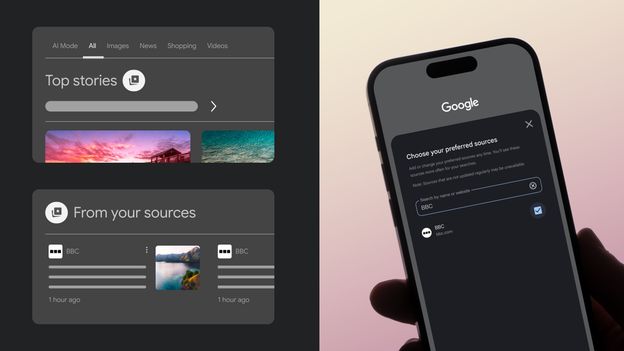
Table of Contents
A Manual Override for the Algorithm
For years, the relationship between Google and the world’s news publishers has been a tense tug-of-war over traffic and visibility. As Google pushes harder into AI-generated summaries—which often synthesize information without requiring a user to click through to a source—publishers have seen a steady erosion of organic reach. In a subtle but significant pivot, Google is now introducing a “Preferred Sources” tool, effectively giving users a manual override to dictate which publishers they trust most.
The feature allows users to curate a shortlist of specific websites and news organizations that Google should prioritize when surfacing content. While Google’s ranking algorithms are designed to optimize for “helpfulness” and “authority,” the Preferred Sources tool allows a user to tell the system: “Regardless of the global algorithm, I want to see this specific outlet first.”
Where the ‘Preferred’ Content Actually Lands
This isn’t a total reconfiguration of the search engine; you won’t suddenly see a preferred source at the top of every single query if the content isn’t relevant. Instead, the impact is most visible within the Top Stories carousel.
Google has implemented a dedicated “from your sources” section nested within the Top Stories results. By adding a publication—such as the BBC, The New York Times, or a niche tech blog—to your preferences, Google increases the probability that these outlets will appear in this curated slot across both desktop and mobile interfaces. It is a move toward a more “subscription-like” experience within a general search tool, acknowledging that users are increasingly fatigued by the noise of SEO-optimized content and AI-generated snapshots.
How to Configure Your Source List
There are two primary ways to manage these preferences. The first is through a direct settings menu (accessible via Google account settings), where users can browse a list of recognized publishers and toggle them on. This is the most efficient method for users who already have a set of trusted news brands.
The second method is more reactive. While browsing search results, users will notice a starred card icon adjacent to the “Top Stories” section. Clicking this allows for the immediate addition of a publisher appearing in those results to the Preferred Sources list. Once selected, the preference persists across all future searches, meaning the algorithm will perpetually weigh those specific entities more heavily in the Top Stories module.
The Strategic Shift: User Agency vs. AI Dominance
The timing of this rollout is noteworthy. Google is currently facing immense pressure from regulators and publishers over the impact of AI Overviews. When an AI summary answers a query directly on the search page, the “click-through rate” to the original reporter drops. By allowing users to explicitly prefer certain sources, Google is attempting to maintain a symbiotic relationship with high-quality journalism.
However, this also creates a fragmented search experience. If users only consume news from a handful of “preferred” outlets, Google may inadvertently be helping users build their own algorithmic filter bubbles, even while claiming to fight the very phenomenon that social media platforms like Meta and X have struggled with for a decade.
For the average user, it is a welcome bit of control. For the publishing industry, it is a small win in a larger battle for visibility in an era where the search bar is becoming an answer engine rather than a directory.