Dell’s XPS 14 Returns to Form, But Panther Lake Efficiency Comes at a Premium
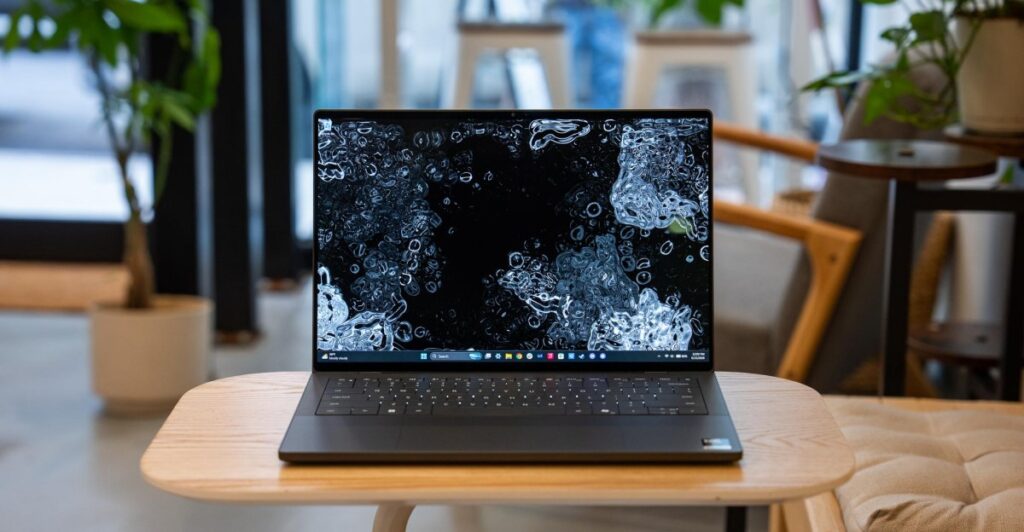
Table of Contents
The Return of the Function Row
For the better part of three years, Dell’s XPS line has been a playground for experimental minimalism—sometimes to a fault. From capacitive touch rows to nearly invisible trackpads, the pursuit of a “seamless” aesthetic often came at the expense of the user experience. The 2026 XPS 14, however, feels like a calculated retreat toward sanity. The most immediate and welcome change is the return of a physical function row, effectively ending the era of guesswork for users trying to find the Escape key.
Dell’s hardware pivot is evident in the chassis. While only marginally thicker than a MacBook Air, the XPS 14 carries a denser, more substantial feel. The haptic trackpad, while still seamless, now features lightly textured boundary lines, providing the tactile orientation that was sorely missing in previous iterations. It isn’t perfect—palm rejection remains inconsistent, and occasional double-clicks occur during light pressure—but it is a vast improvement over the “glass slab” approach of the XPS 13.
Panther Lake and the Power Efficiency Gamble
Under the hood, Dell has deployed Intel’s Core Ultra Series 3 “Panther Lake” architecture. We tested two configurations: a base model featuring the 8-core Core Ultra 5 325 and a high-end variant sporting the 16-core Core Ultra X7 358H. The latter is paired with an integrated 12-core GPU that pushes the XPS 14 beyond simple productivity. In our tests, the X7 chip handled 3D rendering in Blender with surprising agility and managed to run Battlefield 6 at 50fps on low settings at 1920 x 1200 resolution with XeSS enabled.
The real story, however, is the battery life. The IPS model is a standout, utilizing a variable refresh rate (VRR) panel that can drop as low as 1Hz during static content. This efficiency is staggering; in our continuous runtime test, the IPS configuration clocked in at 26 hours, outperforming several ARM-based competitors. The OLED model, while limited to a 20Hz minimum refresh, still comfortably cleared 10 hours of mixed usage involving Chrome, video streaming, and conferencing.
Display Dichotomy: IPS vs. Tandem OLED
The choice between the two screen options is more than just a price jump; it’s a fundamental difference in visual philosophy. The 2880 x 1800 tandem OLED touchscreen is, quite simply, a showstopper. The contrast and color vibrancy are industry-leading, making it an ideal choice for creative professionals. Conversely, the 1920 x 1200 IPS panel feels utilitarian. While it hits 500 nits and handles glare effectively, it lacks the punch of the OLED. However, for users who prioritize longevity over aesthetics, the IPS panel’s 1Hz floor makes it the pragmatic choice.
The Friction Points
Despite the hardware wins, Dell’s commitment to the “gapless” keyboard remains a point of contention. With only 0.8mm of key travel, the typing experience feels stilted. While a tactile bump at the top of the press prevents it from feeling completely shallow, the lack of spacing between keys leads to a higher typo rate during fast typing. It is a design choice that prioritizes a clean look over ergonomic comfort.
Then there is the cost. Starting at $1,999.99 for the base model and climbing to $2,899.99 for the OLED configuration, the XPS 14 enters a price bracket where it must compete with the M5 MacBook Pro. In raw CPU benchmarks, Apple’s silicon still holds a lead in non-GPU tasks, and the fanless M5 MacBook Air offers a compelling performance-per-dollar ratio that Dell struggles to match.
Ultimately, the XPS 14 is a machine of contradictions. It is arguably the best premium Windows laptop Dell has produced in years, fixing the ergonomic blunders of its predecessors. But as the price climbs, the value proposition narrows, leaving the user to decide if the beauty of a tandem OLED and the efficiency of Panther Lake are worth the premium.


