Dell XPS 13 vs. MacBook Neo: Can Hardware Excellence Overcome the Windows Memory Gap?
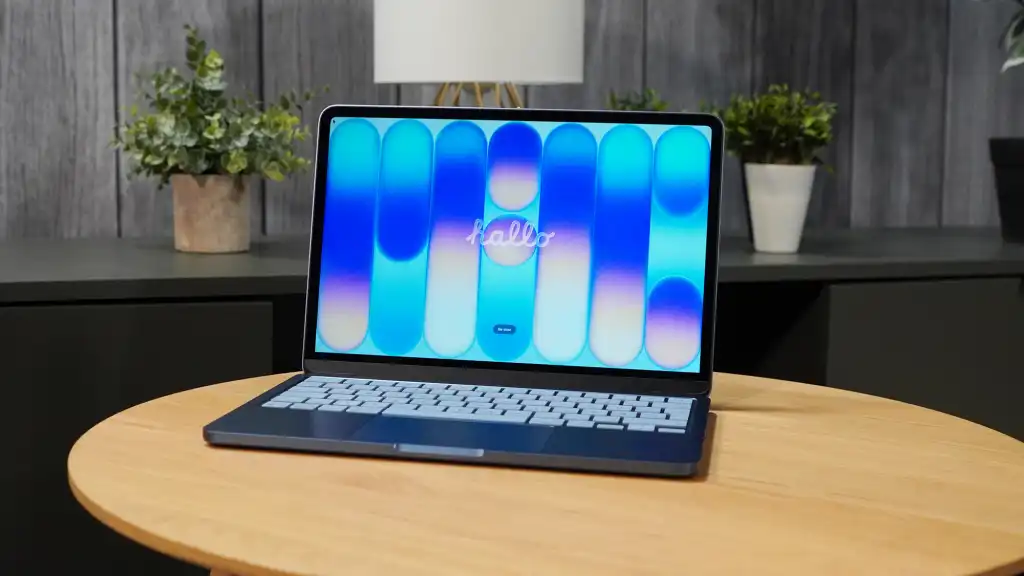
Table of Contents
The Shift Toward Budget Premium: Apple’s Neo Effect
For years, the sub-$700 laptop market was a graveyard of plastic chassis, dim TN panels, and disappointing trackpads. The industry standard was to treat budget machines as disposable utilities. Apple disrupted this equilibrium with the MacBook Neo. At $599, the Neo isn’t just a cheap laptop; it is a premium device that happens to be affordable, leveraging a recycled iPhone-based silicon architecture to deliver efficiency that previously required a professional-grade workstation.
The industry’s response was swift. At Computex, Dell unveiled its latest XPS 13, priced at $699. On the surface, Dell has perfectly decoded Apple’s strategy. They aren’t just competing on specs; they are competing on the visceral experience—the weight, the screen quality, and the tactile feel of the device. However, as a journalist who has spent a month daily-driving the MacBook Neo after years of navigating the Windows budget ecosystem, I see a critical vulnerability in Dell’s strategy: the software layer.
- Hardware Convergence: Dell’s $699 XPS 13 matches the MacBook Neo in build quality, featuring a 2.2-pound chassis and a high-end OLED display.
- The RAM Conflict: Both devices ship with 8GB of RAM, but macOS and Windows 11 utilize this memory with vastly different levels of efficiency.
- Silicon Divergence: The Neo relies on ARM-based efficiency, while the XPS 13 utilizes the new Intel Wildcat Lake architecture designed for low-power budget builds.
- The Windows Hurdle: Despite hardware parity, Windows 11’s legacy bloat may prevent the XPS 13 from matching the Neo’s perceived snappiness.
Analyzing the Hardware: When Premium Goes Budget
To understand why the Dell XPS 13 is a significant move, we have to look at the “touchpoints.” In professional hardware evaluation, we prioritize the components a user interacts with every second: the display, the keyboard, and the chassis. Apple’s Neo succeeded because it refused to compromise here, offering an all-aluminum body and a high-pixel-density screen at a price point where Windows OEMs usually offer recycled plastics.
Dell has mirrored this approach. The new XPS 13 isn’t just a cost-down version of its flagship; it’s a targeted strike at the Neo. By integrating an OLED display and a backlit keyboard, Dell actually offers more raw hardware value for the additional $100. A 2.2-pound footprint makes it an ideal competitor for students and mobile professionals who previously viewed the MacBook Air or Neo as the only viable portable options under $800.
Technical Specifications Comparison
| Feature | MacBook Neo | Dell XPS 13 ($699) |
|---|---|---|
| Price | $599 | $699 |
| Display | Retina LCD | OLED Panel |
| Weight | Approx. 2.3 lbs | 2.2 lbs |
| RAM | 8GB (Unified) | 8GB (LPDDR5x) |
| Processor | ARM-based (iPhone silicon) | Intel Wildcat Lake |
| Battery Life | Claimed High Efficiency | 17 Hours (Claimed) |
The 8GB Paradox: Memory Management and OS Overhead
The most contentious point of this comparison is the 8GB of RAM. In the enthusiast community, 8GB is often viewed as a dealbreaker. However, the reality of how that memory is managed differs wildly between macOS and Windows 11.
On the MacBook Neo, 8GB feels like 16GB. This is due to Apple’s unified memory architecture and the way macOS handles memory compression and swap files. During my testing, and as corroborated by reports from Macworld’s Roman Loyola, the Neo can handle punishing workloads—such as 4K video clips and nearly 60 open browser tabs—without the system stuttering. This is because the ARM-based processor and the OS are designed in tandem to minimize idle overhead.
Windows 11, conversely, is a legacy-burdened operating system. While Microsoft is currently attempting to streamline the OS to reduce bloat, the baseline memory footprint of Windows is significantly higher than that of macOS. When you run a Windows machine with 8GB of RAM, the OS often consumes a large portion of that capacity just to maintain basic background services. This leaves very little “headroom” for user applications. When that headroom disappears, Windows relies on page-filing to the SSD, which—while fast—cannot match the fluidity of active RAM.
Intel Wildcat Lake: A New Hope for Budget PCs?
Dell is betting on the Intel Wildcat Lake processor to bridge this gap. Unlike previous budget Intel chips that often ran hot and throttled quickly, Wildcat Lake is engineered specifically for thin-and-light efficiency. The goal is to mimic the “instant-on” feel of ARM processors while maintaining the x86 compatibility that makes Windows versatile.
However, hardware cannot fully solve a software efficiency problem. As Microsoft CEO Satya Nadella recently noted in an industry interview, the PC era suffered from a lack of software optimization because developers simply assumed the next generation of hardware would be faster. This “brute force” approach to software development is why Windows 11 feels heavier than macOS, regardless of whether it’s running on a $699 Dell or a $2,000 Razer.
What This Means for the Consumer
For the average user, the choice between these two machines depends entirely on their workflow. If your day consists of Google Docs, a few Spotify playlists, and 10-15 Chrome tabs, the Dell XPS 13 is a triumphant piece of hardware. It provides a premium aesthetic and a superior OLED screen that may actually make it more enjoyable to use than the Neo.
But for the “power-lite” user—someone who isn’t a pro but likes to keep 30 tabs open while running Discord, Slack, and a Zoom call—the MacBook Neo is the safer bet. The hardware parity is a facade; the true difference lies in the system responsiveness. The Neo doesn’t just run apps; it manages the transition between them with a fluidity that Windows 11 has yet to master in its budget configurations.
The Performance Gap Breakdown
- Basic Tasks: (Web browsing, Emails) → Tie. Both will feel fast and responsive.
- Multitasking: (15+ Apps/Tabs) → MacBook Neo Wins. Better memory compression.
- Visual Experience: (Movies, Design) → Dell XPS 13 Wins. OLED technology is superior to the Neo’s LCD.
- Longevity: (Battery/Heat) → MacBook Neo Wins. ARM efficiency generally outperforms x86 in low-power states.
Addressing the Windows 11 ‘Bloat’ Crisis
It is worth noting that Microsoft is in the midst of a concerted effort to improve Windows 11’s reliability and performance. After years of user migration toward Linux and the perceived stability of macOS, Microsoft’s 2026 roadmap focuses heavily on reducing background telemetry and improving the efficiency of the kernel. If these updates successfully reduce the OS’s memory footprint, the Dell XPS 13 could suddenly become the dominant budget laptop overnight.
Until those updates are proven in the wild, however, the 8GB RAM limitation on the XPS 13 remains a gamble. We are seeing a clash between a hardware-first approach (Dell) and a vertically integrated approach (Apple). Dell can build the most beautiful, lightweight laptop in the world, but they are still delivering it with an OS they do not control.
Frequently Asked Questions
Is 8GB of RAM enough for a Windows laptop in 2026?
For basic office work, student assignments, and light web browsing, yes. However, for multitasking, heavy browser usage, or creative work, 8GB is often insufficient on Windows 11 due to higher OS overhead compared to macOS.
How does the Intel Wildcat Lake processor compare to Apple’s silicon?
Wildcat Lake is designed for better efficiency and lower heat than previous Intel chips, bringing Windows closer to the ARM experience. While it may not match the extreme power-per-watt of Apple’s silicon, it significantly improves the battery life and responsiveness of budget laptops.
Which laptop has the better screen?
The Dell XPS 13’s OLED display is technically superior, offering deeper blacks and more vibrant colors than the MacBook Neo’s high-quality LCD screen.
Why does the MacBook Neo feel faster with the same amount of RAM?
This is due to unified memory architecture and superior memory compression in macOS, which allows the system to store and retrieve data more efficiently than the Windows paging system.
Should I spend the extra $100 for the Dell XPS 13?
If you require Windows-specific software or prefer an OLED screen, the $100 premium is justified. If you prioritize seamless multitasking and battery life above all else, the MacBook Neo is the more efficient choice.