Asus Expands India’s ChromeOS Ecosystem with CM32, CM14, and CM15 Chromebooks
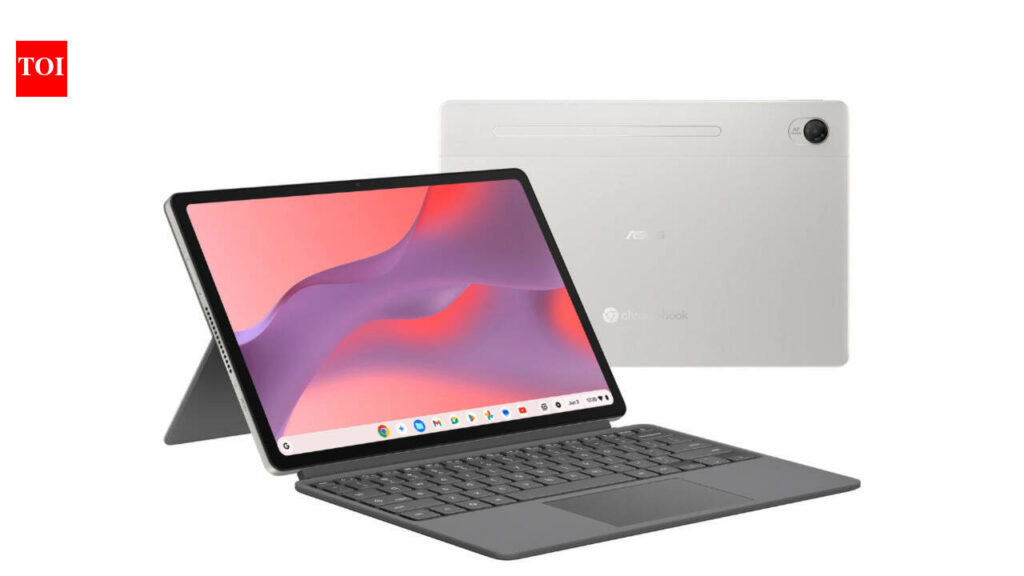
Table of Contents
The Shift Toward Cloud-First Computing in India
Asus has officially expanded its footprint in the Indian computing market with the simultaneous launch of three distinct ChromeOS devices: the CM32 Detachable, the CM14, and the CM15. Starting at a competitive price point of Rs 26,990, these devices are positioned to capture a growing segment of users who are pivoting away from traditional, heavyweight operating systems in favor of the lightweight, cloud-centric agility of ChromeOS.
- CM32 Detachable: A tablet-laptop hybrid targeting extreme portability.
- CM14: A compact, everyday worker designed for students.
- CM15: A larger-screen productivity machine for multi-tasking.
- Aggressive Pricing: Entry-level models starting at Rs 26,990 to challenge the budget Windows laptop segment.
For years, the Indian laptop market was dominated by the ‘Windows-and-Intel’ paradigm, where users prioritized local storage and software compatibility. However, as high-speed 5G penetration increases across urban and semi-urban India, the demand for devices that function as gateways to the cloud—rather than silos for data—has surged. The Asus CM series is a direct response to this behavioral shift.
The hardware strategy here is clear: Asus is not trying to compete with high-end MacBook Pros or gaming rigs. Instead, they are targeting the ‘educational’ and ‘light professional’ brackets. By leveraging the efficiency of ChromeOS, these machines can maintain decent battery life and snappy performance even with mid-range processors, avoiding the common ‘budget Windows lag’ that plagues entry-level laptops with 4GB of RAM.
Technical Breakdown: Choosing Between the CM32, CM14, and CM15
While all three devices share the ChromeOS DNA, their form factors serve entirely different user intents. The CM32 Detachable is the most radical of the three, featuring a keyboard that can be removed entirely. This transforms the device into a high-end Android-capable tablet, making it an ideal choice for those who consume more media than they produce.
The CM32 Detachable: The Versatility Play
The CM32 is designed for the ‘lean’ user. It utilizes a touch-first interface and a compact chassis that fits easily into a small bag. For students who need to take handwritten notes or professionals who travel frequently, the detachable nature allows for a seamless transition from a laptop setup to a handheld tablet. Technical specifications generally focus on power efficiency, utilizing ARM-based processors that allow for fanless designs and extended battery endurance.
The CM14 and CM15: The Productivity Duo
For those who require a physical keyboard for long-form writing or coding, the CM14 and CM15 provide a more traditional experience. The CM14 emphasizes a balance between screen real estate and portability, while the CM15 targets users who find 13-inch screens too restrictive. The CM15, in particular, is geared toward users who frequently multitask with multiple Chrome windows open, providing the necessary screen width to handle side-by-side browsing without constant switching.
| Feature | CM32 Detachable | CM14 | CM15 |
|---|---|---|---|
| Form Factor | 2-in-1 Detachable | Clamshell/Compact | Standard Laptop |
| Primary Use | Media/Light Notes | Education/Portability | Productivity/Work |
| Starting Price | Rs 26,990 (Est.) | Competitive Mid-range | Premium Budget |
| OS | ChromeOS | ChromeOS | ChromeOS |
From a hardware perspective, the move to integrate these models into the Indian market allows Asus to undercut the pricing of traditional laptops while offering a device that is effectively ‘maintenance-free.’ ChromeOS handles updates in the background, removes the need for traditional antivirus software, and boots up in seconds—advantages that are particularly appealing to the non-technical consumer.
What This Means for the Indian Consumer
The introduction of these three models signals a broader move toward Cloud-Native Computing. For the average user in India, this means a departure from the anxiety of ‘disk space’ and ‘system crashes.’ Because ChromeOS relies on the cloud, the hardware requirements are lower, which is why Asus can offer a functioning machine at under Rs 30,000.
However, there is a trade-off. These devices are not meant for heavy video editing in Premiere Pro or high-end gaming. They are built for the Google Workspace ecosystem—Docs, Sheets, Slides, and Gmail. For a college student whose entire curriculum is managed via Google Classroom or a freelancer managing a CRM through a browser, these machines are not just sufficient; they are often more efficient than a bloated Windows install.
The ‘Android Factor’
One of the most significant advantages of the new Asus CM lineup is the integration of the Google Play Store. The ability to run Android apps on a laptop screen fills the gap for users who want the convenience of a mobile app (like Instagram, WhatsApp, or mobile banking) but the ergonomics of a physical keyboard. This creates a bridge between the smartphone and the PC that is uniquely handled by ChromeOS.
Market Dynamics and the Competitive Landscape
Asus is entering a space where HP and Lenovo have already established a presence with their own Chromebook lines. To differentiate itself, Asus is leaning heavily into price-to-performance ratios and build quality. By launching three distinct tiers, they are effectively casting a wide net to capture different demographics—from the primary school student to the remote worker.
The timing is critical. With the Indian government’s push for digital literacy and the proliferation of low-cost data, the ‘Chromebook’ isn’t just a laptop; it’s a utility. When compared to the cost of a mid-range Android tablet plus a Bluetooth keyboard, the CM32 Detachable offers a more cohesive and professional experience for a similar investment.
Frequently Asked Questions
Can I install Windows on an Asus Chromebook?
No. Chromebooks are designed specifically for ChromeOS. While some advanced users can install a version of Linux via the Crostini environment, they are not designed to run the Windows operating system.
Is a Chromebook good for gaming?
For traditional AAA titles, no. However, Chromebooks are excellent for cloud gaming services like NVIDIA GeForce Now or Xbox Cloud Gaming, provided you have a stable internet connection.
How does the battery life compare to traditional laptops?
Because ChromeOS is significantly less resource-intensive than Windows or macOS, Asus Chromebooks generally offer longer battery life on smaller batteries, often lasting a full workday or school day on a single charge.
Do I need a constant internet connection?
While the primary appeal is cloud-based, Google Docs and other core apps have an ‘Offline Mode’ that allows you to work without internet; your changes will sync once you reconnect.
Which Asus CM model is best for a college student?
The CM14 is generally the best balance of portability and productivity. However, if the student prefers digital sketching or note-taking, the CM32 Detachable is a superior choice.
Final Verdict: A Strategic Play for the Budget Segment
The launch of the CM32, CM14, and CM15 is less about technical innovation and more about market accessibility. By lowering the barrier to entry for a reliable, secure, and fast computing experience, Asus is tapping into the core of the Indian digital revolution. For the user who simply needs a window to the web, these devices represent a pragmatic choice over the complexity of traditional PCs.