HP OmniBook Ultra 14 Review: The Snapdragon X2 Elite Makes This the Definitive MacBook Pro Rival
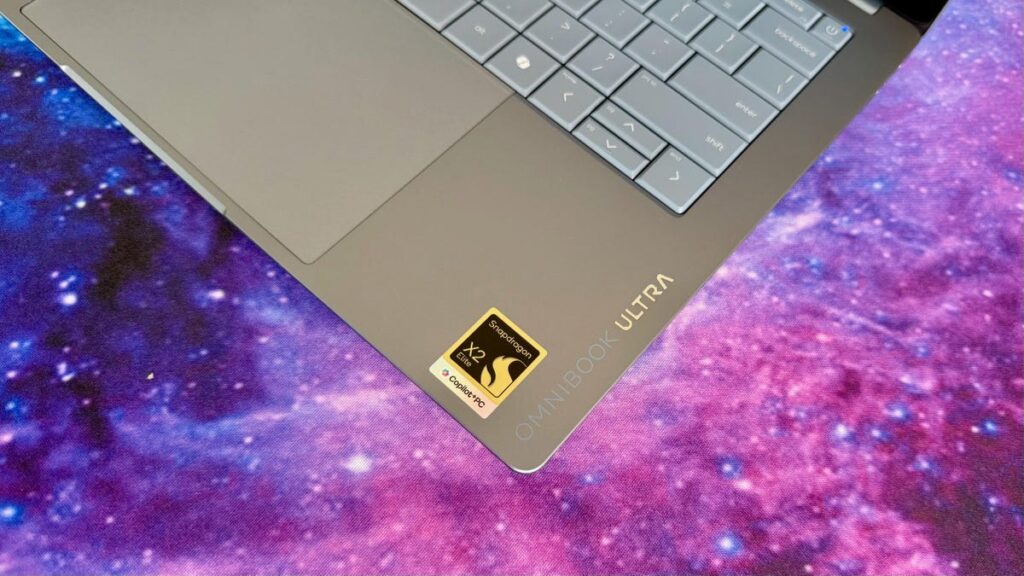
Table of Contents
The Quest for the Perfect Windows Ultraportable
For years, Windows users chasing the ‘MacBook Pro experience’—that specific intersection of rigid chassis build, exceptional battery life, and immediate wake-from-sleep responsiveness—have had to settle for compromises. Whether it was the thermal throttling of thin-and-lights or the erratic battery drain of x86 architecture, the gap remained. The HP OmniBook Ultra 14 arrives as a direct attempt to close that gap, offering a dual-track approach with both Intel’s latest Panther Lake silicon and Qualcomm’s Snapdragon X2 series.
After extensive testing of both configurations—including a maxed-out 64GB RAM and 2TB SSD build—the conclusion is clear: the choice of processor isn’t just a spec detail; it fundamentally changes the identity of the machine. While the Intel model is a safe, traditional powerhouse, the Snapdragon X2 Elite variant transforms the OmniBook into a genuine threat to Apple’s dominance in the 14-inch space.
- The Snapdragon Edge: The X2 Elite model outperforms the Intel variant in multi-core tasks and offers significantly longer battery life.
- Build Quality: Exceptional rigidity and a top-tier keyboard, though sharp chassis edges can be prone to scratching.
- The OLED Value: The 3K OLED panel is a standout feature, though the pricing fluctuates wildly across HP’s store.
- Compatibility: Windows on ARM has matured, but niche legacy software remains the only significant hurdle for the Qualcomm model.
Decoding the Hardware: Intel Panther Lake vs. Snapdragon X2
The OmniBook Ultra 14 isn’t a single laptop; it’s two different philosophies in one chassis. On one side, we have the Intel Panther Lake architecture (featuring the Core Ultra X9 388H), designed for maximum compatibility and superior 3D graphics. On the other, the Qualcomm Snapdragon X2 Elite represents the shift toward ARM-based efficiency and high-performance NPU (Neural Processing Unit) capabilities.
The Performance Breakdown
In synthetic benchmarks, the Snapdragon X2 Elite is the undisputed champion of this chassis. In Geekbench 6 multi-core tests, the X2 Elite not only beat the Intel Panther Lake model but actually edged out the M5 MacBook Pro in specific multi-threaded workloads. This is a rare feat for a Windows machine, signaling that Qualcomm’s second-generation Elite chips have solved many of the early efficiency hurdles.
However, the Intel model holds a distinct advantage in 3D rendering. Thanks to the integrated Arc B390 GPU, the Intel variant performs significantly better in 3DMark’s Steel Nomad tests. If your workflow involves light gaming or GPU-accelerated CAD software, the Intel model is the pragmatic choice. For everyone else—those prioritizing productivity, browser-heavy multitasking, and AI-assisted workflows—the Snapdragon X2 is the superior engine.
AI Capabilities and the NPU Race
The NPU (Neural Processing Unit) is where the gap widens. The Snapdragon X2 Elite delivers 80 TOPS (Tera Operations Per Second), dwarfing the 50 TOPS found in the Core Ultra X9 388H. In real-world AI tests, this manifests as faster local LLM (Large Language Model) processing and more efficient background noise cancellation and camera effects. As Windows 11 continues to integrate Copilot+ features deeply into the OS, the 80-TOPS headroom on the Qualcomm chip provides a significant future-proofing advantage.
Design and Ergonomics: High-End Polish with a Few Sharp Edges
Visually, the OmniBook Ultra 14 is a masterclass in modern industrial design. The most striking element is the concave bottom panel, which creates a visual illusion making the laptop appear even thinner than its actual profile. The chassis is rigid, with zero flex in the keyboard deck, putting it on par with the Dell XPS 14 and the MacBook Pro.
The typing experience is arguably the best in the current 14-inch Windows market. The key travel is tactile and precise, avoiding the ‘mushy’ feel found in some ultra-thin competitors. The haptic touchpad is expansive and responsive, mirroring the precision found in high-end Apple hardware.
It is not without flaws. The edges of the chassis are polished to a high shine, but they are notably sharp. Over a two-week testing period, these edges proved to be ‘pointy’ against the wrist and, more importantly, prone to micro-scratches when slid into a laptop sleeve. Additionally, the port selection is lean. While sufficient for the modern ‘dongle-life,’ users who rely on legacy USB-A ports or HDMI without adapters will find the limitation frustrating.
The Display: 2K vs 3K OLED
HP offers two primary OLED configurations. The base Snapdragon model starts with a 2K (1,920×1,200) touchscreen, while the high-end configurations move to a 3K (2,880×1,800) panel.
In our testing, the 3K OLED is the definitive choice. The color accuracy is professional-grade, with deep blacks and vibrant saturation that make it ideal for photo editing or media consumption. Because OLEDs provide their own light at the pixel level, the contrast is infinite compared to the IPS panels found in budget alternatives. However, it’s worth noting that the Intel series lacks the 2K OLED option, forcing Intel buyers directly into the higher-resolution (and more expensive) 3K tier.
The Pricing Paradox
One of the most frustrating aspects of owning or buying an HP product is the pricing volatility. The official MSRP for a loaded Snapdragon X2 Elite model can soar toward $3,400, but HP frequently runs aggressive discounts that can drop the price by $600 to $1,200.
Based on our analysis, the ‘sweet spot’ for the OmniBook Ultra 14 is a configuration featuring the Snapdragon X2 Elite, 32GB of RAM, and a 1TB SSD. When timed with a standard HP discount, this brings the price under $2,000. Spending more than $2,000 on a laptop without a dedicated GPU (dGPU) is difficult to justify, regardless of how fast the NPU is. At the sub-$2,000 mark, however, it convincingly unseats the Dell XPS 14 as the premier MacBook Pro alternative for Windows users.
What This Means for the Consumer
The arrival of the OmniBook Ultra 14 signals a shift in the Windows ecosystem. For the first time, the choice between x86 (Intel) and ARM (Qualcomm) isn’t just about battery life—it’s about performance.
For the General Professional: The Snapdragon model is the clear winner. You get MacBook-level battery endurance and wake times without leaving the Windows ecosystem. The ‘ARM compatibility’ fear is largely a thing of the past for 95% of users, as most core apps (Office, Chrome, Slack, Zoom) run natively or via a high-performance emulation layer.
For the Creative/Power User: If you rely on specialized software that hasn’t been ported to ARM, or if you do moderate 3D rendering, the Intel Panther Lake model remains the safer bet. You sacrifice some battery life and a bit of raw multi-core speed for the peace of mind that every .exe file you run will work perfectly.
FAQ: Common Questions About the OmniBook Ultra 14
Will all my apps work on the Snapdragon X2 model?
Most common applications work flawlessly. However, some specialized drivers or very old legacy software may struggle. We recommend checking the compatibility of any mission-critical niche software before opting for the ARM-based model over the Intel version.
How does the battery life actually compare to a MacBook Pro?
The Snapdragon X2 Elite model comes remarkably close. In mixed-use productivity (web browsing, document editing, and streaming), it maintains a consistency that rivals the M-series, far surpassing the Intel Panther Lake model which drains faster under similar loads.
Is the 64GB RAM upgrade necessary?
For the vast majority of users, 32GB is the gold standard. 64GB is only beneficial for those running multiple virtual machines or processing massive datasets locally. For standard professional use, the 32GB configuration offers the best value.
Why are the edges described as ‘pointy’?
The chassis uses a precision-milled aesthetic with very sharp transitions between the top and bottom plates. While it looks premium, it can feel sharp against the skin during long typing sessions and is more susceptible to visible scratches.
Does the 3K OLED screen drain battery significantly?
OLED efficiency depends on your usage. Using ‘Dark Mode’ across Windows and your apps significantly reduces power consumption, as black pixels are essentially turned off. In this mode, the battery impact is negligible compared to the 2K panel.
Final Verdict
The HP OmniBook Ultra 14 is a triumph of engineering, particularly in the Snapdragon X2 Elite configuration. By successfully marrying a premium, rigid chassis with an ARM processor that can actually trade blows with Apple’s silicon, HP has created a device that finally justifies the ‘Ultra’ moniker. While the pricing is erratic and the ports are few, the sheer performance-per-watt of the Qualcomm chip makes this the most compelling Windows laptop of the year for those who value mobility and efficiency over raw 3D graphics power.