Ring Panic Button 2026 Review: A Low-Cost Safety Valve in a Turbulent Year
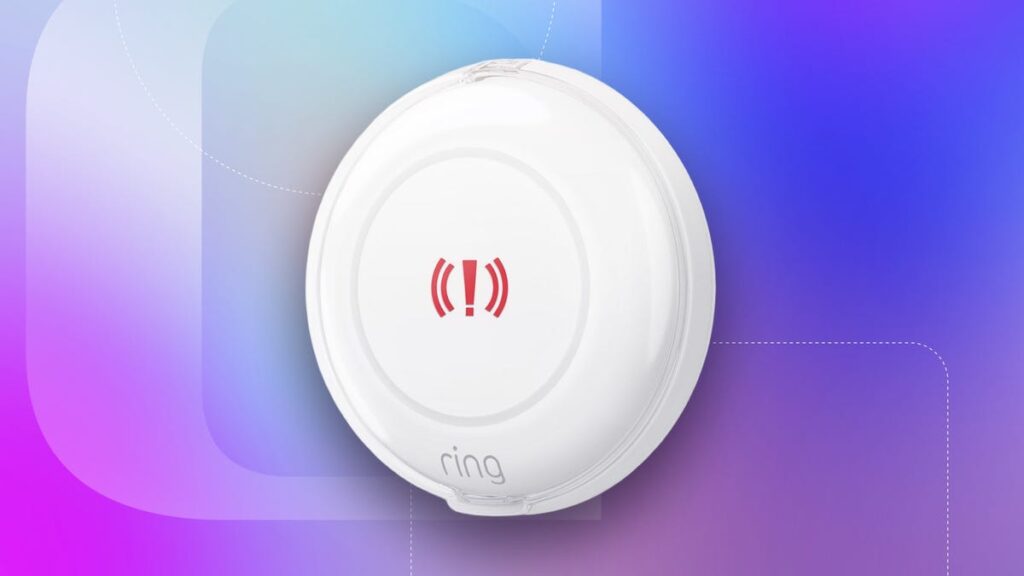
Table of Contents
A Tactical Shift in Home Security
Ring has spent much of the last year navigating a complex storm of regulatory scrutiny and corporate missteps. From legal challenges regarding facial recognition accuracy to the abrupt termination of contracts with Flock Safety, the brand’s reputation for privacy has been under a microscope. However, the release of the Ring Panic Button (2026) represents a pivot toward a more utilitarian, less intrusive form of security. Priced at a modest $30, this device isn’t trying to redefine AI surveillance; it’s attempting to solve a basic human need: the ability to call for help instantly without fumbling for a smartphone.
Having spent extensive time testing the device in various home layouts—ranging from high-traffic kitchens to secluded bedrooms—the immediate takeaway is that Ring has prioritized reliability and accessibility over feature bloat. In an era where security companies are pushing complex ‘ecosystems,’ a simple, physical trigger that does one thing exceptionally well is surprisingly refreshing.
- Immediate Utility: No complex app navigation during a crisis.
- Low Entry Barrier: $30 hardware cost makes it viable for multi-room deployment.
- Flexible Monitoring: Works without a subscription via emergency contact notifications.
Hardware Breakdown: Form and Function
The device is a tactile, circular button roughly two inches in diameter. It features a clean, minimalist aesthetic with a thin LED ring that provides visual feedback during pairing and activation. Setup is nearly instantaneous: pull the battery tab, press the button for three seconds, and sync it via the Ring app. The adhesive backing allows for versatile placement, though I found it most effective when mounted at waist height in areas where a person might fall or be trapped.
One critical design choice is the inclusion of an optional plastic snap-on cover. While it may seem like a minor accessory, it is a vital fail-safe against accidental triggers—especially in households with pets or young children. For those with a Ring subscription, the ability to disarm the button remotely provides an added layer of control, though the hardware itself is designed to be ‘set and forget.’
Power and Connectivity Requirements
The Panic Button is powered by two coin cell batteries. Ring claims a lifespan of up to three years, which aligns with industry standards for low-power Zigbee or Z-Wave style peripherals. However, the connectivity aspect is where the device requires a bit more nuance. If you do not own a Ring Alarm hub, the device relies on Amazon Sidewalk. Sidewalk is a shared low-bandwidth network that allows devices to communicate across a neighborhood, extending the range of the button beyond the limits of a standard home Wi-Fi router.
The Monitoring Spectrum: Free vs. Paid
The most significant divide in the user experience is the choice between self-managed alerts and professional monitoring. Ring has structured the device to be useful even for those who refuse to pay a monthly fee, which is a welcome departure from the ‘subscription-first’ model of many modern security brands.
The Free Tier: Emergency Contacts
Out of the box, the button can be configured to notify a pre-set list of emergency contacts. This is handled through the ‘Monitoring’ section of the Ring app. In my testing, the latency between pressing the button and the contact receiving the notification was minimal, provided the home network was stable. Ring recommends that the primary user be the first contact to ensure they can triage the situation before escalating to emergency services.
A sophisticated addition to this tier is the encouragement of ‘verbal passwords.’ In high-duress situations, a simple ‘I’m okay’ might not be enough. Establishing a code word allows the recipient to verify the authenticity of the emergency, a practice long recommended by personal safety experts.
The Professional Tier: Ring Protect Pro
For those seeking a direct line to first responders, the Ring Protect Pro plan (starting at $20 per month) transforms the button from a notification tool into a professional alarm. Users can customize the trigger based on the emergency type:
| Mode | Direct Response | Typical Use Case |
|---|---|---|
| Panic Mode | Police / 911 | Intrusions, domestic threats |
| Fire Mode | Fire Department | Smoke, electrical fires |
| Medical Mode | Paramedics / EMS | Falls, cardiac events |
It is important to note that the efficiency of professional monitoring varies by jurisdiction. In many U.S. cities, local ordinances prevent dispatchers from sending emergency services without ‘visual affirmation’ or a verified voice call to prevent the cost of false alarms. In these areas, Ring may call the user first to confirm the emergency, or offer a ‘Guard Response’—a private security contractor who visits the site for a fee (approximately $75), which is a critical cost to consider before subscribing.
What This Means for the User
The Ring Panic Button isn’t a replacement for a comprehensive security system, but it fills a specific gap in ‘aging-in-place’ and child safety. For an elderly relative who may struggle with a smartphone during a medical crisis, a wall-mounted button is a lifeline. For a teenager home alone, it provides a level of security that a locked door cannot. The shift toward affordable, standalone hardware suggests that Ring is recognizing a market fatigue regarding high-cost, high-surveillance AI systems. By offering a ‘dumb’ button that performs a ‘smart’ function, they are regaining some of the trust lost during their recent privacy controversies.
Technical Analysis and Trade-offs
From a technical standpoint, the reliance on Amazon Sidewalk is a double-edged sword. On one hand, it ensures that the button remains connected even if the local Wi-Fi fluctuates. On the other hand, it requires users to opt into a network that shares a sliver of their bandwidth with neighbors. While Amazon maintains that the data is encrypted and limited, privacy-conscious users may find this a sticking point.
Comparatively, the lack of an integrated siren on the button itself is a missed opportunity. While it alerts the app and the monitoring center, it doesn’t provide an immediate audible deterrent to an intruder. It is a silent trigger, which is ideal for covertly calling for help but less effective as a standalone alarm.
Frequently Asked Questions
Does the Ring Panic Button require a monthly subscription?
No, the hardware works without a subscription. You can set it up to notify a list of personal emergency contacts for free using the Ring app. Subscriptions are only required for professional monitoring services (Police, Fire, EMS).
What is the battery life of the Ring Panic Button?
The device uses two coin cell batteries that are rated for approximately three years of use, depending on the frequency of activations and signal strength.
How does the button connect to the internet?
It connects via a Ring Alarm hub or through Amazon Sidewalk, a shared low-bandwidth network that allows the device to communicate with the Ring cloud even if you don’t have a dedicated hub.
Can I use the button outdoors?
The button is designed for indoor use. While the plastic casing is durable, it is not rated for extreme weather or prolonged exposure to moisture, and the adhesive may fail in high-humidity environments.
What happens if I press the button by accident?
If you have a subscription, you can disarm the button remotely via the app. If using the free version, you will simply trigger a notification to your emergency contacts, which can be handled as a false alarm through standard communication.
Verdict: Practicality Over Prestige
The 2026 Panic Button is a rare example of a tech company doing less to achieve more. It doesn’t use AI, it doesn’t track your movements, and it doesn’t require a massive investment. For $30, it provides a tangible sense of security that software-only solutions cannot replicate. While the $20/month Pro plan may feel steep for some, the ability to use the device for free as a family alert system makes it a highly recommended addition to any smart home, regardless of the user’s budget or trust level in the broader Amazon ecosystem.