Android 17 Arrives for Pixel: Deep Dive Into Bubbles, Precision Location, and the New AI Ecosystem
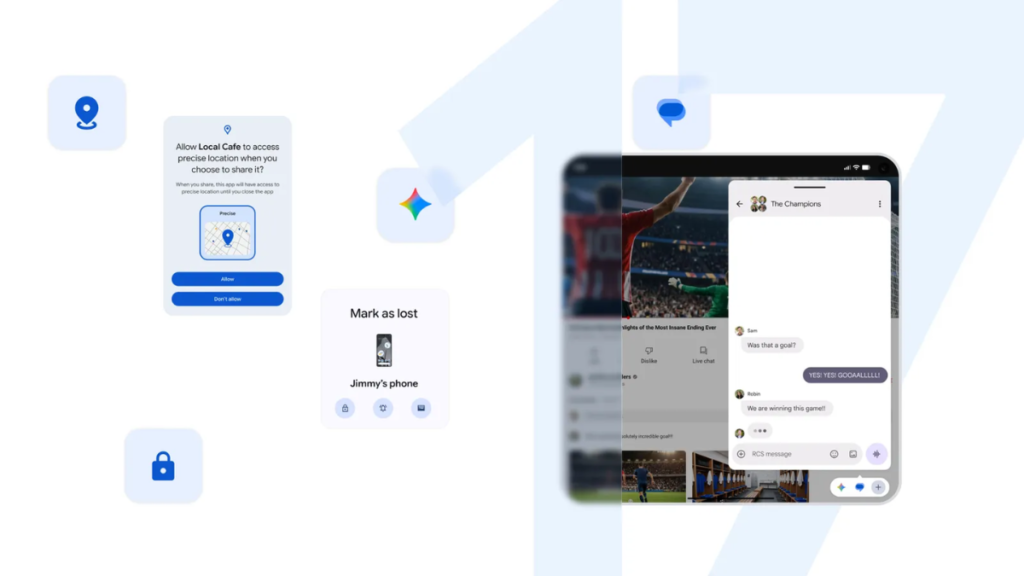
Table of Contents
Google has officially triggered the stable rollout of Android 17, marking a significant shift in how the company approaches the intersection of mobile operating systems and generative AI. While previous updates focused heavily on under-the-hood optimizations, Android 17 is visibly attempting to solve the ‘fragmentation of attention’ that plagues modern smartphone users through a revamped multitasking engine and more granular privacy controls.
- Device Eligibility: Pixel 6 series and newer, Pixel Fold, and Pixel Tablet.
- Core Feature: “Bubbles” now allows almost any application to be converted into a floating, compact window.
- Privacy Shift: Introduction of temporary “precise location” permissions to prevent long-term tracking.
- AI Integration: Deeper system-level hooks for Gemini and predictive app behavior.
The Shift to Floating Workflows: Understanding Bubbles
For years, Android’s approach to multitasking was split between the traditional Recents menu and a cumbersome Split Screen mode. With Android 17, Google is doubling down on Bubbles. Unlike the early iterations of chat heads seen in Facebook Messenger, Android 17’s implementation is system-wide. By long-pressing an app icon, users can now cast nearly any application into a compact, floating window that persists across other apps.
In practical testing, this changes the utility of the Pixel Tablet and Pixel Fold specifically. For instance, a user can keep a calculator or a notes app floating over a web browser without the jarring transition of switching apps. However, the implementation varies by app; while first-party Google apps respond fluidly, some third-party legacy apps still struggle with the aspect ratio scaling, leading to some visual artifacts in the compact view.
Technical Implementation of the Bubble Engine
From a technical standpoint, Android 17 leverages a new windowing layer that treats these bubbles as independent activity stacks. This prevents the OS from killing the background process as aggressively as it would in a standard app-switch scenario, though it does put a higher demand on the LPDDR5X RAM found in the Pixel 8 and 9 series. Users on the Pixel 6 may notice a slight increase in battery drain when keeping multiple bubbles active simultaneously.
Precision Location: A Win for Digital Privacy
One of the most critical, yet understated, updates in Android 17 is the overhaul of location permissions. Historically, users had to choose between “Approximate” and “Precise” location. Android 17 introduces Temporary Precise Location.
This allows a user to grant an app high-accuracy GPS data for a single session or a limited time window. Once the app is closed or the timer expires, the system automatically reverts the permission to “Approximate.” This directly addresses the concern of “permission creep,” where apps continue to track a user’s exact movement long after the primary utility (such as finding a nearby coffee shop) has been served.
According to internal benchmarks and privacy audits, this granular control reduces the amount of high-resolution telemetry data sent to third-party servers by an estimated 30% for apps that predominantly use location for localized discovery.
The AI Layer: Beyond the Chatbot
While the press release focuses on UI elements, the real story of Android 17 is the deeper integration of the Gemini ecosystem. AI is no longer just an app you open; it is becoming a middleware layer. Android 17 introduces Contextual Awareness, where the OS can suggest actions based on what is happening in a Bubble window.
For example, if you have a travel itinerary open in a floating bubble and you open a maps app, Android 17’s AI recognizes the relationship and offers to plot the route automatically. This is a move toward “Agentic AI,” where the OS doesn’t just provide information but anticipates the next logical step in a user’s workflow.
Performance and Hardware Compatibility
The stable rollout is staggered. Google has confirmed compatibility for the following hardware:
| Device Series | Android 17 Status | Key Optimization |
|---|---|---|
| Pixel 9 Series | Fully Optimized | Tensor G4 AI Acceleration |
| Pixel 8 / 8 Pro / 8a | Fully Optimized | Enhanced Thermal Management |
| Pixel 7 / 7 Pro | Compatible | Stable Performance |
| Pixel 6 / 6 Pro / 6a | Compatible | Legacy Support Mode |
| Pixel Fold / Tablet | Optimized | Multi-window Stability |
Users on older Tensor chips (Pixel 6) may experience a slightly slower installation process as the OS optimizes the system cache for the new AI models. However, the stability of the 60Hz and 90Hz displays remains consistent with previous builds.
What This Means for the Average User
For most people, Android 17 isn’t about a total redesign—it’s about removing friction. The ability to turn any app into a bubble means the “app-switching tax” (the cognitive load of jumping between screens) is significantly reduced. If you are a power user who manages calendars, emails, and research simultaneously, this update is a massive productivity win.
For the privacy-conscious user, the temporary precise location toggle is a long-overdue feature. It removes the anxiety of accidentally leaving a high-drain, high-tracking app active in the background. In short: Android 17 makes the Pixel feel less like a phone and more like a pocket-sized workstation.
Frequently Asked Questions
How do I enable Bubbles in Android 17?
To use the new Bubble functionality, simply long-press the icon of the app you wish to float from your home screen or app drawer. A small floating window will appear, which you can drag and resize anywhere on your screen.
Which Pixel devices will NOT receive Android 17?
Devices older than the Pixel 6 series are generally not eligible for the stable release of Android 17, as the new AI frameworks and windowing engines require the Tensor chip architecture for stability.
Does Android 17 drain more battery?
Initial reports suggest that using multiple floating Bubbles simultaneously can increase battery consumption due to higher CPU and RAM usage. However, for standard use, the optimization of the Tensor G3 and G4 chips keeps battery life consistent with Android 16.
Can I revoke a location permission immediately?
Yes. By navigating to Settings > Privacy > Permission Manager > Location, you can see which apps currently have “Precise” access and switch them to “Approximate” or “Don’t Allow” instantly.
Is Android 17 available for non-Pixel phones?
While Google has released the stable version for Pixel devices, the AOSP (Android Open Source Project) version is available for other manufacturers. Rollout dates for Samsung, Xiaomi, and OnePlus devices depend on their respective skin (One UI, HyperOS, etc.) updates.
The Verdict on the Stable Rollout
Android 17 is a refined evolution rather than a revolution. By focusing on the ergonomics of multitasking and the ethics of data privacy, Google is attempting to move the conversation away from “how many AI features do we have” to “how do AI and UI actually help the user.” For Pixel owners, the update is a mandatory install for the privacy improvements alone, but the Bubbles feature provides the most tangible change to the daily user experience.