Apple Intelligence Transforms HomeKit Secure Video: Hands-On With the iOS 27 Beta
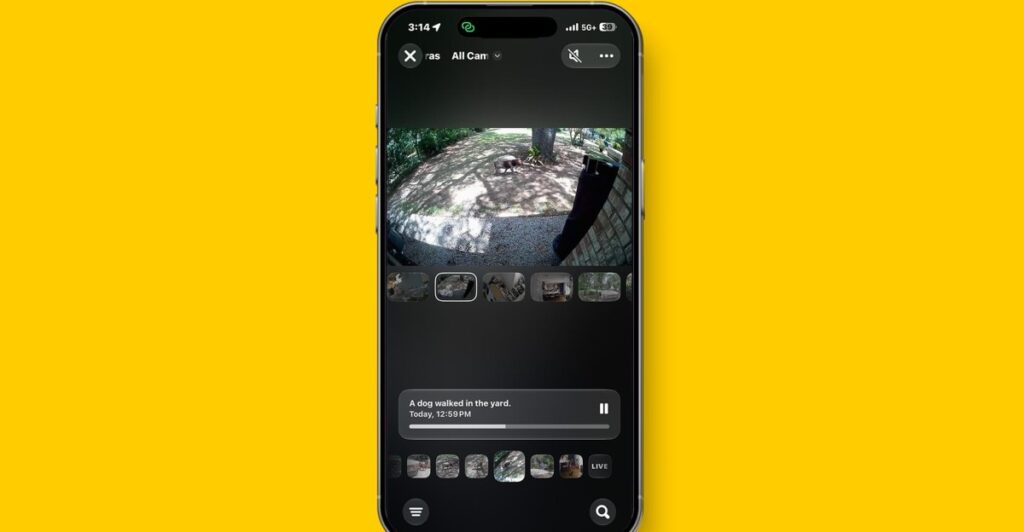
Table of Contents
The Shift Toward Intentional Alerts
For years, the primary friction point of smart home security hasn’t been the lack of data, but the abundance of noise. We have all experienced the ‘notification fatigue’ that comes with a camera that alerts you every time a tree branch moves in the wind or a stray cat crosses the driveway. Apple’s HomeKit Secure Video (HSV) has long promised a privacy-first alternative to the cloud-heavy ecosystems of Amazon and Google, but it often lagged in the one area users care about most: accuracy.
With the release of the iOS 27 developer beta and the integration of Apple Intelligence, the Home app is attempting a fundamental pivot. Rather than simply telling you that something happened, Apple is now attempting to tell you what happened. After spending several days testing these features on an iPhone 17 Pro Max and an Apple TV 4K hub, the experience suggests that Apple is finally closing the gap with industry leaders like Ring and Google Nest.
- Contextual AI: Notifications have evolved from generic ‘Person Detected’ alerts to specific descriptions like ‘Lawn mowing’ or ‘Dog in yard.’
- Semantic Search: Users can now use natural language queries (e.g., ‘Show me my cat’) to filter through hours of recorded footage instantly.
- Hardware Parity: The addition of 4K resolution support removes a significant technical disadvantage compared to high-end competitors.
- Privacy First: Processing remains local on the Home hub, maintaining the end-to-end encryption that defines the HomeKit ecosystem.
Decoding Apple Intelligence in the Home App
To understand the impact of the iOS 27 update, one must first understand how HomeKit Secure Video operates. Unlike traditional cloud cameras that upload footage to a remote server for analysis, HSV uses the local Home hub (an Apple TV or HomePod) to analyze video streams. The AI runs locally, and the encrypted clips are then stored in iCloud.
The new Apple Intelligence layer adds a sophisticated linguistic model on top of this local analysis. In the developer beta, this manifests as a new ‘Apple Intelligence’ section within the Home settings. Users can toggle ‘Summarize Videos’ and ‘Reduce Notifications,’ allowing the system to group related events. For example, if a sensor detects a door unlocking and a camera detects a person entering, Apple Intelligence treats these as a single ‘Arrival’ event rather than two disparate alerts.
The Reality of AI-Generated Summaries
In practical testing, the jump in descriptive quality is noticeable. In previous versions of HomeKit, a notification for a dog in the yard was simply labeled ‘Animal Detected.’ In the iOS 27 beta, the notification explicitly states ‘Dog in yard.’ In one specific instance, the system managed a complex sequence, summarizing that someone walked into the yard, interacted with a dog, and then the Aqara G5 camera changed modes.
While these descriptions are currently briefer than the detailed narratives provided by Google Nest’s AI, they provide a critical ‘glanceable’ utility. You no longer need to open the app and scrub through a timeline to know if the alert was a false positive or a legitimate event.
Natural Language Search: A New Way to Mine Footage
One of the most frustrating aspects of home security is the ‘needle in a haystack’ problem—trying to find the exact moment a package was delivered or a pet did something mischievous. Apple has introduced natural language search to solve this. Instead of filtering by date or time, users can type queries directly into the search bar.
During my testing, a query for ‘Show me my cat’ successfully surfaced a series of clips featuring my pets. However, the AI’s precision is still in its infancy. It could not distinguish between my grey cat and my black cat, treating all feline shapes as a single category. For the average user, this is a massive improvement over manual scrubbing, but for those requiring granular detail (like identifying a specific person among family members), the system still relies heavily on the separate ‘Face Recognition’ toggle, which is not always 100% consistent in the current beta.
Comparison of AI Alert Capabilities
| Feature | Apple HomeKit (iOS 27) | Google Nest | Ring |
|---|---|---|---|
| Processing | Local (Home Hub) | Cloud-Hybrid | Cloud |
| Alert Detail | Descriptive (Beta) | High (Narrative) | Moderate (Categorical) |
| Max Resolution | 4K (Upcoming) | 4K (Selected Models) | 2K/4K (Selected Models) |
| Privacy | End-to-End Encrypted | Account-Based | Account-Based |
Technical Infrastructure and Performance Gains
Beyond the AI, the underlying performance of the Home app has seen a significant overhaul. One of the most persistent complaints regarding HomeKit Secure Video was the latency involved in loading live streams and recorded clips. In the iOS 27 beta, response times feel snappier. The transition from a notification to a live view is nearly instantaneous on local Wi-Fi.
Furthermore, Apple has addressed a long-standing limitation regarding multi-stream viewing. Users can now view more than two live streams simultaneously when remote, a feature that has been standard in professional NVR (Network Video Recorder) systems and competitor apps for years. The redesigned interface replaces the old scrollable banner with a grid of small boxes, making it easier to monitor multiple entry points of a home at once.
What This Means for the Smart Home Market
Apple’s move into generative AI for home security is less about innovation and more about parity. For years, users chose Ring or Nest not because they preferred the ecosystem, but because the software was simply smarter. By bringing AI-powered summaries and natural language search to HomeKit, Apple is removing the ‘intelligence tax’ that previously drove users away from their privacy-centric model.
The most significant implication is for the third-party hardware market. Since HomeKit is an open standard for certified devices, manufacturers like Aqara and Eve can now leverage Apple’s AI capabilities without having to build their own proprietary AI clouds. This creates a virtuous cycle: as Apple improves the Home app’s intelligence, every HomeKit-certified camera becomes more valuable, regardless of the brand.
Developer Beta Caveats and Stability
It is important to note that these impressions are based on a first-iteration developer beta. The experience is not without flaws. During testing, the Home app crashed several times, particularly when switching between 4K streams and the timeline view. Additionally, the ‘reduce notifications’ feature is not yet fully active across all accessory types; while it works for cameras, other sensors still fire off individual alerts.
There is also the matter of hardware requirements. To experience these features, you need a modern Home hub (Apple TV 4K or HomePod) and a device capable of running the latest Apple Intelligence models. This effectively creates a hardware barrier that may exclude users with older legacy setups.
Unlike cloud-based AI, which uploads a video clip to a server to identify a ‘person,’ HomeKit Secure Video uses On-Device Machine Learning (ODML). The Apple TV or HomePod analyzes the pixels in the stream using a neural engine to detect patterns. If a pattern matches a ‘person,’ the hub triggers the notification and uploads the encrypted clip to iCloud. The new iOS 27 summaries use a Large Language Model (LLM) to translate these patterns into human-readable text before the notification is sent to the user’s device.
Frequently Asked Questions
Does Apple Intelligence in HomeKit require a subscription?
HomeKit Secure Video requires an iCloud+ subscription (which comes with any paid storage plan). The AI-powered summaries and natural language search are integrated into the iOS 27 software update and do not appear to require an additional monthly fee beyond the existing iCloud+ requirement.
Will my old HomeKit cameras support the new AI summaries?
Yes, provided you have a compatible Home hub (such as an Apple TV 4K or HomePod) and the latest version of iOS/tvOS. The AI processing happens on the hub, not the camera itself, meaning legacy cameras can benefit from the updated analysis.
How does Apple’s AI search differ from Google Nest’s?
Google Nest uses cloud-based analysis to allow for very detailed searches and narrative descriptions. Apple’s approach is local and end-to-end encrypted. While Google’s results may currently be more descriptive, Apple’s search happens without your video data being accessible to a cloud provider for training purposes.
When will these features be available to the public?
Apple announced these features at WWDC and indicated a public rollout in the Fall of 2026, coinciding with the general release of iOS 27.
Can I use natural language search for people I’ve identified?
Yes, if you have Face Recognition enabled, you can search for specific people. However, initial beta testing shows that the system is more reliable at searching for general categories (like ‘cat’ or ‘package’) than distinguishing between specific individuals in every scenario.
Closing Thoughts on the HomeKit Evolution
Apple’s approach to the smart home has always been cautious, prioritizing privacy over rapid feature deployment. For a long time, that caution looked like obsolescence. However, the integration of Apple Intelligence into HomeKit Secure Video signals a shift. By combining 4K resolution, local AI processing, and an intuitive new interface, Apple is finally offering a product that is both powerful and private.
While the beta is still buggy and the summaries are shorter than the competition’s, the trajectory is clear. Apple is no longer just providing a secure pipe for video; they are providing an intelligent lens through which to view your home. For those already entrenched in the Apple ecosystem, the incentive to switch from Ring or Nest back to HomeKit has never been stronger.