Acer PM1: Can a Phone-Powered Monitor Replace the Budget Laptop?
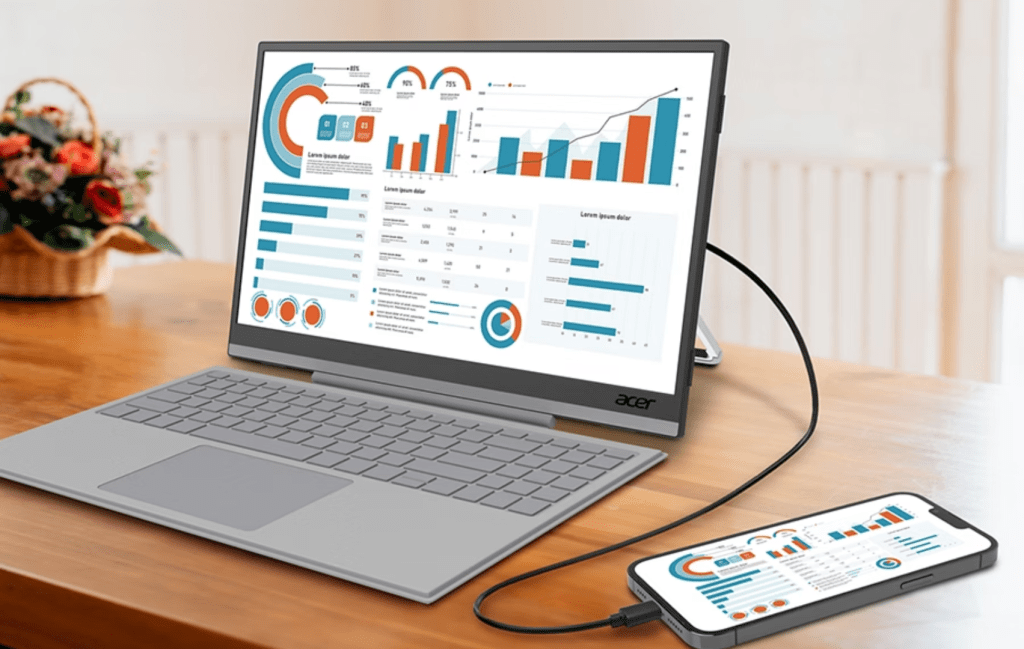
Table of Contents
The Budget Laptop Floor is Rising
For years, the $300 to $500 range was the sweet spot for students and casual users. However, as we move through 2026, the ‘entry-level’ laptop has shifted. Due to a systemic RAM crisis and the rising cost of silicon, a functional, multitasking-capable laptop now starts closer to $700. For users who primarily live in a browser—where Chrome tabs devour 16GB of RAM before the first hour of work is over—this price hike creates a significant barrier to entry.
Enter the Acer PM1. Rather than trying to sell another overpriced budget notebook with a plastic chassis and a sluggish processor, Acer is pitching a different philosophy: stop buying a second computer. If you already carry a flagship smartphone, you already own the most powerful processor in your household. The PM1 is designed to unlock that power through a combination of a high-quality portable display and a dedicated input interface.
- The Concept: The Acer PM1 is a portable USB-C monitor system with a magnetic keyboard, turning a smartphone into a makeshift laptop.
- Hardware: Features a 15.6-inch 1080p touchscreen (PM161JB) or a 12.3-inch ultrawide (PM131QT).
- Software Reliance: Success depends heavily on Samsung DeX and Android 16’s Desktop Mode.
- Economic Angle: Positioned as a cheaper alternative for users priced out of the current $700+ laptop market.
Breaking Down the Acer PM1 Hardware
At first glance, the PM1 looks like a standard portable monitor, but the integration is where the strategy lies. The primary model, the PM161JB, offers a 15.6-inch 1080p panel. While 1080p may seem modest in an era of 4K monitors, it is the strategic choice for a phone-powered system. Pushing higher resolutions would place an immense strain on the smartphone’s battery and thermal envelope, likely leading to throttling during intensive tasks.
The hardware includes a built-in kickstand and VESA-compatible mounting holes, making it versatile for both desk setups and nomadic work. The standout feature is the magnetic keyboard, reminiscent of the Microsoft Surface line, which connects via pogo pins. This eliminates the lag and connectivity issues common with cheap Bluetooth peripherals and provides a tactile, laptop-like experience.
The Ultrawide Alternative: PM131QT
Acer is also introducing the PM131QT, a 12.3-inch ultrawide version. While it shares the same keyboard compatibility, the form factor is more polarizing. It targets a niche of users who prefer a more compact, ‘digital notebook’ feel, though the aspect ratio may prove awkward for traditional spreadsheet work or long-form coding. The utility of this version depends largely on how the connected OS handles window snapping and screen scaling.
The Software Bridge: DeX, Android 16, and the ‘Desktop’ Experience
Hardware is only half the battle. A screen and keyboard are useless if the phone simply mirrors its vertical screen onto a wide monitor. This is where the Information Gain of this setup becomes apparent: we are finally seeing the convergence of hardware and OS maturity.
Samsung DeX has long been the gold standard for this experience. For those of us who have used DeX in professional settings, the transition is seamless. Once plugged into a device like the PM1, the interface shifts from a mobile grid to a windowed environment with a taskbar and app switcher. It transforms the Galaxy series from a communication device into a legitimate Chromebook competitor.
Google has followed suit with Desktop Mode, now baked into Android 16. While many OEMs have been slow to enable this feature, the underlying architecture is present. The PM1 acts as the catalyst for this software, giving users a reason to actually trigger these modes. For iPhone users, the experience remains fragmented. While USB-C allows for screen mirroring via HDMI/DisplayPort adapters, iOS lacks a native windowed desktop environment, meaning the PM1 would essentially act as a giant, slightly clumsy iPad screen.
Why the ‘Phone-PC’ Failed Before—and Why It Might Work Now
The history of this form factor is littered with failures. In 2011, Motorola launched laptop-style docks for Android phones. Later, Asus attempted the Transformer line. These failed because the value proposition was inverted: you had to pay nearly as much as a budget laptop for a device that was bulkier and less capable than a cheap Acer Aspire.
In 2026, the math has changed. Consider the following shifts in the consumer electronics landscape:
- The Performance Gap: A decade ago, a budget laptop’s CPU outperformed a phone. Today, the gap is closed. Flagship ARM chips in phones often outperform budget x86 laptop processors in burst speeds and efficiency.
- The MacBook Neo Effect: We’ve seen the success of the MacBook Neo, which leverages repurposed mobile silicon to provide high efficiency. This has primed consumers to accept ‘phone-like’ architecture in their primary computers.
- The RAM Crisis: With DDR5 prices fluctuating and manufacturers pushing 16GB as the bare minimum, the cost of entry for a ‘real’ PC has spiked. A PM1 setup avoids the cost of a motherboard, CPU, and RAM entirely by borrowing them from the pocket.
Practical Implications: What This Means for the User
For the average consumer, the Acer PM1 represents a shift from owning hardware to extending hardware. But there are critical trade-offs that users must consider before ditching their laptops.
Battery Drain and Thermal Management
Powering a 15.6-inch backlit panel is a heavy lift for a 5,000mAh smartphone battery. While the PM1 likely supports pass-through charging via USB-C, users relying on battery power will find their phone drained rapidly. Furthermore, running a desktop environment while powering a monitor generates significant heat. If the phone is tucked away in a pocket or a tight sleeve, thermal throttling will inevitably slow down the experience.
The I/O Limitation
One of the biggest hurdles is the ‘Port Problem.’ A laptop gives you multiple USB-A, USB-C, and HDMI ports. The PM1 includes a USB-A port on the back, which is a vital addition for flash drives and peripherals, but the overall connectivity is still bottlenecked by the single USB-C connection to the phone. Power users will likely need to invest in additional dongles, adding to the total cost and clutter.
Comparative Analysis: PM1 vs. Budget Laptops
| Feature | Acer PM1 + Flagship Phone | Budget Laptop (~$700) |
|---|---|---|
| Processing Power | High (ARM Flagship) | Moderate (Entry-level x86) |
| Portability | Moderate (Two separate pieces) | High (All-in-one) |
| Battery Life | Dependent on Phone/External Power | Integrated 6-10 hours |
| OS Flexibility | Mobile-first / Desktop Mode | Full Windows/ChromeOS/macOS |
| Initial Cost | Lower (assuming phone is owned) | Higher |
The Market Outlook: A Symptom of a Broken PC Market
The emergence of the PM1 is not just a clever gadget launch; it is a symptom of a broader downturn in the PC market. Projections for 2026 suggest a significant dip in traditional PC sales as consumers recoil from rising prices. When the ‘affordable’ option disappears, people innovate out of necessity.
Acer is betting that Gen Z and younger Millennials—who already treat their phones as their primary computing device—will find a ‘monitor-and-keyboard’ kit more appealing than a restrictive, mid-tier laptop. If the PM1 is priced aggressively (estimated under $300), it could carve out a significant market share among students and remote freelancers who only need a browser and a word processor.
Frequently Asked Questions
Will the Acer PM1 work with any smartphone?
The PM1 requires a smartphone that supports Video Output over USB-C (DisplayPort Alternate Mode). This is common in flagship Samsung Galaxy, Google Pixel, and high-end Xiaomi devices, but is often missing from budget ‘A-series’ or ‘Lite’ models.
Can I run full Windows apps on the PM1?
No. You are running the apps installed on your phone. While Samsung DeX allows you to use these apps in windows, they are still Android apps. You cannot install .exe or .msi Windows files unless you use a remote desktop application to connect to a separate PC.
Does the PM1 charge the phone?
While official specs are pending, typical USB-C portable monitors support pass-through charging. This means you can plug a power adapter into the monitor, which then charges your phone while it outputs video.
Is this better than a tablet with a keyboard?
It depends on your existing hardware. If you already own a $1,000 phone, the PM1 is a cheap way to get a laptop experience. If you don’t have a flagship phone, buying a dedicated tablet (like an iPad or Tab S9) is generally a more stable and integrated experience.
How does the magnetic keyboard connect?
The keyboard uses pogo pins to connect directly to the monitor’s chassis. This ensures a stable power and data connection without needing to pair via Bluetooth or use a separate cable.
Final Verdict: A Viable Backup or a Mainstay?
The Acer PM1 is an interesting, if slightly desperate, response to the current economic state of consumer hardware. It doesn’t replace the power of a dedicated workstation, nor does it offer the seamlessness of a MacBook. However, as a ‘bridge’ device for those priced out of the laptop market, it is a pragmatic solution.
For the professional who needs a lightweight backup or the student who only needs to write essays and research in a browser, the PM1 is a compelling alternative. Whether it succeeds where the Motorola docks of 2011 failed depends entirely on the price point and how well Android 16’s Desktop Mode handles the transition from handheld to horizontal. If Acer hits the price point right, the ‘phone-as-a-PC’ might finally move from a tech enthusiast’s hobby to a mainstream reality.