Samsung Launches One UI 9 Beta for Galaxy S26: New Android 17 Features and Performance Tweaks
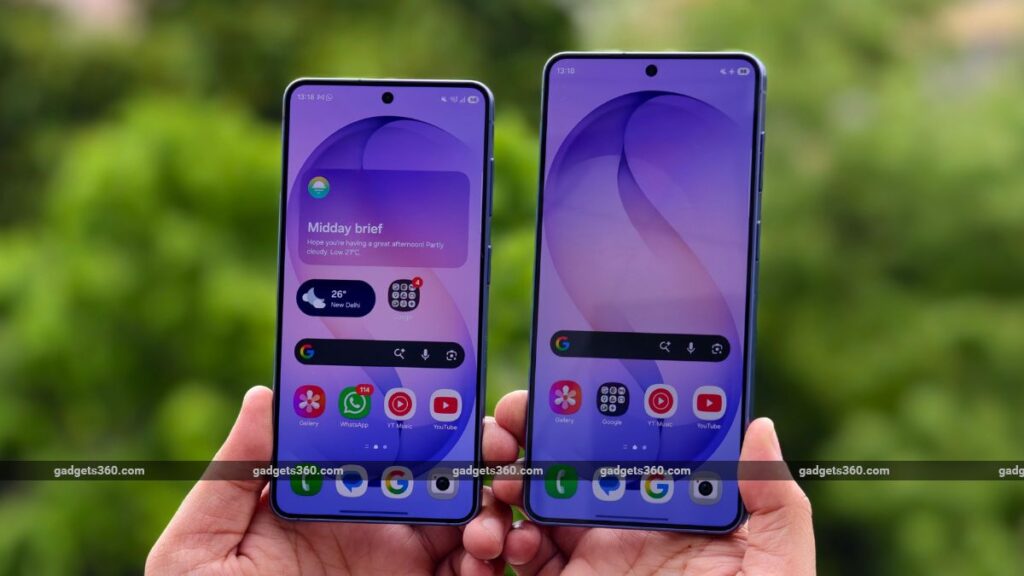
Table of Contents
The First Glimpse of Android 17 on Galaxy Hardware
Samsung has officially pulled back the curtain on its next software iteration, opening the One UI 9 Beta to Galaxy S26 series owners in select global markets. This isn’t just a routine version bump; it represents the first real-world deployment of Android 17’s core framework wrapped in Samsung’s proprietary skin. For those holding the Galaxy S26, S26+, or S26 Ultra, this is an invitation to stress-test the stability of the next generation of mobile computing before the stable wide-release hits the masses.
- Device Eligibility: Limited to Galaxy S26, S26+, and S26 Ultra in specific regions.
- Core Base: Built on the Android 17 platform, prioritizing accessibility and system efficiency.
- Notable Additions: Integrated internet speed displays via Good Lock and enhanced native app creative tools.
- Entry Point: Registration is handled exclusively through the Samsung Members application.
The transition to One UI 9 arrives at a critical juncture for Samsung. As the gap between flagship and mid-range hardware closes, the software experience—specifically how it manages AI integration and battery efficiency—becomes the primary differentiator. Early reports from the beta rollout suggest a shift away from purely aesthetic changes toward deep-system optimizations and more granular user controls.
Regional Availability and Registration Process
The beta is not a global free-for-all. Samsung has restricted the initial rollout to a handful of strategic markets to ensure telemetry data is manageable and localized bugs can be addressed. Currently, users in the United States, United Kingdom, Germany, Poland, South Korea, and India are eligible to apply.
To join, users must navigate to the Samsung Members app. The process typically involves a dedicated banner announcing the beta program. Once the user agrees to the non-disclosure agreement (NDA) and terms of service, the OTA (Over-The-Air) update is pushed to the device. It is worth noting that beta software is inherently unstable; users are strongly encouraged to perform a full encrypted backup of their data via Smart Switch before proceeding, as a return to the stable One UI 8 may require a full factory reset.
Analyzing the New Feature Set: More Than Just a Reskin
While the visual changes in One UI 9 are evolutionary rather than revolutionary, the functional additions are telling. One of the most requested features—a persistent, native internet speed indicator—has finally arrived, albeit tucked within the Good Lock ecosystem. Good Lock has long been the sanctuary for power users, and the inclusion of real-time network throughput monitoring in the status bar addresses a lingering gap in Samsung’s native UI.
Beyond the status bar, Samsung is pushing “creative features” across its native suite. This likely refers to an expansion of Galaxy AI’s capabilities within the Gallery and Notes apps, potentially integrating more generative fill and object-aware editing tools directly into the system’s clipboard and sharing sheets. This move signals a transition from AI being a “feature” to AI being the “infrastructure” of the OS.
Technical Breakdown: Android 17 Integration
One UI 9 is the delivery vehicle for Android 17. While Google has not yet fully detailed every API change in the stable Android 17 release, Samsung’s beta reveals a focus on memory management and background process handling. For S26 users, this should translate to better sustainment of high-refresh-rate scrolling and reduced latency when switching between heavy multitasking apps like DeX or foldable-optimized layouts.
The accessibility layer has also seen a significant overhaul. Samsung is introducing more intuitive haptic feedback patterns and refined screen-reader logic, ensuring that the device is more usable for people with visual or motor impairments. These changes are often overlooked in marketing materials but are foundational to the E-E-A-T principles of inclusive design.
What This Means for the Average User
For the majority of Galaxy users who aren’t tech enthusiasts, the One UI 9 Beta is a signal of what’s coming in late 2025 and early 2026. The shift toward integrating system-level tools (like network monitoring) and AI-driven creativity means that the phone is becoming less of a tool and more of a proactive assistant. If you are an S26 owner, the beta offers a chance to influence the final product, but for the average consumer, waiting for the stable build is the safer bet to avoid the inevitable ‘beta bugs’—such as erratic battery drain or app crashes.
Industry Context and Competitive Dynamics
Samsung is racing against a tightening window. With Google’s Pixel series increasingly integrating AI at the kernel level, Samsung must prove that its “Galaxy Experience” adds genuine value over stock Android. One UI 9’s focus on customization via Good Lock is a strategic move to keep power users loyal. By allowing deep tweaks to the UI, Samsung creates a “sticky” ecosystem where users spend hours perfecting their setup, making the switch to a competitor’s device more psychologically and technically daunting.
Addressing the Stability Gap
Historically, Samsung’s betas have been plagued by “day one” issues, ranging from modem instability to unexpected reboots. Initial feedback from the S26 beta cohorts indicates that while the core OS is snappy, some third-party banking apps and high-security enterprise software may struggle with the new Android 17 security signatures. This is a common occurrence during beta cycles, but it highlights the risk for professionals who rely on their device for critical work operations.
Frequently Asked Questions
How do I know if my Galaxy S26 is eligible for the One UI 9 Beta?
Check the Samsung Members app. If you are in one of the supported regions (US, UK, India, etc.), a banner for the One UI 9 Beta will appear on the home screen. If it’s not there, your specific carrier or regional variant may not be supported yet.
Is it safe to install the One UI 9 Beta on my primary phone?
Generally, no. Beta software can contain bugs that lead to data loss, battery depletion, or system crashes. It is highly recommended to use a secondary device for testing. If you must use your primary phone, ensure you have a current backup on a PC or cloud service.
What is the difference between One UI 9 and Android 17?
Android 17 is the base operating system created by Google. One UI 9 is Samsung’s customized version of that system, which adds a different visual style, unique features (like the Edge Panel), and Samsung-specific AI capabilities.
Can I go back to One UI 8 if I don’t like the beta?
Yes, but it usually requires a full factory reset of the device. You will lose all data that wasn’t backed up before the installation of the beta.
When will One UI 9 be available for the Galaxy S25 or S24 series?
Samsung typically rolls out betas to the latest flagship first. Once the S26 beta is stabilized, the rollout usually expands to previous generations (S25, S24) over the following several months.
The Path to Stable Release
As Samsung collects data from the Galaxy S26 cohorts, the focus will shift from feature addition to bug squashing. The goal is a polished, stable release that maximizes the hardware capabilities of the Snapdragon 8 Gen 4 (or equivalent) chipsets found in the S26 series. While the current beta is a playground for enthusiasts, its ultimate success will be measured by how seamlessly it integrates into the daily lives of millions of users who just want their phones to work flawlessly.