Google Unveils ‘Googlebook’: A Radical Pivot Toward an AI-Native OS
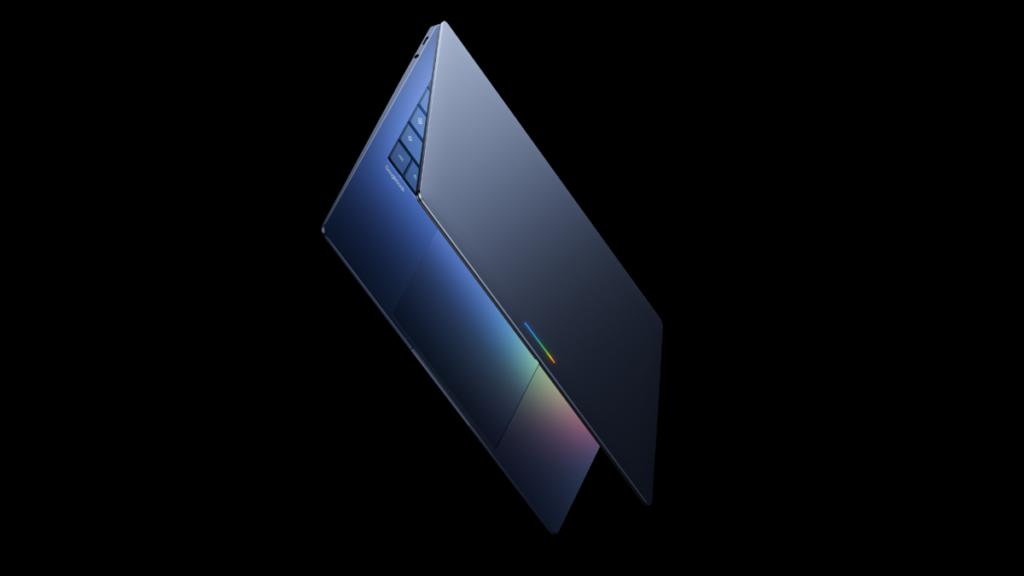
Table of Contents
The End of the ChromeOS Era?
Google is attempting to redefine the laptop category once again. During the Android Show: I/O Edition on Tuesday, the company officially unveiled the Googlebook, a new line of hardware designed not as a vehicle for a web browser, but as a physical extension of Gemini, Google’s generative AI ecosystem.
For over a decade, Chromebooks served as the industry’s primary example of cloud-first computing—lean, inexpensive, and tethered to the browser. However, the Googlebook represents a fundamental shift in philosophy. As Alex Kuscher, Senior Director at Google, noted in an official blog post, the transition is moving from an “operating system” to an “intelligence system.” This isn’t just a software update to existing hardware; it is a ground-up rethink of how a user interacts with a personal computer.
The OS Mystery and ‘Project Aluminum’
While Google has not explicitly named the operating system powering these devices, the phrasing is telling. Kuscher described it as a “modern OS designed for Intelligence,” pointedly avoiding the term ChromeOS. This strongly suggests that the Googlebook is the official debut of Project Aluminum, the long-rumored convergence of Android and ChromeOS.
By merging the two, Google solves a lingering friction point for Chromebook users: the clunky emulation of Android apps. Googlebooks are expected to run Android applications natively and fluidly, effectively turning the laptop into a giant, keyboard-equipped Android tablet that possesses the processing power of a traditional PC.
Gemini as the Interface
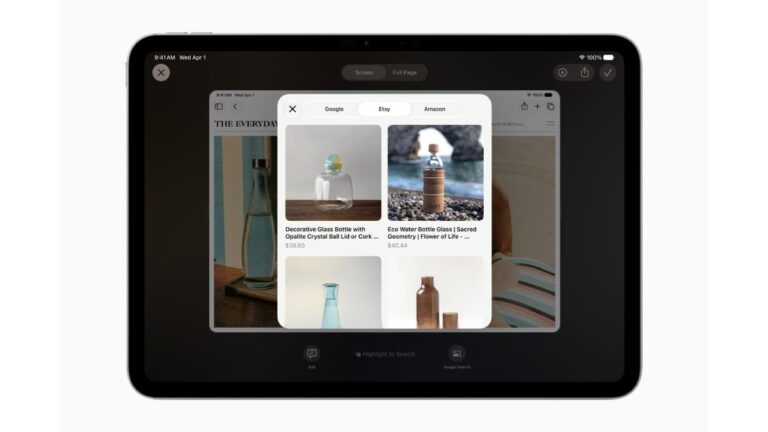
The hardware is designed to facilitate a more intuitive, less menu-driven experience. The standout feature is the “Magic Pointer,” a cursor system powered by Gemini that understands the semantic context of what is on screen. Rather than clicking through multiple menus, users can theoretically “wiggle” the cursor over a date in an email to trigger a calendar invite or drag a product image from a web store into a photo of their own room to visualize a purchase in real-time.
Beyond the cursor, Google is introducing prompt-based customization through a “Create your Widget” tool. This allows users to generate functional desktop widgets using natural language prompts via Gemini, moving away from the static, pre-designed toolbars that have defined desktop computing for decades.
Ecosystem Convergence
The Googlebook is also positioned as the ultimate hub for the Android ecosystem. New “Quick Access” features will allow users to search and manipulate files on their paired Android phones directly from the laptop desktop. Furthermore, Google is introducing a seamless casting feature that allows mobile apps to be mirrored and operated on the Googlebook without requiring a separate installation of the app on the laptop itself.
Hardware Partners and Market Positioning
While detailed technical specifications remain under wraps, Google confirmed that the first wave of devices will be manufactured by a consortium of established partners, including Acer, Asus, Dell, HP, and Lenovo. The most distinct visual marker mentioned is a “glowbar” lightstrip integrated into the lid, which will likely serve as a visual indicator for Gemini’s active processing states.
The marketing language—”Featherweight Design with Heavyweight Power”—points toward a premium ultraportable segment. This suggests a pricing strategy that diverges from the budget-friendly nature of early Chromebooks. With high-end Chromebooks already pushing the $1,000 mark, the Googlebook is expected to target the professional and power-user demographic, positioning itself as a direct competitor to Microsoft’s Copilot+ PCs and Apple’s M-series MacBook Airs.
The first Googlebook models are slated for a fall release, marking what could be the most significant gamble in Google’s hardware history since the launch of the Pixel phone.