Acer’s TravelMate P6 14 AI Challenges the Weight-to-Power Ratio with Panther Lake
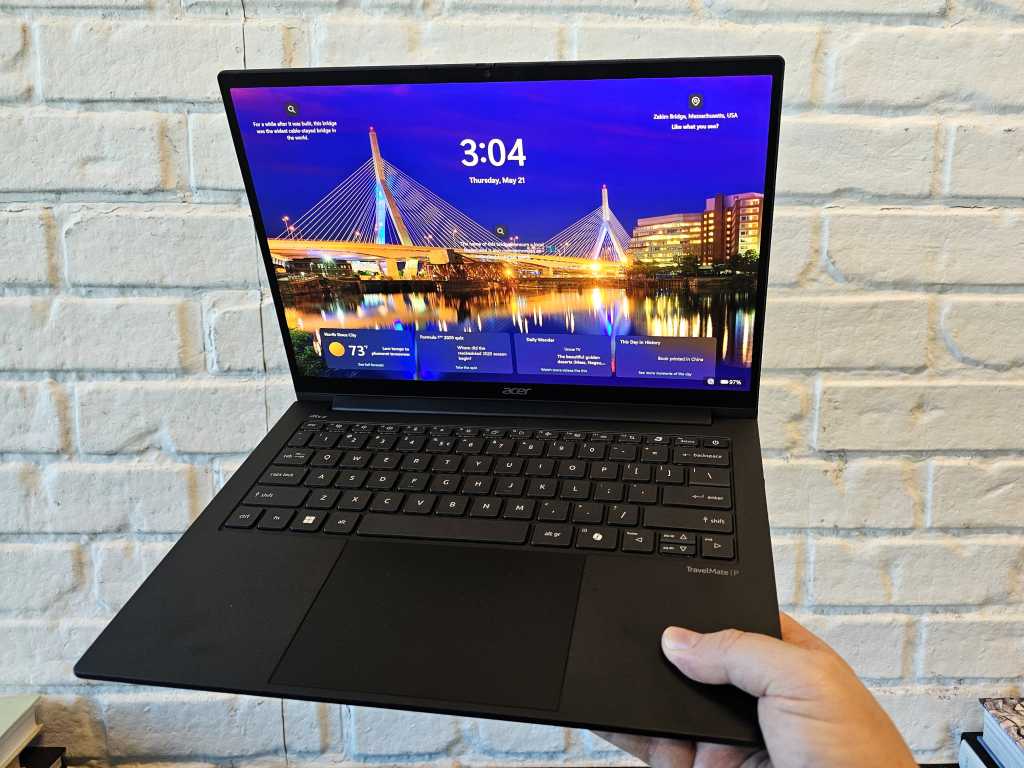
Table of Contents
The Weight Paradox of Modern Productivity
For years, the trade-off in travel laptops has been predictable: if you wanted a battery that could survive a cross-continental flight without a charger, you had to accept a chassis that felt like a brick in your messenger bag. Acer is attempting to break that correlation with the TravelMate P6 14 AI. By combining a high-density 71Wh battery with an aggressive use of carbon fiber and magnesium-aluminum alloys, Acer has managed to bring the machine’s weight down to a startling 2.11 pounds in its lightest configuration.
In a market where many ‘ultra-portables’ still hover around the 2.8 to 3.2-pound mark, the difference is tactile. Holding the P6 14 AI feels less like holding a piece of enterprise hardware and more like holding a lightweight prop, yet it is engineered for sustained professional workloads. The efficiency gains are not just a result of the materials, but a strategic pivot to Intel’s latest silicon.
Panther Lake and the Efficiency Gains
Under the hood, the TravelMate P6 14 AI leverages the Intel Core Ultra Series 3 (Panther Lake) architecture. Acer is offering a range of options, from the Core Ultra 5 325 up to the high-performance Core Ultra X7 368H. The X7 variant is particularly interesting because it integrates Intel’s most capable integrated GPU to date, theoretically pushing this thin-and-light machine into the realm of light gaming and hardware-accelerated creative work.
However, there is a caveat regarding thermal headroom. Based on similar implementations of Panther Lake in other premium chassis—such as the latest Surface Laptop 8—there is a high probability that the P6 14 AI will be thermally limited. While the chip is capable of high bursts, the slim profile of the TravelMate likely means the system will throttle performance to keep heat manageable, trading raw peak power for the sake of portability and silence.
Decoding the ’30-Hour’ Battery Claim
Acer’s marketing highlights a 30-hour battery life, but as with most manufacturer claims, the reality depends entirely on which screen you choose. The TravelMate P6 14 AI is available in three distinct display configurations, and the power draw varies significantly between them:
- The Efficiency Build: A 14-inch 1920×1200 non-touch panel. This is the version that hits the 30-hour mark during video rundown tests, though it bumps the weight up slightly to 2.65 pounds.
- The Premium Builds: Both the 3K (2880 x 1800) OLED touchscreen and the 3K IPS touchscreen models are lighter (roughly 2.11 to 2.16 pounds) but less efficient, yielding about 23.5 hours of video playback.
All three options utilize variable refresh rate (VRR) technology to shave off milliwatts of power by dropping the refresh rate during static tasks. For those working in high-glare environments, the OLED model is the only one featuring a dedicated matte covering and a higher peak brightness of 500 nits, compared to 400 nits on the IPS and non-touch versions.
Real-World Performance vs. Lab Tests
While video playback loops are the standard for marketing, real-world productivity is a different beast. Acer utilized the Bapco MobileMark 30 test to simulate a professional workday. In these more demanding scenarios, the non-touch version lasted 15.5 hours, while the touchscreen variants dipped to 13 hours. Even with this reduction, these figures comfortably outperform the majority of the current Windows-on-ARM and x86 competition in the 14-inch category.
From a design standpoint, the keyboard remains a strong point for Acer, offering the tactile response expected in the TravelMate line. However, the port placement is a point of contention; placing both Thunderbolt 4 ports on the left side creates a congested “cable nest” for left-handed users who prefer their mouse on the right and their peripherals on the left.
Market Positioning
Acer has not yet released regional pricing, with the official launch slated for August. However, with configurations supporting up to 60GB of soldered LPDDR5X memory and 1TB of PCIe Gen 4 NVMe storage, this is clearly positioned as a premium enterprise tool. Given the cost of carbon fiber construction and the latest Panther Lake silicon, consumers should expect a price point that reflects its status as a top-tier executive ultrabook.