ViewSonic Launches IN05 Series ViewBoard 4K Displays in India: Bringing Android 16 and Generative AI to the Classroom
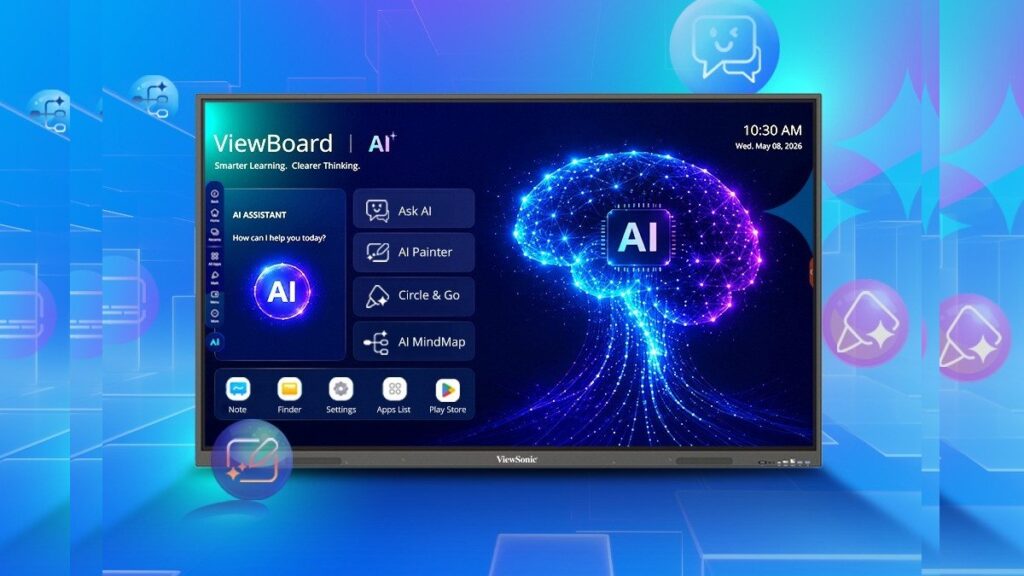
Table of Contents
The Shift Toward AI-Native Classrooms
ViewSonic has officially expanded its educational hardware footprint in India with the launch of the IN05 Series ViewBoard 4K EDLA interactive displays. While interactive flat panels (IFPs) have been staples in modern classrooms for years, the IN05 series represents a strategic pivot toward AI-native hardware. By integrating Android 16 and a suite of generative AI tools, ViewSonic is attempting to move the ViewBoard from a simple projection surface to a proactive teaching assistant.
- Hardware Variety: Available in 65-inch (IN6505-N), 75-inch (IN7505-N), and 86-inch (IN8605-N) formats to suit different room sizes.
- Software Edge: Ships with Android 16, offering improved security, better memory management, and native Google ecosystem integration via EDLA certification.
- AI Integration: Introduces specialized tools including Ask AI, Video Pilot, AI Mind Map, and Circle Go to automate lesson planning and student engagement.
- Performance Specs: Equipped with 8GB of RAM and 128GB of onboard storage, addressing the lag issues common in older-generation educational displays.
Decoding the Hardware: More Than Just a Big Screen
The IN05 series is built around the EDLA (Enterprise Devices Licensing Agreement) certification. For those unfamiliar with the terminology, EDLA means these boards are officially licensed by Google. This is a critical distinction; it allows teachers to log into their Google Workspace accounts directly on the board and access the Google Play Store for vetted educational apps without relying on cumbersome workarounds or third-party casting devices.
Technical Specifications Breakdown
The hardware specifications for the IN6505-N, IN7505-N, and IN8605-N models reflect a need for multitasking. With 8GB of RAM, these units are designed to handle multiple open tabs, high-resolution educational media, and AI processing without the stuttering often seen in 4GB-variant boards.
| Feature | Specification |
|---|---|
| Resolution | 4K Ultra HD |
| Operating System | Android 16 |
| Memory (RAM) | 8GB |
| Storage (ROM) | 128GB |
| Audio | Dual Speakers (20W Output) |
| Available Sizes | 65″, 75″, 86″ |
The AI Toolkit: How ‘Ask AI’ and ‘Video Pilot’ Actually Work
The headline feature of the IN05 series is the integration of generative AI. Rather than just adding a browser window to ChatGPT, ViewSonic has baked AI into the interface to solve specific classroom friction points.
AI Mind Map and Circle Go
AI Mind Map allows educators to input a core concept—for example, “The French Revolution”—and the system automatically generates a visual hierarchy of related events, figures, and causes. This reduces the time spent manually drawing diagrams and allows students to see the interconnectedness of ideas in real-time.
Circle Go functions similarly to Google’s ‘Circle to Search’ feature. A teacher can circle a specific image, equation, or word on the screen, and the AI will instantly provide a definition, a deeper explanation, or related resources from the web, keeping the flow of the lesson uninterrupted.
Video Pilot and Ask AI
Video Pilot optimizes the way multimedia is consumed. It can summarize long educational videos into bullet points or highlight key timestamps, ensuring that a 20-minute documentary doesn’t derail a 40-minute lesson. Ask AI serves as a real-time query engine, allowing teachers to refine their explanations on the fly or generate quiz questions based on the content currently displayed on the board.
What This Means for the Indian Education Sector
The launch of the IN05 series in India comes at a time when the National Education Policy (NEP 2020) is pushing for a more digitally integrated approach to learning. However, the practical implication here is workflow efficiency.
For the average educator, the value isn’t just in the 4K resolution, but in the reduction of “administrative friction.” When a teacher can generate a mind map in three seconds instead of ten minutes, the cognitive load shifts from organizing information to explaining it. Furthermore, the move to Android 16 ensures that these devices will receive security patches and app updates for a longer lifecycle, protecting the institutional investment.
The Android 16 Advantage: Why the OS Version Matters
It is rare for hardware to launch with the absolute latest version of Android, especially in the enterprise/education sector where stability is usually prioritized over novelty. By shipping with Android 16, ViewSonic is optimizing for the future of edge computing. Newer Android versions handle background processes and memory allocation much more efficiently, which is vital when running AI models locally on the device to reduce latency.
Moreover, the Android 16 foundation enables better integration with modern classroom management software and enhances the security of student data, which is a growing concern for school administrations across India.
Market Positioning and Availability
ViewSonic has confirmed that the IN05 series will be available through authorized education resellers and partners in India. While the company has not yet disclosed the exact pricing, the inclusion of 128GB storage and EDLA certification suggests these are positioned as premium, high-end tools rather than budget alternatives.
Compared to traditional interactive whiteboards, these “all-in-one” displays eliminate the need for separate projectors, PCs, and complicated wiring, which reduces the total cost of ownership (TCO) over a five-year period through lower energy consumption and reduced maintenance.
Frequently Asked Questions
What is an EDLA certified display?
An EDLA (Enterprise Devices Licensing Agreement) certified display is a device officially licensed by Google to run the Android OS. This ensures the device has native access to the Google Play Store, Google Drive, and other Workspace apps with full security and compatibility support.
How does AI Mind Map help in teaching?
AI Mind Map automatically generates a visual web of connected ideas from a single keyword. This helps teachers introduce new topics by showing the big picture and detailed sub-topics without spending significant time on manual sketching.
Is Android 16 better for classrooms than previous versions?
Yes, Android 16 offers superior memory management (crucial for 8GB RAM/128GB storage configurations), updated security protocols to protect student data, and better native support for the latest AI-driven educational applications.
Can I use my own laptop with the ViewBoard?
Yes, the ViewBoard series typically supports various input methods, including HDMI and wireless casting, allowing teachers to mirror their laptop screens while using the board’s interactive touch features.
Which size ViewBoard should I choose for my classroom?
The 65-inch (IN6505-N) is ideal for small meeting rooms or specialized labs. The 75-inch (IN7505-N) is the standard for medium-sized classrooms, while the 86-inch (IN8605-N) is recommended for large lecture halls to ensure visibility for students in the back rows.