Baseus Spacemate RD1 Pro Review: Does Vertical Design and Qi2 Wireless Charging Solve the Desk Clutter Problem?
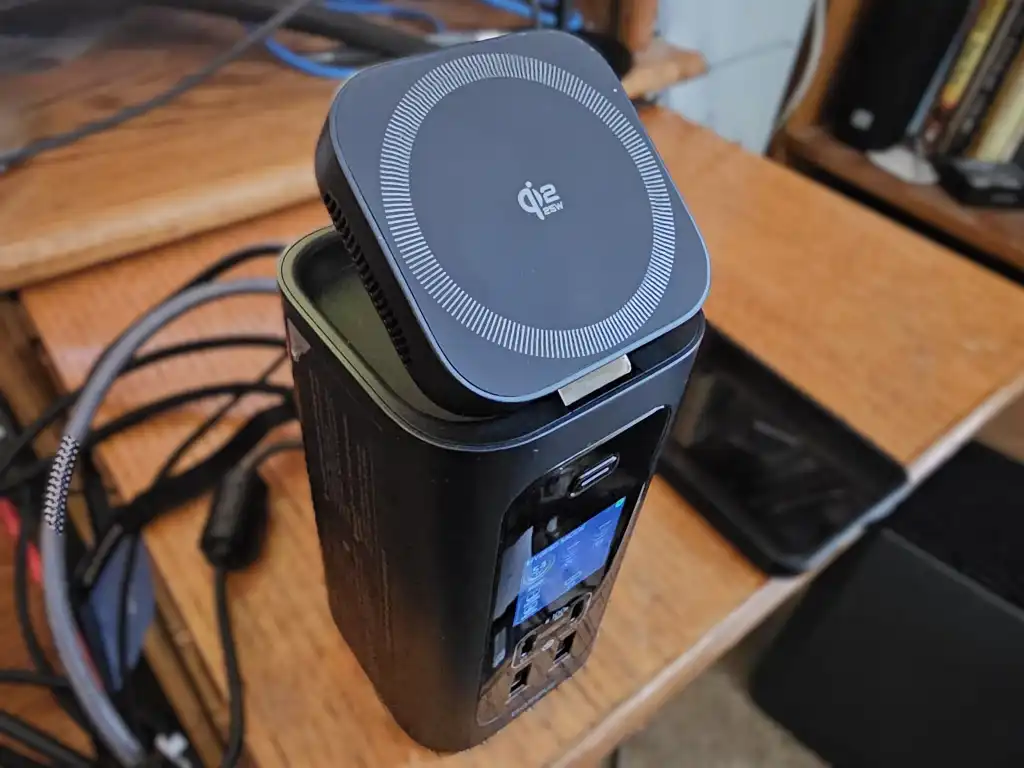
Table of Contents
The Eternal Struggle for Desk Real Estate
Anyone who has transitioned to a modern laptop setup knows the ‘dongle dance.’ Whether you are using a MacBook Pro with its returning ports or a slim Windows ultrabook, the necessity of a docking station is undeniable. However, the industry has long suffered from a design flaw: most high-performance docks are essentially metallic bricks. They are wide, flat, and consume a significant portion of your usable workspace, often acting as expensive paperweights that only serve to move cables from one side of the desk to the other.
The Baseus Spacemate RD1 Pro attempts to pivot this paradigm. Instead of expanding horizontally, it builds vertically. By adopting a ‘skyscraper’ form factor and integrating a 25W Qi2 wireless charger directly into the chassis, Baseus is targeting a specific pain point—the cluttered intersection where your laptop, peripherals, and smartphone meet.
- Vertical Form Factor: Significantly reduces the physical footprint compared to traditional horizontal Thunderbolt docks.
- Integrated Qi2 Charging: Features a rotating 25W wireless charger, eliminating the need for a separate MagSafe or Qi pad.
- High Power Ceiling: Offers a combined 160W output across the host and peripheral ports.
- Connectivity Hub: Includes dual HDMI (4K 120Hz support), Gigabit Ethernet, and a mix of 10Gbps and 5Gbps USB ports.
- Hardware Dependency: Performance is tied to the host device’s support for DisplayPort and Direct Stream Compression (DSC).
The Wireless Charging Gamble: Why Qi2 Matters
For years, dock manufacturers have avoided wireless charging. The technical reasoning is sound: induction coils generate electromagnetic interference (EMI) that can bleed into high-speed data lines, causing packet loss or signal degradation in 10Gbps or 40Gbps connections. Most engineers simply decided that the risk to data integrity wasn’t worth the convenience of a phone pad.
Baseus has taken a different architectural approach by physically isolating the charging coil at the apex of the vertical tower. In our testing, the 25W Qi2 charger proved to be more than just a gimmick. For iPhone users, the magnetic alignment mimics the MagSafe experience, allowing the phone to sit in either portrait or landscape mode for FaceTime calls or watching content. Interestingly, the Qi2 standard’s improved efficiency allowed the charger to penetrate a Spigen case on a Samsung Galaxy device, though this did result in noticeable heat buildup on the back of the case—a common trait of high-wattage wireless charging.
Comparing the Power Delivery Ecosystem
The RD1 Pro isn’t just a charger; it’s a power distributor. While many docks offer a flat 60W or 85W pass-through to the laptop, the Spacemate operates on a dynamic power budget. The total system output is 160W, which is split between the laptop host, the wireless pad, and the auxiliary USB-C ports.
| Feature | Baseus Spacemate RD1 Pro | Standard Thunderbolt 4 Dock |
|---|---|---|
| Form Factor | Vertical Tower | Horizontal Slab |
| Wireless Charging | 25W Qi2 (Integrated) | None / External |
| Total Power Output | 160W (Shared) | Up to 100W (Host) + Peripherals |
| Max Display Output | 4K @ 120Hz (Single) | Dual 4K @ 60Hz or 8K @ 30Hz |
| Interface | USB-C (10Gbps) | Thunderbolt 4 (40Gbps) |
The Technical Trade-off: 10Gbps vs. Thunderbolt 4
It is critical to understand that the Baseus Spacemate RD1 Pro is a USB-C dock, not a Thunderbolt 4 dock. This is where the ‘value’ of the $199 price point (during promotional windows) comes from, but it also introduces specific limitations. A Thunderbolt 4 connection provides a massive 40Gbps pipe, which allows for uncompressed high-resolution video and lightning-fast NVMe drive speeds simultaneously.
The RD1 Pro operates on a 10Gbps connection. To achieve 4K at 120Hz on a single monitor, the dock relies on Direct Stream Compression (DSC). DSC is a virtually lossless compression algorithm that allows more data to fit through a narrower pipe. If your laptop doesn’t support DSC (which is common in older Intel integrated graphics or certain budget ARM chips), the dock will automatically downscale the resolution to 4K 30Hz or even 1080p to maintain the signal.
Real-World Port Performance
The port layout is designed for a hybrid workflow. On the front, you find two USB-C charging ports and two 5Gbps USB-A ports. These are ideal for keyboards, mice, and low-power peripherals. The rear is where the heavy lifting happens: two 10Gbps USB-C ports for fast external SSDs, two 480Mbps USB-A ports, a V3.0 SD/TF card reader, and the dual HDMI outputs.
During our use, we noted that while the dock is ‘plug and play,’ the initial handshake between the dock and dual monitors can sometimes be finicky. A system reboot was occasionally required to force the OS to recognize the second display’s optimal resolution—a common quirk of USB-C hubs that manage multiple high-bandwidth streams over a single cable.
What This Means for Your Workflow
The transition to a vertical dock isn’t just about aesthetics; it’s about changing how you interact with your peripherals. By moving the primary connection point and the phone charger to a single vertical pillar, you reclaim roughly 15 to 20 square inches of desk space. For users with small desks or those utilizing a ‘minimalist’ setup, this is a significant gain.
Furthermore, the integration of the power monitoring LCD is a rare feature that provides actual utility. Being able to see exactly how many watts your laptop is drawing versus your peripherals allows you to diagnose power delivery issues in real-time. For example, if your laptop is only drawing 60W instead of the rated 100W, you can immediately see if a high-power USB-C peripheral is stealing that overhead.
Who should buy this?
- The Minimalist: Users who hate the ‘cable jungle’ and want their phone and laptop docked in one spot.
- The Hybrid Worker: Those moving between a home office and a corporate environment who need a portable yet powerful hub.
- The iPhone/Android Power User: Anyone who relies on wireless charging and wants to eliminate a separate charging brick and cable.
Who should avoid it?
- Video Editors/3D Artists: If you are pushing dual 4K 60Hz monitors and transferring terabytes of data via Thunderbolt NVMe drives, the 10Gbps ceiling will be a bottleneck.
- Legacy Hardware Users: If your laptop lacks USB-C with DisplayPort Alt Mode, this dock will function only as a USB hub and charger.
Addressing the Common Concerns
Is the vertical design stable?
Despite its ‘skyscraper’ look, the base is weighted sufficiently to prevent tipping, even when a heavy smartphone is mounted on the rotating Qi2 charger. However, frequent rotations of the phone mount do cause a slight shift in the center of gravity; it is recommended to keep the dock on a non-slip surface.
Does it overheat?
Because it lacks the massive aluminum heat-sinking chassis found in Thunderbolt 4 docks, the RD1 Pro relies on internal thermal management. While the dock remains warm to the touch during heavy 160W distribution, we did not encounter any thermal throttling of the data ports. The most heat is concentrated around the wireless charging coil, which is expected.
How does it handle power surges?
Baseus employs standard over-current protection, but the shared power pool means that if you plug in multiple high-draw devices, the host laptop’s charging speed will drop. This is a logical limitation of the 160W total ceiling.
The Verdict on the Spacemate Ecosystem
The Baseus Spacemate RD1 Pro represents a shift toward ‘lifestyle’ hardware. It acknowledges that a dock is no longer just a technical necessity, but a piece of desk furniture. While it doesn’t offer the raw throughput of a $300 Thunderbolt 4 station, it provides a level of utility—specifically the Qi2 integration—that the ‘pro’ market has completely ignored.
At the MSRP of $299.99, it feels slightly overpriced for a 10Gbps dock. However, when discounted to the $199 range, it becomes a compelling value proposition. It solves the space problem, the phone charging problem, and the connectivity problem in one vertical stroke.
Frequently Asked Questions
Will the Baseus Spacemate RD1 Pro work with my MacBook Air?
Yes, provided your MacBook Air has a USB-C port that supports Power Delivery and DisplayPort Alt Mode. However, keep in mind that MacBook Air models only support one external display natively; the dual HDMI ports will not both work unless you use a workaround or have a compatible M-series Pro/Max chip.
What is the difference between Qi and Qi2 in this dock?
Qi2 is the latest wireless charging standard that incorporates magnets for precise alignment (similar to MagSafe). This ensures the phone is perfectly centered on the coil, maximizing charging efficiency and allowing for the 25W fast charging speeds that older Qi chargers couldn’t maintain.
Can I use the dock as a standalone charger without a laptop?
Yes. If you disconnect the host USB-C cable, the dock enters a dedicated charging mode. The LCD screen will display the power distribution to the remaining USB-C ports and the wireless pad, effectively turning the dock into a high-powered multi-device charging station.
Does the 10Gbps limit affect my internet speed?
No. The Gigabit Ethernet port is independent of the 10Gbps USB data lane. You will get full 1000Mbps speeds regardless of how many USB drives are plugged in, as the network traffic is handled separately by the internal controller.
What happens if my laptop requires 140W of power?
The RD1 Pro is rated for up to 100W to the host. If your laptop (like a 16-inch MacBook Pro) supports 140W, it will still charge, but it will do so more slowly. The laptop will simply draw the maximum 100W available from the dock.