Android 17 Breaks Pixel Exclusivity: Google Standardizes Parental Controls Across the Ecosystem
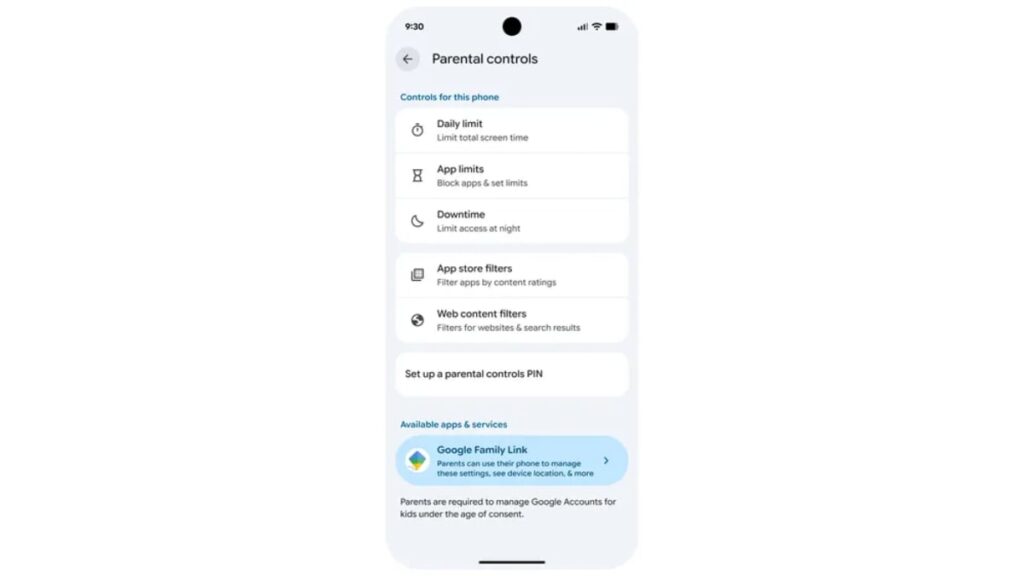
Table of Contents
The End of the Pixel Safety Gap
For years, Google has treated its Pixel lineup as the primary laboratory for ‘premium’ Android experiences. While the core OS was available to everyone, the most refined safety and wellbeing tools often remained locked behind Google’s own hardware. That is changing with the rollout of Android 17. Google has officially announced that its expanded suite of Android 17 parental controls will no longer be exclusive to Pixel devices, instead becoming a standardized part of the OS for all compatible handsets.
This shift represents a strategic pivot in how Google manages the intersection of OS-level permissions and the Google Family Link app. By moving these controls deeper into the system settings, Google is attempting to close the gap between raw hardware capability and software oversight, ensuring that a child using a Samsung, Xiaomi, or Motorola device has the same safety guardrails as one using a Pixel.
- Universal Access: Advanced parental controls previously limited to Pixel hardware are now available to all Android 17 devices.
- OS Integration: Google Family Link is being integrated directly into the system settings menu, reducing the reliance on a standalone app for basic management.
- Wellbeing Focus: The update coincides with expanded digital wellbeing initiatives specifically targeted at the US market for teenagers.
- Standardization: This move forces OEMs to adhere to a more unified safety standard, reducing fragmented experiences across different Android skins.
Integrating Family Link into the OS Core
To understand why this matters, one must look at the historical friction between the Android OS and the Google Family Link app. Previously, Family Link operated largely as an overlay—an app that communicated with the system to enforce limits. This often led to ‘leaky’ controls where savvy teenagers could find workarounds through guest profiles or developer settings that the app couldn’t fully lock down.
Android 17 changes the architecture. By embedding parental controls within a dedicated section of the Settings app, Google is moving from an ‘app-based’ restriction model to a ‘system-level’ restriction model. This means the OS itself recognizes the device as a ‘supervised’ entity from the kernel level up, making it significantly harder to bypass screen time limits or app blocks.
The Technical Shift: App vs. System
In previous versions, if a parent blocked an app via Family Link, the app would essentially be ‘frozen’ by a third-party service. In Android 17, the OS manages the state of the application. This leads to faster enforcement and fewer bugs where apps would occasionally ‘wake up’ and allow access despite a lockout. For the end user, this manifests as a more seamless transition between active and locked states.
Addressing the ‘Teenager Problem’ in Digital Wellbeing
Google’s decision to expand these tools is not happening in a vacuum. The company is facing increasing pressure from regulators and child advocacy groups regarding the addictive nature of short-form video and the mental health crisis among adolescents. According to data from the Common Sense Media reports, a significant percentage of parents feel overwhelmed by the variety of tools needed to manage different devices.
By consolidating these tools, Google is attempting to solve the ‘fragmentation headache.’ When parental controls are baked into the OS, parents no longer need to wonder if a specific feature works on a Samsung Galaxy versus a Google Pixel. The baseline for safety is now the Android version, not the brand of the phone.
For most parents, this means a single point of truth. Instead of toggling between the Family Link app on their own phone and the settings on their child’s phone, the integration allows for a more synchronized experience. Specifically, it simplifies the process of granting temporary extensions for homework or managing ‘downtime’ schedules without having to dive into complex app menus.
Comparing the New Framework to Previous Iterations
To visualize the evolution of Google’s approach to child safety, it is helpful to see how the architecture has shifted over the last few major releases.
| Feature | Android 14/15 (Legacy) | Android 17 (Standardized) |
|---|---|---|
| Availability | Pixel-focused / App-reliant | Universal across Android 17 |
| Control Entry | Standalone Family Link App | Integrated System Settings |
| Enforcement | App-level overlay | OS-level kernel restriction |
| OEM Variance | High (Different by brand) | Low (Unified Google Standard) |
The Regulatory Context: US Digital Wellbeing
The timing of this rollout aligns with an increase in scrutiny from the US Federal Trade Commission (FTC) and various state-level legislation targeting ‘social media harm.’ Google’s expansion of digital wellbeing initiatives in the US is a preemptive strike against potential mandates. By providing robust, built-in tools, Google can argue that it is providing the necessary infrastructure for parents to protect their children, shifting some of the responsibility from the platform provider to the end-user (the parent).
This is a common pattern in big tech: implementing features that satisfy regulatory appetite before they are legally mandated. By standardizing these controls in Android 17, Google effectively sets the industry standard for the entire Android ecosystem, making it difficult for competitors or regulators to demand a different approach to device-level supervision.
The Privacy Trade-off
While these tools offer unprecedented control, they also raise questions about data privacy. System-level integration means Google has a more granular view of a child’s device usage than ever before. While the company maintains that this data is used solely for the purpose of parental supervision, the depth of integration ensures that the ‘digital shadow’ cast by a child on an Android 17 device is highly detailed.
Expert Analysis: Is This Enough?
Industry analysts suggest that while OS-level integration is a win for usability, it doesn’t solve the fundamental problem of ‘app-level’ addiction. A parent can limit the time spent on TikTok, but they cannot easily control the content within the app once it is open. This is where the limitation of Android’s parental controls lies; they are excellent at managing access but limited in managing experience.
Furthermore, the ‘cat-and-mouse’ game between teenagers and parents is eternal. Experienced users in the Android community have already begun discussing potential vulnerabilities in Android 17, such as the use of side-loaded launchers or virtual machines to bypass system-level restrictions. While Android 17’s integration is the most robust to date, no software wall is impenetrable to a determined 14-year-old with a YouTube tutorial.
Frequently Asked Questions
Does my child need a Pixel phone to use these new controls?
No. While these features were previously prioritized for Pixel devices, they are now available on any device running Android 17, regardless of the manufacturer.
How is this different from the standard Family Link app?
The Family Link app is the remote control, but Android 17 integrates the ‘engine’ of those controls directly into the phone’s system settings. This makes the restrictions more stable and harder to bypass.
Will Android 17 parental controls work on older phones?
The specific system-level integrations require Android 17. If your device cannot be updated to Android 17, you can still use the standalone Family Link app, but you will not have the deep OS-level settings integration.
Can children disable these controls if they are over 13?
Under Google’s current policies, once a child reaches the age of consent (13 in the US), they can choose to manage their own account. However, parents can still choose to keep supervision active with the child’s consent, or the child can stop supervision, which notifies the parent and temporarily locks the device.
Do these updates affect data privacy?
The controls operate on the permissions granted by the parent. Because the controls are now part of the OS, the system can monitor usage more accurately, but Google states this data is strictly for the parental control functionality.
Final Technical Outlook
The transition of parental controls from a ‘feature’ to a ‘foundation’ in Android 17 marks a maturing of the platform. By removing the Pixel exclusivity, Google is acknowledging that safety is not a luxury add-on but a core requirement of a modern mobile operating system. As we move toward 2026, the expectation is that these system-level hooks will be used to implement even more granular content filtering and AI-driven wellbeing alerts, further cementing the OS’s role as a digital guardian.