macOS 27 ‘Golden Gate’ Drops Intel Support: Full Compatibility List and Apple Intelligence Requirements
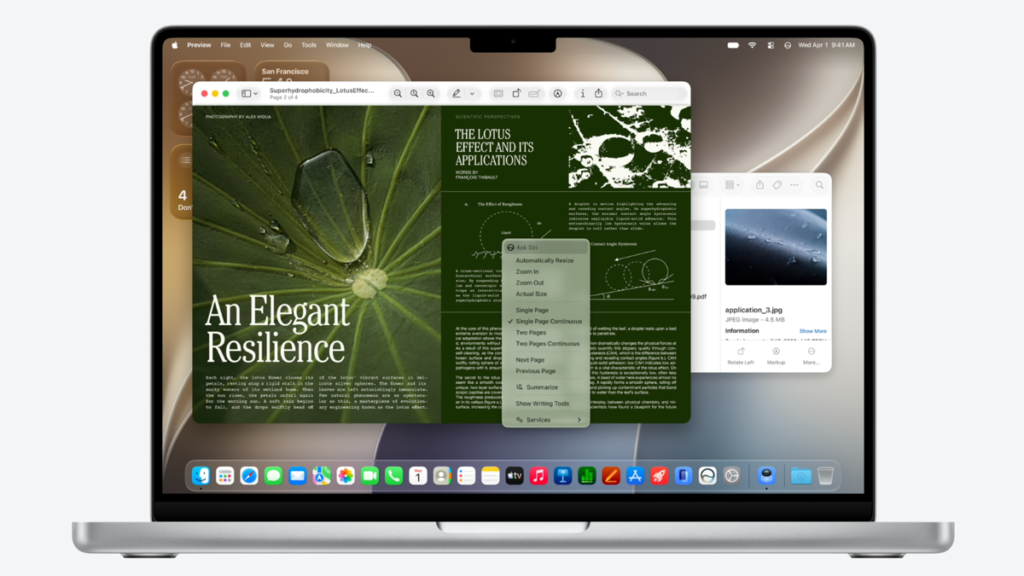
Table of Contents
The Final Curtain for Intel: Apple Unveils macOS 27 ‘Golden Gate’
Apple has officially closed the chapter on the Intel era. During the opening keynote of WWDC 2026, the company announced macOS 27, codenamed ‘Golden Gate,’ signaling a hard pivot toward a unified silicon ecosystem. While previous versions of macOS maintained a legacy bridge for Intel-based machines, macOS 27 marks the first major release that is exclusively compatible with Apple Silicon.
This transition isn’t merely about processor architecture; it is a strategic requirement for the next phase of Apple Intelligence. The deep integration of Neural Engine (NPU) capabilities required for the next-generation Siri and generative AI tools simply cannot be replicated on the x86 architecture of older Intel Macs. For users still clinging to their 2019 or 2020 Intel MacBooks, the message is clear: your hardware has reached its architectural ceiling.
- Intel Macs are unsupported: macOS 27 requires an M1 chip or later; no Intel-based Macs are compatible.
- AI Hardware Lock: Next-gen Siri and Apple Intelligence features are strictly tied to the Apple Neural Engine found in M-series chips.
- Security Lifecycle: Intel Macs running macOS 26 will likely receive security patches for approximately two more years, but no new features.
- Visual Overhaul: The ‘Liquid Glass’ design language introduces deeper customization and a refined UI for M-series displays.
Detailed Compatibility List: Which Macs Run macOS 27?
According to the official technical specifications released by Apple, the baseline for macOS 27 is the M1 chip. This includes the entry-level M1 found in the 2020 MacBook Air and the high-end M2 Ultra found in the Mac Studio. If your device has an Intel Core i5, i7, or i9 processor, it will not be able to install the Golden Gate update.
Supported MacBook Pro Models
The compatibility extends to all MacBook Pro models equipped with Apple Silicon. This includes the 13-inch M1 models and the subsequent 14-inch and 16-inch iterations featuring M1 Pro, M1 Max, M2 Pro, M2 Max, M3 series, and the latest M4 variants. The shift ensures that the unified memory architecture can handle the massive data throughput required by the new AI models running locally on the device.
Supported MacBook Air Models
Every MacBook Air from the M1 (2020) onward is compatible. This is a significant win for budget-conscious users, as the M1 Air remains a highly capable machine that now gains access to the full suite of macOS 27’s generative AI capabilities.
Supported Desktop Macs
The iMac (24-inch, M1 2021 and later), Mac mini (M1 2020 and later), and Mac Studio (all models) are fully supported. The Mac Pro (M2 Ultra and later) also qualifies. The older Intel iMacs and Mac minis are now relegated to the legacy support track.
| Device Category | Compatible Models | Unsupported Models |
|---|---|---|
| MacBook Pro | M1, M2, M3, M4 (All variants) | All Intel Core i5/i7/i9 models |
| MacBook Air | M1 (2020) and later | All Intel-based Air models |
| iMac | 24-inch M1 and later | 27-inch Intel & older 21.5-inch |
| Mac mini | M1 (2020) and later | All Intel-based mini models |
| Mac Studio/Pro | All M-series models | Intel-based Mac Pro (Rack/Tower) |
The Technical Driver: Why Intel Had to Go
The decision to drop Intel support isn’t arbitrary; it’s a matter of hardware constraints. macOS 27 is built around Apple Intelligence, which relies on the Apple Neural Engine (ANE). Unlike a GPU, the ANE is specifically designed for the matrix multiplication tasks that power Large Language Models (LLMs) and diffusion models.
Intel Macs rely on the CPU and GPU for these tasks. While some AI tasks can be offloaded to a GPU, the efficiency and latency required for the ‘next-generation Siri’—which Apple claims can now maintain complex context across multiple apps—require the tightly integrated memory and NPU architecture of the M-series. Running these models on Intel hardware would result in prohibitive battery drain and sluggish performance, undermining the user experience Apple intends to deliver.
The ‘Liquid Glass’ Interface
Beyond AI, macOS 27 introduces ‘Liquid Glass,’ an evolution of the current design language. This update focuses on dynamic translucency and adaptive layouts that change based on the display’s brightness and ambient lighting. Because this rendering engine is optimized for the Metal API and Apple Silicon’s integrated GPU, the performance overhead would be too great for older Intel Iris or AMD Radeon graphics found in legacy Macs.
What This Means for Current Users
Depending on your hardware, the arrival of macOS 27 places you in one of two camps: the Optimized or the Legacy.
For M-Series Users: A Performance Leap
If you are on an M1 or newer, this update represents a significant value-add. You aren’t just getting a UI refresh; you’re getting a functional upgrade via the new Siri AI. The ability for the OS to understand on-screen content and execute multi-step actions across apps (e.g., “Find the flight details in my email and add them to my calendar with a reminder to pack my passport”) is a hardware-enabled feature that transforms the Mac from a tool into an agent.
For Intel Users: The Transition Strategy
If you are using an Intel Mac, you are now on the ‘security-only’ path. Apple’s historical pattern suggests that macOS 26 will continue to receive critical security patches and Safari updates for roughly 24 months. However, you will not receive the Liquid Glass UI, the new child safety tools, or any Apple Intelligence features.
For those in this position, the primary question is: Do I upgrade now or wait? Given that the M-series chips have already proven to be exponentially more efficient than Intel counterparts, the performance jump from an Intel i7 to even a base M3 or M4 is staggering, particularly in thermal management and battery life.
Addressing the Software Gap
One of the most pressing concerns for Intel users is software compatibility. While macOS 27 drops support for the hardware, most third-party developers still support macOS 26. However, as developers shift their focus to the new AI APIs provided in macOS 27, the ‘feature gap’ will widen. Within a year, you may find that new versions of Adobe Creative Cloud or Final Cut Pro begin requiring macOS 27 for their most advanced AI-driven tools.
“The transition to Apple Silicon was always the goal. By removing the Intel overhead, we can optimize the kernel for the Neural Engine, allowing Apple Intelligence to run locally with unprecedented speed and privacy.” — Summary of Apple’s technical positioning at WWDC 2026.
Comparing the Ecosystem Shift
The shift from Intel to Apple Silicon is one of the most aggressive hardware transitions in computing history. To understand the impact of macOS 27, it helps to look at the performance metrics of the M-series vs. the last generation of Intel Macs.
- Thermal Efficiency: M-series Macs typically operate at 30-50% lower temperatures under load compared to Intel chips.
- Unified Memory: The M-series allows the CPU and GPU to access the same memory pool, eliminating the need to copy data between them—a critical requirement for the large models in macOS 27.
- Battery Life: M-series MacBooks consistently offer 2x to 3x the real-world battery life of their Intel predecessors.
Frequently Asked Questions
Will my Intel Mac stop working after macOS 27 is released?
No. Your Mac will continue to run macOS 26 (or whatever version it currently has). You simply cannot upgrade to macOS 27. Your apps and files will remain intact, but you won’t have access to the new features.
Can I use Apple Intelligence on an Intel Mac with a powerful GPU?
No. Apple Intelligence is built specifically for the Apple Neural Engine (ANE). Even if you have a high-end AMD GPU in an Intel Mac Pro, the software is locked to the M-series architecture.
How long will Apple support macOS 26 for Intel Macs?
While not officially guaranteed, Apple typically provides security updates for the previous two versions of macOS. You can expect critical security patches for macOS 26 through late 2027 or 2028.
Is it worth upgrading to an M-series Mac just for macOS 27?
If you rely on productivity tools, the AI integration in macOS 27 is a compelling reason. However, the jump in battery life and speed alone usually justifies the upgrade for any Intel user.
Will my old Intel apps work on an M-series Mac?
Yes, via Rosetta 2. Apple’s translation layer allows almost all Intel-based apps to run on Apple Silicon with minimal performance loss, and often with a speed increase.
Final Technical Assessment
The release of macOS 27 ‘Golden Gate’ is the final nail in the coffin for x86 Macs. By stripping away the legacy code required to support Intel chips, Apple is streamlining the OS to act as a thin layer over its own silicon. This allows for deeper integration between hardware and software, enabling features like local LLM execution that would be impossible on generic hardware.
For the professional user, this means a more stable, faster, and more capable machine. For the legacy user, it is a signal that the hardware they bought five or six years ago has finally reached the end of its functional life in the Apple ecosystem. The move is bold, but from a technical standpoint, it is the only way Apple can compete in the rapidly evolving AI landscape.