ViewSonic Brings Android 16-Powered ViewBoard IN05 Series to India: AI-Driven Classrooms Shift into High Gear
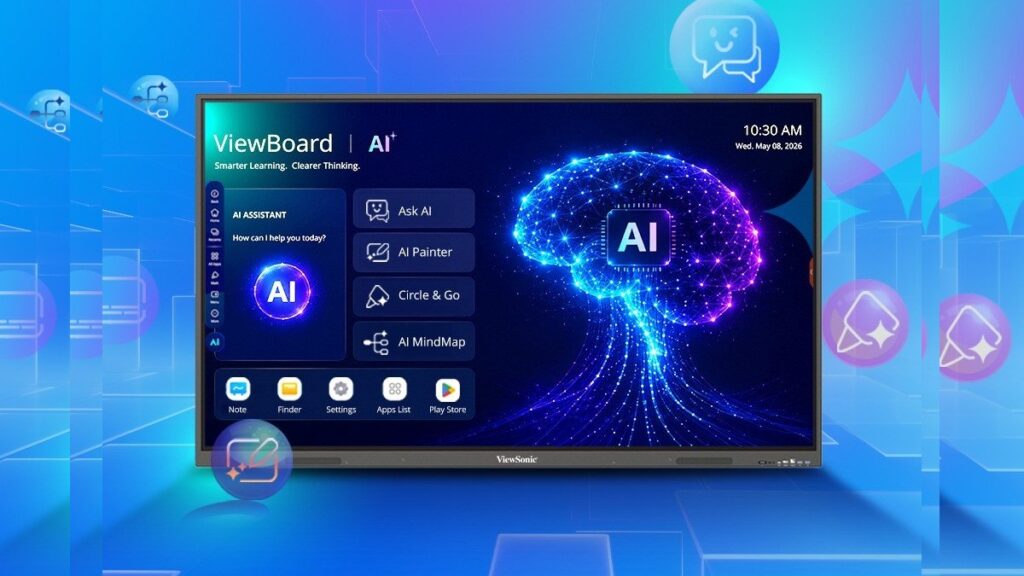
Table of Contents
A New Standard for the Digital Classroom
ViewSonic has officially expanded its hardware footprint in the Indian education sector with the launch of the IN05 series ViewBoard 4K EDLA interactive displays. Coming in three distinct sizes—65-inch (IN6505-N), 75-inch (IN7505-N), and 86-inch (IN8605-N)—these displays are not just larger versions of previous iterations. They represent a strategic shift toward tighter Google ecosystem integration and the deployment of generative AI tools directly onto the classroom whiteboard.
- Android 16 Integration: The IN05 series is among the first interactive displays to ship with Android 16, ensuring longer software support and updated security protocols.
- EDLA Certification: Google EDLA (Enterprise Device Licensing Agreement) certification allows native access to the Google Play Store and Google Workspace without cumbersome side-loading.
- AI Toolset: Integrated features including AI Mind Map, Video Pilot, and Circle Go aim to reduce teacher administrative load and enhance student engagement.
- Hardware Specs: All models feature 8GB of RAM and 128GB of onboard storage, addressing the lag often found in lower-end interactive panels.
Understanding the EDLA Advantage
For those unfamiliar with the technical jargon, EDLA (Enterprise Device Licensing Agreement) is a critical certification for any interactive display in a modern school. In the past, many “Android” boards were essentially modified tablets that lacked official Google Play Store access, forcing IT administrators to manually install APKs—a security nightmare and a logistical headache.
By being EDLA certified, the ViewSonic IN05 series provides a seamless, secure environment where teachers can log into their Google accounts and access Classroom, Drive, and Docs natively. This eliminates the need for external laptops in many scenarios, turning the board into a standalone computing hub.
Technical Breakdown: Powering the Interactive Experience
The shift to 8GB of RAM across the entire IN05 lineup is a necessary evolution. Interactive displays often suffer from “input lag”—the delay between a stylus touch and the digital ink appearing. By pairing a 4K resolution panel with 8GB of memory and 128GB of storage, ViewSonic is targeting the multitasking requirements of modern educators who often run browser tabs, video streams, and interactive apps simultaneously.
| Model | Screen Size | OS | RAM/Storage | Audio Output |
|---|---|---|---|---|
| IN6505-N | 65 inches | Android 16 | 8GB / 128GB | 20W Dual Speakers |
| IN7505-N | 75 inches | Android 16 | 8GB / 128GB | 20W Dual Speakers |
| IN8605-N | 86 inches | Android 16 | 8GB / 128GB | 20W Dual Speakers |
The AI Suite: Beyond the Buzzwords
The most provocative part of the IN05 launch is the inclusion of specific AI utilities. While many companies claim “AI-powered” hardware, ViewSonic has integrated functional tools designed for pedagogy:
- AI Mind Map: This tool allows educators to input a central concept and have the AI generate a visual hierarchy of related sub-topics, which can then be manually edited and expanded by students.
- Video Pilot: An AI-driven tool designed to help curate and summarize video content, making it easier to integrate multimedia into a lesson plan without spending hours scrubbing through footage.
- Ask AI: A direct interface for querying information, effectively bringing a LLM-style assistant to the front of the room to answer student questions in real-time.
- Circle Go: A visual search tool that allows users to circle an object or text on the screen to instantly find related information or definitions.
What This Means for Indian Education
The launch of the IN05 series comes at a time when India is aggressively pushing for the National Education Policy (NEP) 2020, which emphasizes the integration of technology in teaching. The move toward Android 16 and EDLA certification suggests that ViewSonic is moving away from being a “hardware vendor” and toward being a “platform provider.”
For school administrators, the implication is a lower Total Cost of Ownership (TCO). When a board ships with the latest OS and native Google integration, the time spent on IT troubleshooting decreases. However, the lack of immediate pricing details suggests that these boards are being positioned as premium investments rather than budget-friendly replacements.
The Hardware vs. Software Tug-of-War
From a professional perspective, the success of the IN05 will depend on software adoption. 4K displays are common, and 8GB of RAM is respectable, but the real value lies in how the AI Mind Map and Video Pilot tools integrate with existing curricula. If these tools remain gimmicks, the board is simply a very expensive tablet. If they become essential for lesson planning, ViewSonic gains a significant competitive edge over legacy whiteboard brands.
Market Positioning and Competition
In India, ViewSonic is competing against the likes of BenQ and Samsung, both of whom have strong footprints in the interactive display market. By prioritizing Android 16—an OS version that is exceptionally new—ViewSonic is attempting to “future-proof” their hardware. Most competitors are still shipping boards with Android 11 or 13, meaning the IN05 series could potentially receive security updates for years longer than its rivals.
Common Implementation Questions
How does Android 16 benefit a classroom display?
Android 16 brings improved memory management, better privacy controls for student data, and updated API support for the latest educational apps. Most importantly, it extends the hardware’s lifecycle, ensuring the board won’t be obsolete in three years due to software incompatibility.
What is the difference between a standard 4K screen and an EDLA ViewBoard?
A standard 4K screen is a passive output device. An EDLA ViewBoard is a computer. It has its own processor, RAM, and operating system, and it is officially licensed by Google to run the Play Store and Google Workspace natively, meaning you don’t need to plug in a PC to access your files.
Is the AI in these boards safe for students?
While ViewSonic provides the tools, the safety depends on the administrative settings and the underlying LLM used. Most educational AI tools are designed with filtering layers, but schools will need to manage these via the Google Admin console provided through the EDLA certification.
Which size should a school choose?
The 65-inch model is ideal for small breakout rooms or specialized labs. The 75-inch is the standard for average-sized classrooms, while the 86-inch is necessary for larger lecture halls to ensure visibility for students in the back row.
How is the audio quality for large rooms?
The 20W dual speakers are sufficient for small to medium rooms. However, for the 86-inch model in a large hall, administrators will likely need to leverage the audio-out ports to connect to a dedicated classroom PA system.
Final Assessment
The ViewSonic IN05 series is a calculated move to dominate the “Smart Classroom” niche in India by leveraging the Google ecosystem. By removing the friction of non-certified Android versions and adding generative AI utilities, ViewSonic is addressing the two biggest pain points in EdTech: IT complexity and teacher burnout. While the absence of pricing leaves a question mark over accessibility, the technical specifications position these boards as top-tier contenders for institutions looking to modernize their infrastructure.