Asus Expands ChromeOS Lineup in India: CM32 Detachable’s 2.5K Screen Leads New Budget Trio
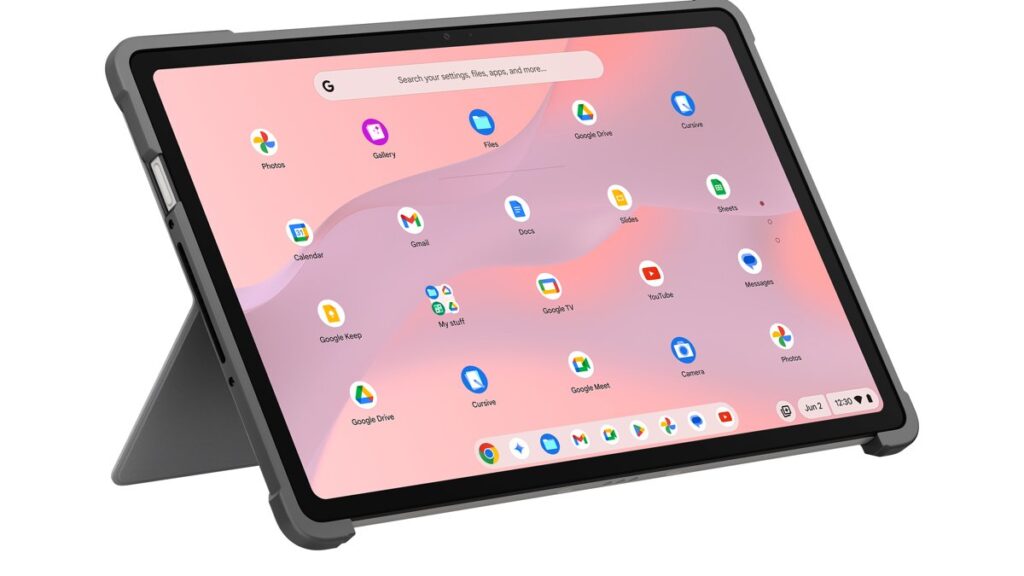
Table of Contents
A High-Resolution Shift for Budget ChromeOS
Asus is aggressively targeting the education and entry-level productivity sectors in India with the simultaneous launch of three new devices: the Asus Chromebook CM32 Detachable, the Chromebook CM14, and the Chromebook CM15. While budget Chromebooks have historically been associated with dim, low-resolution panels, the CM32 Detachable attempts to break that mold by introducing a 2.5K resolution touchscreen, signaling a shift toward higher-quality media consumption in the sub-40,000 INR bracket.
- Display Leap: The CM32 Detachable features a high-density 2.5K resolution screen with Corning Gorilla Glass for durability.
- Unified Silicon: All three models leverage the MediaTek Kompanio 540, optimizing for battery life over raw processing power.
- Diverse Form Factors: Options range from the ultra-portable CM14 to the versatile 2-in-1 CM32 and the larger-screen CM15.
- Competitive Pricing: Entry prices start at ₹26,990 (CM14), making them highly accessible for students.
The arrival of these devices comes at a critical time for ChromeOS. As Google continues to integrate Gemini AI across its ecosystem, the demand for affordable hardware capable of running lean, cloud-based applications has surged. By pairing MediaTek’s ARM-based architecture with a focused software stack, Asus is positioning these machines not as laptop replacements, but as agile companions for a mobile-first workforce.
Technical Deep Dive: The MediaTek Kompanio 540 Factor
At the heart of the CM32, CM14, and CM15 is the MediaTek Kompanio 540. To understand the performance profile of these machines, one must look at the ARM architecture. Unlike traditional Intel Core or AMD Ryzen chips, the Kompanio 540 is designed for efficiency. This results in virtually silent operation (often fanless) and significantly longer standby times.
With up to 8GB of RAM, these devices handle the typical ChromeOS workload—multiple browser tabs, Google Docs, and Android apps—with reasonable fluidity. However, users should manage expectations: this is not a machine for 4K video editing or heavy local computing. Its strength lies in cloud-native productivity. The 42Wh battery in the CM32 Detachable is particularly impressive given the power draw of a 2.5K panel, suggesting a strategic balance between visual fidelity and endurance.
Comparing the Hardware Tiers
| Feature | Chromebook CM14 | Chromebook CM15 | CM32 Detachable |
|---|---|---|---|
| Starting Price | ₹26,990 | ₹28,990 | ₹37,990 |
| Form Factor | Clamshell | Clamshell | 2-in-1 Detachable |
| Display | Standard HD | Standard HD | 2.5K Touchscreen |
| Processor | MediaTek Kompanio 540 | MediaTek Kompanio 540 | MediaTek Kompanio 540 |
| Max RAM | 8GB | 8GB | 8GB |
| Protection | Standard | Standard | Corning Gorilla Glass |
The Detachable Advantage: More Than Just a Tablet
The Asus Chromebook CM32 Detachable (model CM3206) is the standout of the trio. By allowing the keyboard to be removed, Asus effectively creates a hybrid device that competes with the entry-level iPad and Android tablets, but with the full utility of a desktop-class browser. This is a critical distinction for students who need to switch between handwriting notes (via stylus support) and typing long-form essays.
The inclusion of Corning Gorilla Glass is not a luxury but a necessity for a detachable device. In a classroom or coffee shop environment, the screen is the most vulnerable point of failure. By reinforcing the 2.5K panel, Asus acknowledges the “rugged” requirements of the student market. The high pixel density also makes this the first budget-friendly Asus Chromebook in India truly suitable for reading high-resolution PDFs and digital textbooks without excessive scrolling or blurring.
What This Means for the Indian Consumer
The launch of these three models represents a strategic “tiering” of the market. For the first time, users can choose based on their specific ergonomics rather than just their budget.
- For the Budget-Conscious Student: The CM14 provides the absolute lowest barrier to entry for a new, warrantied machine. At ₹26,990, it competes directly with low-end Windows laptops that often struggle with bloatware and short battery life.
- For the Power User/Content Consumer: The CM32 Detachable is for those who prioritize screen real estate and resolution. The jump to 2.5K is significant, offering a much sharper image for streaming and creative tasks.
- For the General Home User: The CM15 offers a larger screen footprint, making it more suitable for those who prefer a traditional laptop experience for browsing and administrative tasks.
From a market perspective, Asus is betting that Indian consumers are becoming more comfortable with ChromeOS. As internet penetration increases and more services move to the cloud, the “thin client” model—where the heavy lifting is done on Google’s servers—becomes more attractive than managing a heavy, slow Windows installation on cheap hardware.
Analysis: The Trade-offs of ARM-Based Chromebooks
While the MediaTek Kompanio 540 is efficient, it does introduce certain limitations. The primary trade-off is app compatibility. While most ChromeOS apps and the vast majority of Android apps run flawlessly, some legacy Linux applications or highly specific x86-based software may not perform as well as they would on an Intel-based Chromebook. However, for 95% of users, this is a non-issue, as the Google Play Store fills most of those gaps.
Furthermore, the pricing of the CM32 Detachable at ₹37,990 puts it in a territory where users might consider a basic Windows laptop. The value proposition here is specifically the user experience: instant boot times, seamless updates, and a battery that actually lasts a full school day without needing a charger. This is “frictionless computing” versus the traditional “maintenance-heavy” computing of cheap Windows machines.
Frequently Asked Questions
Is the Asus Chromebook CM32 Detachable good for gaming?
It is not designed for AAA gaming. However, it is excellent for cloud gaming services like NVIDIA GeForce Now or Xbox Cloud Gaming, and it can run light Android games from the Google Play Store thanks to the MediaTek Kompanio 540.
Can I install Windows on these Asus Chromebooks?
No. These devices are designed specifically for ChromeOS. While some advanced users flash custom firmware, it is not supported and would void the warranty. The benefit of ChromeOS is its lightness and security, which is why these devices can remain fast even with modest specs.
How does the 2.5K display compare to standard HD?
A standard HD display (typically 1366×768 or 1920×1080) can look pixelated on larger screens. A 2.5K display offers significantly higher pixel density, meaning text is sharper, images are clearer, and you have more “screen real estate” to view multiple windows side-by-side.
Are these Chromebooks suitable for professional work?
For roles that are primarily browser-based (marketing, copywriting, virtual assistance, and administration), yes. For roles requiring heavy software like AutoCAD, full Adobe Creative Cloud, or complex local database management, a traditional Windows or Mac laptop is recommended.
When and where can I buy these in India?
The Chromebook CM14 and CM15 will be available starting June 19 via the Asus E-shop and Amazon. The CM32 Detachable is currently available for pre-order.