Asus Expands Indian ChromeOS Lineup: Chromebook CM32 Detachable Debuts With 2.5K Display
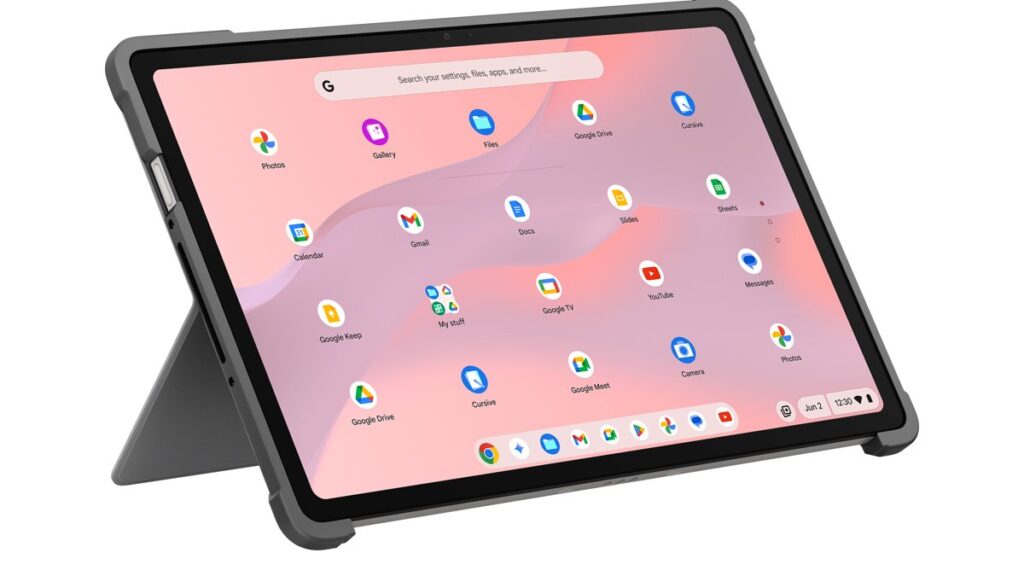
Table of Contents
A New Strategy for the Indian Education and Entry-Level Market
Asus has officially expanded its ChromeOS portfolio in India, introducing a trio of devices designed to capture the fluctuating demand for flexible, low-cost computing. The centerpiece of this rollout is the Asus Chromebook CM32 Detachable (CM3206), a versatile 2-in-1 that attempts to bridge the gap between a dedicated tablet and a functional laptop. Joining it are the more traditional clamshell designs of the Chromebook CM14 (CM1405) and Chromebook CM15 (CM1505).
- High-Res Visuals: The CM32 Detachable features a standout 2.5K resolution touchscreen with Corning Gorilla Glass.
- Efficient Silicon: All three models leverage the MediaTek Kompanio 540 processor, prioritizing battery life and thermal efficiency over raw power.
- Aggressive Pricing: With a starting price of ₹26,990 for the CM14, Asus is targeting the student and basic home-office segment.
- Availability: The devices hit the Asus E-shop and Amazon India on June 19, with the CM32 available for pre-order earlier.
The move comes at a time when the Indian market is seeing a surge in “hybrid learning” and remote work requirements, where users are increasingly looking for devices that don’t require the overhead of a full Windows installation for basic web-based tasks. By utilizing MediaTek’s ARM-based architecture, Asus is leaning into the “always-on, always-connected” philosophy that has traditionally made Chromebooks attractive for their longevity and boot speed.
The CM32 Detachable: More Than Just a Tablet
The Asus Chromebook CM32 Detachable is the most ambitious of the three. Unlike the CM14 or CM15, the CM32 allows users to remove the keyboard entirely, transforming the device into a standalone tablet. This flexibility is underpinned by a high-density 2.5K display, a rarity in the budget Chromebook segment where 1080p or lower-resolution TN panels are the norm.
The integration of Corning Gorilla Glass suggests that Asus is targeting a demographic that needs durability—specifically students who may be transporting the device in backpacks without dedicated sleeves. From a technical standpoint, the 42Wh battery is designed to sustain the higher-resolution panel throughout a standard school day, though actual runtime will vary depending on screen brightness and connectivity (Wi-Fi vs. LTE).
Technical Synergy: MediaTek Kompanio 540 and ChromeOS
Powering this lineup is the MediaTek Kompanio 540. To understand why this matters, we have to look at the architecture. Unlike Intel Core or AMD Ryzen chips found in premium laptops, the Kompanio 540 is an ARM-based SoC (System on a Chip). This means it consumes significantly less power and generates less heat, allowing Asus to keep the CM32 and CM14 slim without needing bulky cooling fans.
Paired with up to 8GB of RAM, these devices are optimized for the ChromeOS environment. While 8GB might seem modest compared to high-end gaming rigs, it is the “sweet spot” for ChromeOS. Because the operating system is lightweight and relies heavily on cloud computing and web-based apps, the 8GB configuration ensures that users can keep multiple tabs open in Chrome without the system triggering aggressive memory swapping.
Comparing the Lineup: CM14 vs. CM15 vs. CM32
Choosing between these three models depends entirely on the intended use case. The CM14 and CM15 serve as the “workhorses,” while the CM32 is the “creative/consumption” hub.
| Feature | Chromebook CM14 (CM1405) | Chromebook CM15 (CM1505) | Chromebook CM32 Detachable (CM3206) |
|---|---|---|---|
| Form Factor | Clamshell Laptop | Clamshell Laptop | 2-in-1 Detachable |
| Display | Standard HD/FHD | Larger Standard Display | 2.5K Touchscreen |
| Processor | MediaTek Kompanio 540 | MediaTek Kompanio 540 | MediaTek Kompanio 540 |
| Max RAM | Up to 8GB | Up to 8GB | Up to 8GB |
| Starting Price | ₹26,990 | ₹28,990 | ₹37,990 |
The price jump for the CM32 (approximately ₹11,000 more than the CM14) is largely justified by the panel quality and the detachable hinge mechanism. For users who primarily type documents, the CM15 offers the most screen real estate, making it a better choice for side-by-side multitasking.
What This Means for the Indian Consumer
For the average buyer, the launch of these devices represents a shift toward purpose-built computing. For years, the Indian market has been dominated by low-end Windows laptops that often struggle with performance due to slow HDDs or limited RAM. Chromebooks solve this by stripping away the OS bloat.
The practical implication here is twofold. First, the lower entry price (starting under ₹30,000) makes these viable options for households that previously relied on tablets or smartphones for internet access. Second, the inclusion of high-resolution screens on the CM32 acknowledges that users are now consuming more high-fidelity media (streaming 4K content, digital art) even on budget hardware.
However, there is a trade-off. These are not machines for video editing, heavy gaming, or complex software development. They are designed for Google Workspace, Android app integration, and web browsing. If your workflow depends on specialized .exe software, these devices will not meet your needs.
Market Context and Competitive Pressure
Asus is entering a crowded space where HP and Lenovo have already established a strong presence in the Indian education sector. To compete, Asus is focusing on hardware versatility. The 2.5K screen on the CM32 is a strategic move to differentiate the product from the generic 1366×768 displays often found in entry-level Chromebooks.
Recent market data indicates that the “Chromebook-first” approach in schools is growing, but the consumer market remains hesitant. By pricing the CM14 and CM15 so aggressively, Asus is betting that they can convert users who are tired of the slowdowns associated with budget Windows machines. The MediaTek Kompanio chip is the secret weapon here; it allows for a thin profile and long battery life that traditionally elusive in the sub-₹30k Windows category.
A Note on ChromeOS Evolution
It is also worth noting that ChromeOS has evolved significantly. With better Android app support and the introduction of Linux (Beta) for developers, these devices are more capable than the “browser-only” machines of five years ago. The 8GB RAM configuration across the lineup is a direct response to the fact that modern web pages and Android apps are increasingly memory-intensive.
Reliability and Build Quality
Asus has a reputation for durable chassis in their ruggedized lines, and the use of Corning Gorilla Glass on the CM32 suggests that same philosophy is being applied here. In a market like India, where dust and accidental drops are common concerns, a reinforced screen is a significant selling point. The 42Wh battery in the CM32 is respectable for its size, likely providing 8-10 hours of mixed-use, which is the gold standard for student devices.
Frequently Asked Questions
Can I run Windows apps on the Asus Chromebook CM32?
No. The Asus Chromebook CM32 and its siblings run ChromeOS. You cannot install standard Windows (.exe) files. However, you can run most Android apps from the Google Play Store and some Linux applications.
Is the keyboard included with the CM32 Detachable?
Yes, the CM32 Detachable comes with a detachable keyboard, allowing it to function as both a laptop and a tablet.
Which model is best for a student?
If the student needs to do a lot of typing and research, the Chromebook CM15 is recommended for its larger screen. If they prefer a portable device for reading, drawing, and light browsing, the CM32 Detachable is the superior choice.
Do these Chromebooks support offline work?
Yes. While ChromeOS is designed for the cloud, Google Docs, Sheets, and Slides have offline modes that allow you to work without internet; your changes will sync once you reconnect.
What is the benefit of the MediaTek Kompanio 540 processor?
The primary benefits are power efficiency and heat management. It allows the devices to be thinner and lighter while maintaining a long battery life, as it doesn’t require the high wattage that traditional laptop CPUs do.
Where can I buy the Asus Chromebook CM series in India?
They are available through the official Asus E-shop and Amazon India, starting from June 19.
Closing Perspective on the CM Lineup
The Asus Chromebook CM series launch represents a calculated attempt to dominate the entry-level productivity market in India. By offering a range of form factors—from the budget-friendly CM14 to the high-resolution CM32 Detachable—Asus is covering all the bases of the modern student’s needs. While they won’t replace a high-end MacBook or XPS for professional creators, as tools for education and basic digital literacy, they provide a seamless, low-maintenance alternative to the traditional laptop experience.