Asus ProArt PZ14 and TUF Gaming A14 Hit India: A Clash of ARM Efficiency and RTX 50-Series Power
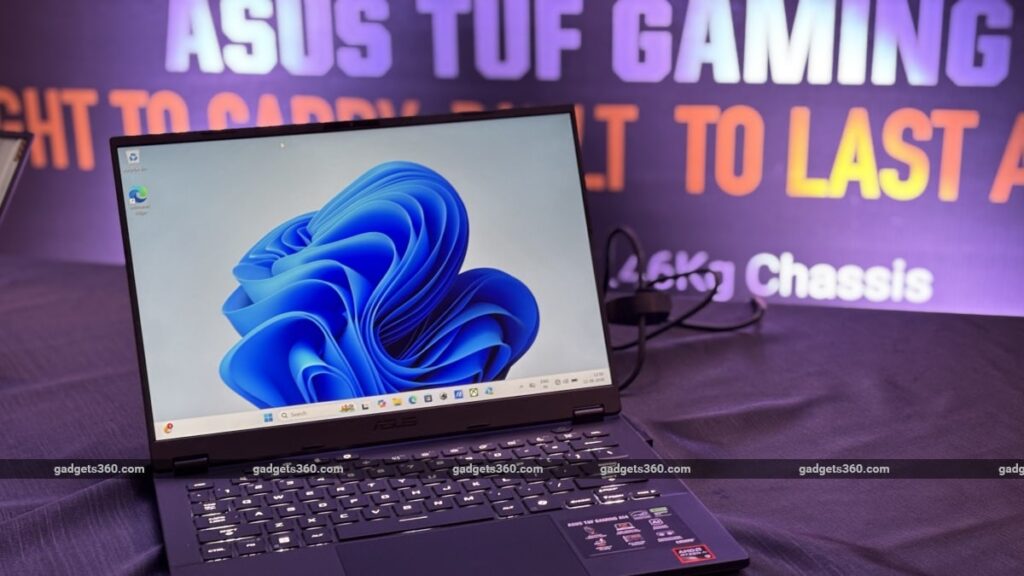
Table of Contents
A Strategic Pivot Toward AI-Native Hardware
Asus has officially expanded its high-performance portfolio in India with the simultaneous rollout of the ProArt PZ14 and a heavily refreshed TUF Gaming A14. While the press release frames this as a simple product launch, the technical specifications suggest a deeper strategic pivot: Asus is betting heavily on the divide between ARM-based efficiency for creators and AI-accelerated brute force for gamers.
The ProArt PZ14 represents a bold gamble on the Windows-on-ARM ecosystem, utilizing the Snapdragon X Elite to challenge the long-standing dominance of Apple’s M-series in the creative space. Conversely, the TUF Gaming A14 refresh isn’t just a spec bump; it integrates the next generation of Nvidia’s architecture into a compact 14-inch form factor, targeting a growing demographic of “portable power” users who refuse to compromise on GPU performance.
- ProArt PZ14: A 2-in-1 detachable with a 3K OLED display, powered by Snapdragon X Elite, priced at ₹2,69,990.
- TUF Gaming A14: A compact gaming powerhouse featuring AMD Ryzen AI 9 and Nvidia RTX 5060, priced at ₹1,99,990.
- AI Integration: Both devices feature dedicated NPUs (Neural Processing Units) to handle on-device AI tasks without relying solely on the cloud.
- Market Positioning: Asus is targeting two distinct niches—the mobile professional who needs all-day battery and the hardcore gamer needing a portable workstation.
The ProArt PZ14: Betting on ARM for the Creative Class
The Asus ProArt PZ14 is more than just a tablet with a keyboard; it is an attempt to bring a genuine “iPad Pro equivalent” experience to the Windows ecosystem. The centerpiece is the Snapdragon X Elite processor. Unlike traditional x86 chips from Intel or AMD, the X Elite uses an ARM architecture designed specifically for high performance-per-watt. For a photographer or digital illustrator, this translates to hours of editing in Adobe Lightroom or Photoshop without the chassis becoming a heat sink.
The visual experience is handled by a stunning 3K OLED touchscreen. OLED technology is critical here not just for the “deep blacks,” but for color accuracy. For professionals working in CMYK or Pantone color spaces, the ProArt series typically offers factory-calibrated screens that minimize Delta E variances, ensuring that what you see on the screen matches the final print.
The Detachable Factor and Workflow Integration
By opting for a detachable keyboard, Asus is acknowledging the hybrid nature of modern creative work. The PZ14 allows users to switch from a traditional laptop setup for heavy emailing and project management to a tablet mode for sketching or presenting portfolios. However, the real test for the PZ14 will be software compatibility. While Qualcomm has made strides with Prism (their emulation layer), some legacy creative plugins may still struggle on ARM, a point that professional users should verify before investing ₹2.7 lakh.
TUF Gaming A14: The 14-Inch Powerhouse
While the ProArt is about efficiency, the refreshed Asus TUF Gaming A14 is about density. Packing an AMD Ryzen AI 9 processor alongside an Nvidia GeForce RTX 5060 is a significant engineering feat for a 14-inch chassis. Traditionally, 14-inch gaming laptops suffered from “thermal throttling,” where the laptop slows down its clock speed to prevent melting.
The inclusion of the RTX 5060 is the headline here. Based on the latest architecture, the 50-series GPUs are expected to offer improved ray-tracing capabilities and more efficient DLSS (Deep Learning Super Sampling) frame generation. This allows the TUF A14 to push high frame rates in AAA titles while remaining small enough to fit in a standard backpack.
Synergy Between Ryzen AI and RTX Graphics
The Ryzen AI 9 chip isn’t just for naming rights. The integrated NPU allows the system to handle background AI tasks—like noise cancellation for microphones or background blur for cameras—without touching the GPU. This frees up the RTX 5060 to focus entirely on rendering game worlds or exporting 4K video. This “split-tasking” approach is the new gold standard for 2025 hardware.
Technical Comparison: ProArt PZ14 vs. TUF Gaming A14
| Feature | ProArt PZ14 | TUF Gaming A14 (Refreshed) |
|---|---|---|
| Processor | Snapdragon X Elite (ARM) | AMD Ryzen AI 9 |
| Graphics | Integrated Qualcomm Adreno | Nvidia GeForce RTX 5060 |
| Display | 3K OLED Touchscreen | High-Refresh Rate Gaming Panel |
| Form Factor | 2-in-1 Detachable | Traditional Clamshell (14″) |
| Primary Use Case | Digital Art, Design, Mobile Work | Gaming, 3D Rendering, STEM |
| Price (India) | ₹2,69,990 | ₹1,99,990 |
What This Means for the Indian Consumer
The launch of these two machines signals a shift in how Asus views the Indian market. We are moving away from a “one size fits all” laptop approach toward highly specialized tools.
For the creative professional, the ProArt PZ14 means you no longer have to choose between the versatility of a tablet and the power of a desktop OS. If you spend your day moving between client meetings and high-res illustration, the ARM efficiency is a game-changer for battery life.
For the student or gamer, the TUF A14 means that the “gaming laptop brick” is dead. You can now have a machine capable of running Cyberpunk 2077 or Blender on a high setting without carrying a 3kg device and a massive power brick. The ₹1,99,990 price point positions it as a premium entry-level enthusiast machine.
Market Implications and Competitive Landscape
Asus is directly challenging two fronts with this release. The ProArt PZ14 is a shot across the bow for the iPad Pro and the Surface Pro, offering a more robust OS for those who need full file-system access. Meanwhile, the TUF A14 puts pressure on the Razer Blade 14 and the ROG Zephyrus G14, offering a more “budget-friendly” (though still expensive) alternative that doesn’t sacrifice the latest GPU tech.
However, the success of the ProArt PZ14 depends entirely on the Windows-on-ARM ecosystem. If major software vendors like Adobe and Blackmagic Design continue to optimize for ARM, this device will be a triumph. If they remain sluggish, it risks becoming an expensive curiosity.
Sourcing and Availability
Asus has ensured wide availability to penetrate the Indian market. The ProArt PZ14 is available through Asus Exclusive Stores, the official eShop, Amazon, Flipkart, and ROG Stores. The TUF Gaming A14 follows a similar path but expands its reach into Reliance Digital and Vijay Sales, targeting the traditional retail shopper who wants to feel the keyboard travel before buying.
Frequently Asked Questions
Is the ProArt PZ14 compatible with all Windows apps?
Most apps work via Qualcomm’s Prism emulation, but for the best performance, you should use “native ARM” versions of software. High-end creative suites are currently prioritizing ARM optimization, but some legacy plugins may not work.
Does the TUF Gaming A14 support DLSS 3.5?
Yes, since it features the RTX 5060, it supports the latest Nvidia DLSS technologies, including frame generation and ray reconstruction, which significantly boosts FPS in supported games.
Which one has better battery life?
The ProArt PZ14 will overwhelmingly win on battery life due to the Snapdragon X Elite’s ARM architecture, which is designed for low-power idling and high efficiency. The TUF A14 is a power-hungry machine designed for performance.
Is the keyboard on the PZ14 replaceable or upgradable?
The keyboard is detachable, allowing for a tablet-like experience. While not “upgradable” in the traditional sense, it provides a modularity that standard laptops lack.
How does the Ryzen AI 9 improve gaming?
The Ryzen AI 9 doesn’t directly increase FPS in the way a GPU does, but its NPU handles system-level AI tasks, reducing the CPU overhead and allowing for smoother multitasking and more efficient power management during gaming sessions.