Microsoft’s Surface Laptop 8 for Business Experiments with Integrated Privacy Screens, but Visual Trade-offs Persist
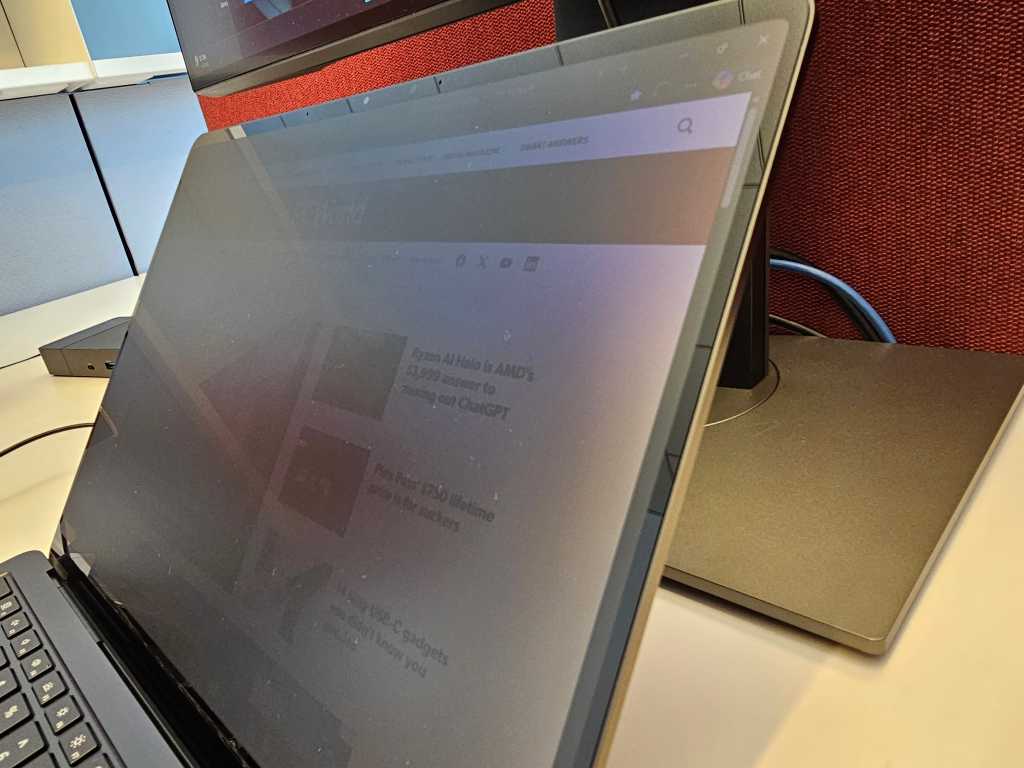
Table of Contents
A Hardware Solution to the ‘Shoulder Surf’
For years, the only way to prevent a curious seatmate on a long-haul flight from reading your confidential emails was to apply a third-party privacy laminate. These plastic overlays are notoriously finicky; they often degrade touch sensitivity, distort color accuracy, and can be a nightmare to align perfectly. Microsoft is attempting to kill the laminate by baking the technology directly into the glass.
The new Surface Laptop 8 for Business (specifically the 13.8-inch models) introduces a dedicated privacy screen toggle located in the function row, tucked next to the Escape key. With a single tap, the display shifts its viewing angle, darkening the screen to a nearly opaque black for anyone not sitting directly in front of the device. It is a move that mirrors the Privacy Display logic seen in Samsung’s recent Galaxy S26 handsets, shifting the burden of privacy from a physical accessory to a firmware-controlled hardware feature.
The Reality of ‘Digital Blackout’
In practice, the effectiveness of the privacy screen depends entirely on what you are working on. If you are reviewing a dense spreadsheet of quarterly projections or a legal brief, the screen does a commendable job of obscuring the fine print. However, the technology isn’t a total blackout. As observed during testing, the general layout of a page remains visible. A competitor sitting next to you might not be able to read your specific figures, but they can certainly tell you are looking at a spreadsheet, or perhaps scrolling through a familiar site like ESPN.
The system excels at masking high-contrast content and video, where the lack of sharp edges makes it harder for an observer to discern specific imagery. But for those working in open-plan offices with dual-monitor setups, the irony is stark: while your laptop screen remains a fortress of secrecy, your 27-inch external displays likely broadcast your entire workflow to the rest of the department.
The ‘Speckling’ Problem Returns
The most concerning aspect of the Surface Laptop 8’s display isn’t the privacy feature itself, but a visual artifact known as ‘speckling.’ This phenomenon—which looks like a faint layer of dust trapped beneath the glass—previously plagued the OLED panels of the Surface Pro 11 and the lower-resolution screens of the Surface Laptop Go.
The Laptop 8 does not use OLED; instead, it employs ‘PixelSense Flow,’ an enhanced version of Microsoft’s proprietary display tech designed for higher refresh rates and peak brightness. Despite this, the speckling is present. It becomes most apparent on white backgrounds or light-colored webpages when the brightness is dialed back. While the effect is virtually invisible at maximum brightness, lowering the backlight reveals a slight inconsistency in how pixels reflect light—a byproduct, likely, of the hardware offsets required to make the privacy screen function.
When contacted for comment, Microsoft requested photographic evidence of the issue, though capturing the subtle texture of display speckling is notoriously difficult with consumer-grade smartphone cameras, often resulting in images that don’t do justice to the actual visual experience.
The Business Value Proposition
Aside from the privacy toggle and the transition to Intel’s Panther Lake processors, the Surface Laptop 8 for Business feels remarkably similar to its predecessor. The addition of adaptive color settings by default gives the screen a slight yellowish cast—a choice that appeals to those sensitive to blue light but may annoy color-critical professionals.
Ultimately, the integrated privacy screen is a welcome convenience for the frequent traveler or the corporate executive. It preserves touchscreen functionality while providing a level of security that was previously clunky to implement. However, the trade-off is a slight degradation in visual purity. For most business users, a bit of speckling on a white background is a fair price to pay for the ability to hide a sensitive document with a single keystroke.


