The ‘Mac-assed’ Struggle: Why SwiftUI Still Falls Short for Power-User Apps in 2026
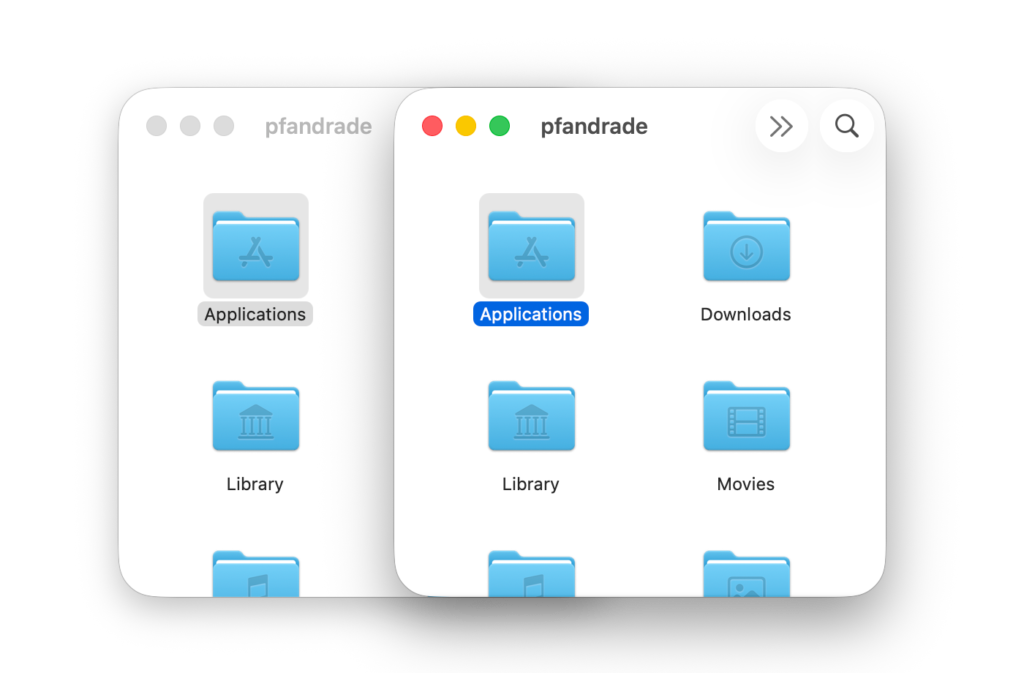
Table of Contents
The Quest for the ‘Mac-assed’ Experience
For a specific breed of macOS developers, the goal isn’t just to make an app that runs on a Mac—it’s to make a “Mac-assed” app. A term popularized by industry figures like John Gruber and Brent Simmons, the phrase describes software that doesn’t just port its functionality to the desktop, but impeccably integrates with the operating system’s deepest conventions, from keyboard shortcuts and menu bar utility to sudden termination and AppleScript support.
However, as developers push SwiftUI—Apple’s declarative UI framework—further into the macOS ecosystem in 2026, a recurring tension has emerged. While SwiftUI promises a “write once, run anywhere” efficiency across iOS, iPadOS, and macOS, the reality for those seeking true platform parity is a frustrating gap in nuance.
The Nuance of Focus and Selection
One of the most subtle yet critical distinctions of a native Mac app is how it handles window activity and focus. According to Apple’s Human Interface Guidelines (HIG), inactive windows should appear subdued, which historically meant that only controls in the key window possessed color. While SwiftUI handles basic active/inactive states reasonably well via .appearsActive, it struggles with the “middle ground”: when an item remains selected but the view itself no longer has focus.
In a professional-grade Mac app, such as a mail client or file browser, a user needs to know exactly which part of the UI will respond to keyboard input. In the legacy AppKit framework, NSTableRowView provides isEmphasized to handle this visual transition. In SwiftUI, achieving this same behavior often requires developers to bypass standard components and manually track focus states through the environment—a tedious workaround for a fundamental desktop interaction.
The Customization Trap
The friction is most apparent in SwiftUI’s List component. On the surface, List provides the expected behavior for free. But for developers attempting to polish the user experience, the component becomes a black box. Simple customizations, such as changing selection colors with .listRowBackground(), can inadvertently break native selection fade-out animations.
The core issue is a lack of transparency. Developers accustomed to UITableViewCell or NSTableRowView find it baffling that SwiftUI does not pass critical values like .isHighlighted or .isSelected directly down to its rows. This lack of granularity forces a choice: use the standard List and accept its rigid limitations, or build a custom list from ScrollView and LazyVStack, effectively recreating the wheel to gain the control they need.
Three Eras of Drag-and-Drop
Perhaps the most glaring example of SwiftUI’s unsettled nature is its handling of drag-and-drop. By 2026, the framework has undergone three distinct API iterations. It began with onDrag and onDrop, transitioned to the Transferable API in macOS 13, and has most recently introduced new dropDestination overloads and container-based drag APIs.
Despite these iterations, a critical blind spot remains: visibility into the drag session. In a truly native experience, a developer might want to dim an element as it’s being dragged or remove it from the interface entirely. However, if a user drops an item outside the application window, SwiftUI provides no reliable way to notify the source view that the drag has ended. This can leave UI elements stuck in a “dimmed” state, a bug that is non-existent when using AppKit’s NSDraggingSource.
For developers porting apps like Shopie—a product tracking tool—the dream of a 100% SwiftUI codebase is enticing for code reuse. But as these technical hurdles suggest, the “Mac-assed” gold standard still requires a level of precision that SwiftUI’s abstraction layers haven’t yet mastered.


